
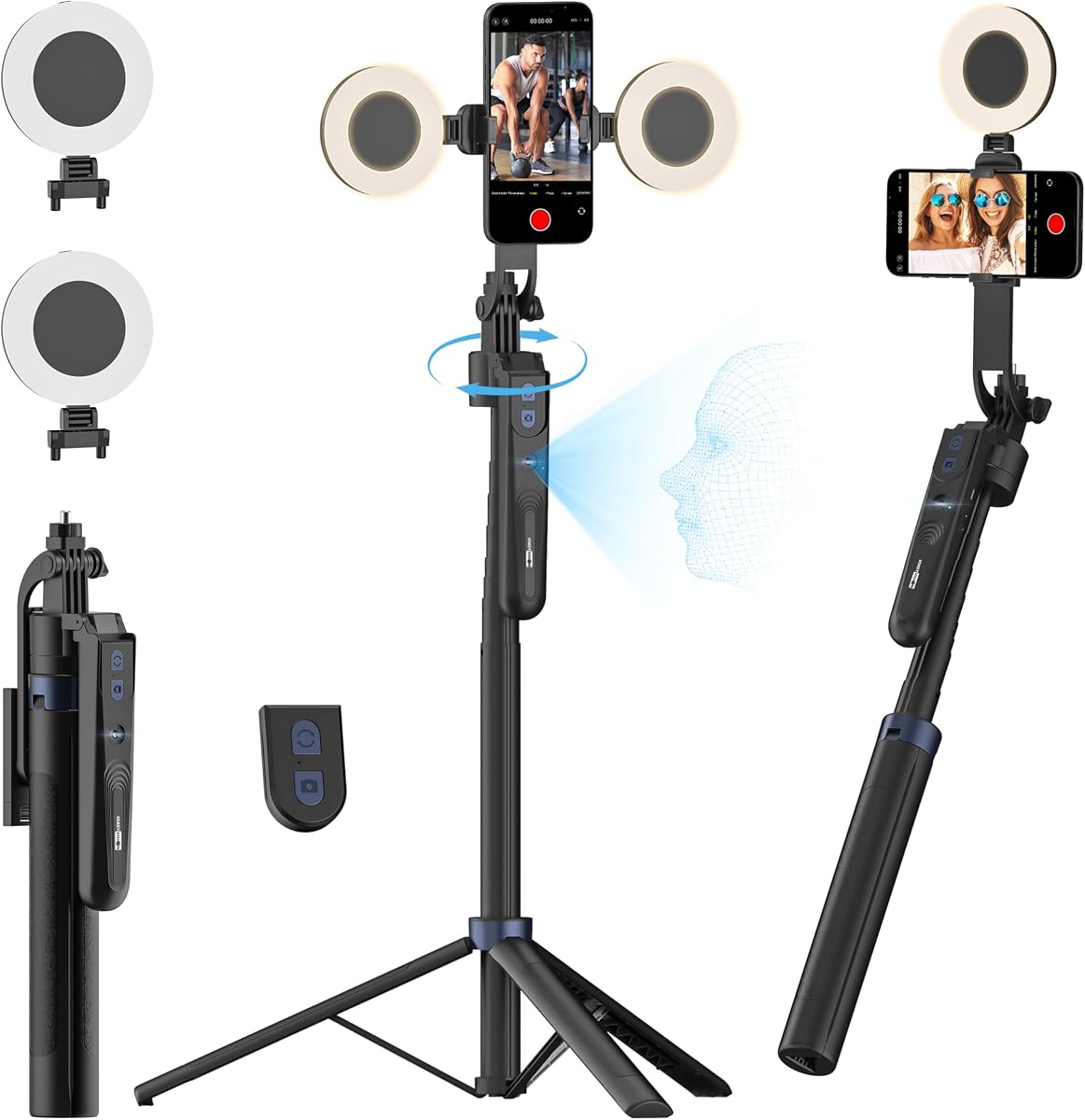
Acer Gadget Auto Face Tracking Tripod for iPhone
4.6Editor score
No app needed for face tracking
Detachable remote with gesture control
Quadpod design for superior stability
Finding the right stabilizer can transform your mobile footage into professional quality content. An AI gimbal with tripod offers intelligent tracking and hands-free operation for creators on the move.
We evaluated leading models based on tracking accuracy, battery life, and build quality. Our list includes options for vloggers, streamers, and casual users seeking reliable stabilization.
Each pick highlights key features and real-world performance insights. Prices and availability change frequently, so verify current details before making your final purchase decision today.
4.6Editor score

4.4Editor score

4.3Editor score
As an Amazon Associate we earn from qualifying purchases.
This side-by-side comparison highlights the core specifications and unique capabilities of each featured stabilizer to help you find the perfect match for your needs.




The Insta360 Flow 2 Pro stands out as a top tier option for creators needing reliable AI tracking across many apps. It earned a solid rating from users who value seamless integration with iOS devices.
We may earn a commission when you buy through this link, at no additional cost to you.
Its standout feature is Apple DockKit support which unlocks tracking in over two hundred apps. Active zoom tracking keeps subjects sharp even at high zoom levels. Multi-person tracking ensures groups stay framed without manual adjustment.
While the price is higher than budget options, the included AI tracker and spotlight justify the cost. Some users note reliance on iOS for full feature access.
This model is ideal for serious content creators using iPhone who need professional features. It delivers smooth footage and versatile tracking for diverse shooting scenarios.
DockKit allows direct communication between the gimbal and iOS apps for native tracking without extra hardware.
Active zoom tracking maintains focus on subjects even when zoomed in up to fifteen times for dynamic shots.
We may earn a commission when you buy through this link, at no additional cost to you.
The Acer Gadget Auto Face Tracking Tripod offers exceptional value for users seeking AI tracking without a high cost. It achieved a high user rating due to its ease of use and reliable performance.
We may earn a commission when you buy through this link, at no additional cost to you.
This tripod tracks your face without needing a dedicated app which simplifies setup significantly. Gesture controls allow you to start or pause tracking with hand signals. The detachable ring light improves video quality in low light environments.
Build quality is functional but not premium. It lacks advanced stabilization like motorized gimbals but excels as a static tracking solution.
Ideal for beginners or social media creators on a budget. It provides a straightforward way to create centered content without complex gear.
Built-in camera technology handles face recognition directly on the tripod hardware without software dependencies.
Four feet provide a wider base than standard tripods ensuring stability on uneven surfaces during filming.
We may earn a commission when you buy through this link, at no additional cost to you.
The DJI Osmo Mobile 8 delivers premium performance with advanced tracking and stabilization. It received strong ratings for its build quality and smooth operation during dynamic movement.
We may earn a commission when you buy through this link, at no additional cost to you.
Key strengths include native tracking that combines audio and lighting for polished shots. The ten hour battery allows extended filming sessions. A built-in tripod and extension rod add versatility for hands-free use.
Users note that app availability varies by region which can impact features. The price reflects the high-end features and DJI ecosystem integration.
Best for professionals or enthusiasts wanting top-tier mobile filmmaking tools. It offers reliability and quality for demanding content creation.
The multifunctional module supports audio reception and lighting for professional quality video in one unit.
Ten hours of operation ensures you can film all day without frequent recharging during events or travel.
We may earn a commission when you buy through this link, at no additional cost to you.
The Flow 2 Pro Grey extends compatibility to Android while keeping premium features. Users appreciate the broad device support and consistent tracking performance across platforms.
We may earn a commission when you buy through this link, at no additional cost to you.
It includes the AI tracker bundle which adds versatility for live streaming and vlogs. Active zoom tracking and free tilt mode offer creative flexibility. Integrated lighting ensures clear footage in varying conditions.
Higher cost may be a barrier for casual users. Performance is solid but relies on the Insta360 ecosystem for full functionality.
Suitable for creators using Android devices seeking high-end tracking. It balances advanced tech with user-friendly operation.
Native tracking works across iPhone and Android allowing broader access to third party apps without restrictions.
This mode maintains consistent angles while moving the phone vertically for dynamic framing shots.
We may earn a commission when you buy through this link, at no additional cost to you.
The AOCHUAN Smart V3 emphasizes flexibility with a long extension rod for high and low angles. Users rated it well for its convenience and affordability in the mid range category.
We may earn a commission when you buy through this link, at no additional cost to you.
The detachable remote allows control from a distance which is useful for group shots. AI tracking works app-free for simplicity. Six creative modes offer variety for different content styles.
Some users mention the build is lighter than premium gimbals. It may lack durability in harsh environments.
Great for travelers and vloggers needing height flexibility without heavy gear. It balances features and price effectively.
The detachable magnetic remote lets you film from up to thirty two feet away for self recording.
Six modes like FPV and POV allow quick switching between dynamic and smooth cinematic movements.
We may earn a commission when you buy through this link, at no additional cost to you.
The DJI Osmo Mobile 7P provides reliable stabilization and tracking with dual lens tech. It earned strong ratings for ease of use and consistent performance in everyday shooting.
We may earn a commission when you buy through this link, at no additional cost to you.
Magnetic mounting allows for quick phone attachment. The extension rod supports wide shots. It integrates with DJI Mimo for editing and guidance.
App availability varies which can affect tracking features in some regions. It lacks some advanced features of the newer Mobile 8 model.
Best for those seeking a trusted DJI gimbal at a moderate price point. It offers balanced features for general creators.
Two lenses on the phone work together to improve tracking stability and accuracy during fast motion.
Snap on magnetic clamp lets you mount and remove phones instantly without manual clamping adjustments.
We may earn a commission when you buy through this link, at no additional cost to you.
The USKEYVISION tripod offers a budget solution for AI face tracking with light support. It received good reviews for its height and lighting versatility in home setups.
We may earn a commission when you buy through this link, at no additional cost to you.
Dual detachable lights allow flexible illumination for videos. It works as a desktop tripod or floor stand. Remote control enables easy shutter operation.
It lacks motorized stabilization so shaking occurs during movement. Suitable for static shots or low motion content.
Ideal for streamers on a budget needing lighting and tracking. It is simple to set up for daily use.
Flip up rotatable lights expand coverage and reduce shadows for better video clarity indoors.
Extends to over seventy inches for high angle shots and full body recording without bending.
We may earn a commission when you buy through this link, at no additional cost to you.
This bundle pairs the DJI Osmo Mobile 8 with a wireless mic for complete audio video stability. Users praise the convenience and clear sound capture.
We may earn a commission when you buy through this link, at no additional cost to you.
The Mic Mini Transmitter integrates seamlessly for clean audio. Tracking and stabilization features remain top tier. Battery supports long sessions with phone charging.
Price is higher but value comes from bundled audio gear. App availability still varies by region.
Perfect for interview or vlog creators needing reliable audio. It simplifies setup by including essential mic.
The mic receiver works with the multifunctional module to capture clear audio without external wiring.
The gimbal provides power to your phone during recording which prevents battery drain.
We may earn a commission when you buy through this link, at no additional cost to you.
The Flow 2 Plus brings animal tracking to pet owners. It achieved solid ratings for its versatility and ease of use in content creation.
We may earn a commission when you buy through this link, at no additional cost to you.
Animal tracking captures pets moving around freely. Second screen control uses another phone as a remote. Teleprompter helps with scripted videos.
It shares features with the Pro but focuses on content tools. Price reflects the included accessories.
Ideal for pet bloggers and home vloggers. It offers a balance of fun and functional tools.
AI tracking recognizes dogs and cats allowing seamless filming of playful pets without manual adjustment.
Turn any smartphone into a remote to preview and shoot without touching the main device.
We may earn a commission when you buy through this link, at no additional cost to you.
The Flow 2 Grey offers a foldable and lightweight option for travel. Users rate it well for portability and consistent stabilization.
We may earn a commission when you buy through this link, at no additional cost to you.
Gesture control simplifies recording. Animal tracking adds fun features. It keeps core functions like tripod and AI editing accessible.
Lacks some Pro bundle features but remains capable. Ideal for casual daily use.
Best for travelers needing a compact gimbal. It delivers reliable performance without bulk.
Folds down to fit in bags easily making it convenient for travel and daily carry.
Raise your hand to start and stop tracking or recording without pressing buttons.
We may earn a commission when you buy through this link, at no additional cost to you.
Selecting the right AI gimbal with tripod requires balancing features like tracking, stability, and compatibility. This guide outlines key factors to consider.
Accurate AI tracking keeps subjects centered during movement. Look for models with dual lens or active zoom tracking to handle fast motion and complex scenes.
Prioritize gimbals with high tracking scores and support for your favorite apps.
Three-axis stabilization reduces shake for smooth footage. Check the motor strength and balance to ensure it supports your phone model without lag.
Robust motors deliver smoother results during active shoots.
Long battery life ensures uninterrupted filming. Aim for ten hours or more and features like power bank mode to charge your phone.
More hours allow full day shoots without recharging.
Ensure the gimbal fits your phone size. Magnetic mounts offer quick release while clamps provide security for heavier devices.
Check the range of supported phone widths.
A stable tripod base is crucial for static shots. Look for wide footpads or quad designs that prevent tipping on uneven surfaces.
Wider bases enhance stability for group videos.
Built-in fill lights improve video quality in low light. Adjustable brightness and color temperature settings allow customization.
Good lighting ensures clear footage without external gear.
Consider the companion app features. Some models work app-free while others offer advanced editing and tracking tools.
Apps with editing tools save time post production.
Durable materials extend lifespan. Aluminum alloy and reinforced joints resist wear during travel and frequent use.
Sturdy build ensures long term reliability.
Start by balancing your phone on the gimbal clamp or mount. Ensure it sits level before powering on to prevent motor strain.
Connect to the companion app via Bluetooth for tracking. Adjust sensitivity settings to match your movement style.
Store the device in a padded case when not in use. Clean the motors and joints with a dry cloth to remove dust and debris.
Some models offer app-free tracking using built-in cameras or hardware AI. However most advanced features like editing require a companion app.
Yes most support standard smartphone weights. Check the max load capacity to ensure it can hold your device safely.
Active zoom tracking keeps subjects sharp when zoomed in. It uses motorized control to adjust focus during zoom for dynamic shots.
Most are designed for phones. Some support small tablets but verify the clamp width before buying.
Most offer ten to twelve hours. Using tracking and lighting reduces time so carry a portable charger.
Models with AI animal tracking can follow pets. Use gesture controls to start tracking your pet.
Many models have built-in legs. Others require a separate tripod stand for floor use.
Use a soft brush to remove dust. Avoid water near motorized parts to prevent damage.
We reviewed ten models offering various tracking stabilization and accessory features. The Insta360 Flow 2 Pro leads with app versatility and zoom tracking.
Budget users may prefer the Acer Gadget Auto Face Tripod for app-free ease. Pros might choose the DJI Osmo Mobile 8 for audio integration.
Prices and specs change so check current details before buying. Choose a model that fits your content style and device.