
CORSAIR 4000D RS ARGB Frame Modular Mid-Tower ATX PC Case
4.7Editor score
FRAME Modular Case System
3x Pre-Installed RS Fans
InfiniRail Mounting System
This guide compares ten top Corsair PC Case models for airflow, aesthetics, and modularity to help you select the ideal chassis for your custom build needs.
Choosing the right chassis is critical for any custom PC build. A good Corsair PC Case offers excellent airflow, solid build quality, and thoughtful cable management features. It protects your components while showcasing your hardware with style and efficiency for long-term use.
We compared ten distinct models based on cooling capacity, modular features, and design aesthetics. Each option supports various motherboard sizes and includes pre-installed fans or advanced mounting systems. Our analysis highlights how each case handles heat and looks on your desk.
Every pick below shows key strengths and potential trade-offs for different builders. Prices and availability change frequently so verify current deals before purchasing. This list helps you narrow down choices based on your specific performance and visual priorities for your next system.
4.7Editor score

4.7Editor score

4.7Editor score
Here is a side-by-side overview of all ten models to help you compare key specs at a glance.
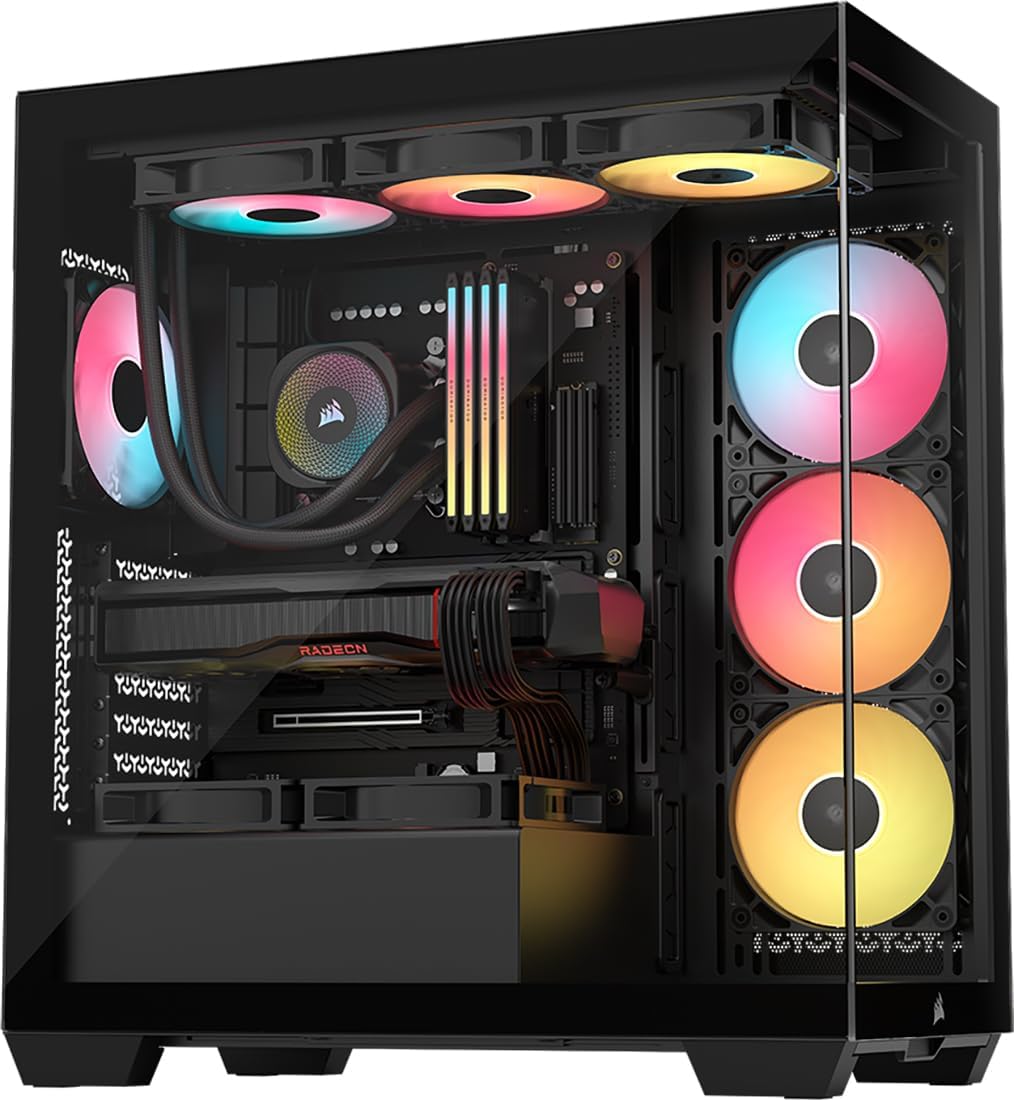


This mid-tower case ranks first for its balance of price and performance. It comes with three pre-installed fans and features a modular FRAME system that allows upgrades like aluminum trays. The design prioritizes airflow with a perforated front panel.
We may earn a commission when you buy through this link, at no additional cost to you.
The InfiniRail mounting system lets you slide fans to optimize airflow placement. Users appreciate the clean look and the ability to manage cables neatly with the side panel cover. It supports modern motherboards including reverse connection types for a cleaner setup.
Trade-offs include standard steel construction instead of premium materials. The front panel is not curved which limits the panoramic view compared to higher-end models. These differences keep the cost low while delivering essential cooling and build quality.
Ideal for budget-conscious builders who want reliable airflow and future upgrade paths. It handles standard components well and offers great value. This case is a strong starting point for a custom PC build.
The FRAME system allows swapping trays and panels as needs change over time.
The Y-pattern front panel reduces obstruction and increases cooling potential.
We may earn a commission when you buy through this link, at no additional cost to you.
This model stands out with its iCUE LINK system and curved glass panels. It includes three reverse rotor fans that provide a clean unobstructed view. The case supports modern motherboards and offers excellent cooling capacity.
We may earn a commission when you buy through this link, at no additional cost to you.
The Link hub simplifies RGB and fan wiring significantly. Users find setup faster with fewer cables. The wraparound glass design showcases hardware beautifully without blocking light from fans or components.
Trade-offs involve a higher cost and more fragile glass. Assembly requires care to avoid scratches or cracks during installation. These factors are minor compared to the benefits of simplified cabling and premium aesthetics.
Best for builders wanting a clean look and easy ecosystem integration. It delivers strong cooling and visual appeal. This case is highly recommended for mid to high-end custom builds.
The iCUE LINK hub reduces cable clutter with single daisy-chain connections.
Curved glass offers an uninterrupted view of your build's RGB lighting.
We may earn a commission when you buy through this link, at no additional cost to you.
This chassis redefines cooling with its triple-chamber layout. It isolates the CPU GPU and PSU to prevent heat pooling. The design ensures hot exhaust does not affect other components.
We may earn a commission when you buy through this link, at no additional cost to you.
Fans mounted in dedicated chambers force air directly over hardware. Ducts accelerate airflow without increasing fan noise. This leads to better thermal performance even under heavy loads.
Trade-offs include a larger footprint and premium cost. It may not fit smaller desks or budget builds. These drawbacks are acceptable for users seeking maximum cooling efficiency and distinct zones.
Best for enthusiasts needing top-tier thermal management. It supports extreme builds and high-end hardware. This case sets a new standard for airflow and component isolation.
Separate chambers prevent hot air from CPU reaching GPU or PSU.
Ducts increase velocity and reduce turbulence for more effective cooling.
We may earn a commission when you buy through this link, at no additional cost to you.
This case offers a stunning panoramic view with wraparound glass panels. It includes three RS fans pre-installed for immediate use. The interior supports up to ten 120mm fans for cooling flexibility.
We may earn a commission when you buy through this link, at no additional cost to you.
Removable tempered glass makes building and maintenance easier. Users can access components without tools. The design ensures a beautiful showcase of your hardware while protecting it from dust.
Trade-offs include standard RGB controls rather than Link integration. Care is needed to avoid fingerprints on the large glass. These issues are minor compared to the visual impact and airflow.
Ideal for those who value aesthetics and cooling potential. It fits standard builds well with strong support for fans. This case delivers a premium look at a reasonable price.
Panoramic glass wraps around the front to create a seamless look.
Multiple mounting points allow diverse fan layouts for specific needs.
We may earn a commission when you buy through this link, at no additional cost to you.
This case features a single-piece curved glass panel for a seamless view. Reverse-rotor side fans blow air directly while keeping LEDs visible. The FRAME system allows upgrades like billet aluminum trays.
We may earn a commission when you buy through this link, at no additional cost to you.
The cascading design offers generous openings for airflow. Users appreciate the unique industrial look. Vertical GPU mounting points are integrated into the modular shroud design.
Trade-offs include complex assembly and a premium price. Careful handling is needed for the curved glass. These factors are acceptable for those seeking unique customization options.
Best for users who want distinct design and modularity. It balances aesthetics and performance well. This case stands out with its waterfall-like exterior lines.
FRAME system allows upgrades like aluminum trays and custom shrouds.
Reverse fans provide intake without obscuring RGB lighting effects.
We may earn a commission when you buy through this link, at no additional cost to you.
Similar to the LX version this model focuses on thermal isolation. It features a triple-chamber layout for CPU GPU and PSU separation. The design ensures efficient cooling with dedicated ducts.
We may earn a commission when you buy through this link, at no additional cost to you.
Central chamber fans force vertical airflow to cool components thoroughly. The PSU chamber has its own intake to keep cables organized. It supports large radiators without compromising airflow.
Trade-offs involve cost and desk space requirements. It is not ideal for compact setups. These factors are worth considering for users prioritizing pure cooling performance.
Best for high-end workstations needing thermal separation. It handles powerful hardware with ease. This case delivers advanced cooling in a stunning panoramic chassis.
Each hardware type gets its own air path for maximum efficiency.
Bottom ducts accelerate intake air to improve cooling velocity.
We may earn a commission when you buy through this link, at no additional cost to you.
This model brings the 4500X design in a stylish white finish. It features single-piece curved glass and reverse-rotor fans. InfiniRail mounting allows flexible fan placement for optimized cooling.
We may earn a commission when you buy through this link, at no additional cost to you.
Users appreciate the clean white look for themed builds. The case supports reverse connection motherboards for hidden cables. It combines aesthetics with strong airflow capabilities.
Trade-offs include dust visibility on white panels and curved glass risks. Regular cleaning is needed to maintain the look. These factors are minor for those who prioritize style.
Ideal for white-themed builds needing premium aesthetics. It delivers solid performance and visual impact. This case is a top choice for custom color schemes.
Clean white panels complement RGB setups and white components.
Compatible with reverse boards for a clutter-free interior view.
We may earn a commission when you buy through this link, at no additional cost to you.
This is a massive full-tower case for ambitious builds. It supports up to eighteen 120mm fans and huge radiators. InfiniRail mounting allows flexible fan placement throughout.
We may earn a commission when you buy through this link, at no additional cost to you.
iCUE LINK integration simplifies RGB control for many devices. The removable front panel makes cleaning easier. This case is built for extreme cooling and component storage.
Trade-offs include large size and high cost. It fits large desks but dominates space. These factors are acceptable for enthusiasts needing maximum expansion.
Best for extreme custom loops and high-compute systems. It offers unparalleled cooling and storage options. This case represents the top tier of chassis performance.
Supports up to 18 fans and multiple radiators for custom loops.
Removable front panels simplify cleaning dust from large air intakes.
We may earn a commission when you buy through this link, at no additional cost to you.
This model offers high airflow with four pre-installed RS fans. The FRAME system supports upgrades like aluminum trays. It supports 420mm radiators for powerful cooling setups.
We may earn a commission when you buy through this link, at no additional cost to you.
Users like the Y-pattern front panel for unrestricted airflow. It supports reverse connection motherboards for cleaner builds. The white finish adds to its visual appeal.
Trade-offs include higher cost and glass care requirements. Dust visibility on white panels needs attention. These factors are minor compared to cooling performance.
Ideal for users needing top airflow and clean look. It handles high-end parts well. This case balances cooling and aesthetics effectively.
Supports massive 420mm radiators for superior CPU cooling.
Back-panel connection support ensures a tidy build.
We may earn a commission when you buy through this link, at no additional cost to you.
This case features the FRAME modular system for future upgrades. The Y-pattern front panel ensures minimal airflow restriction. InfiniRail mounts allow flexible fan placement throughout.
We may earn a commission when you buy through this link, at no additional cost to you.
Users value the option to upgrade trays and shrouds. It supports large radiators for strong cooling potential. The design focuses on high airflow and customization.
Trade-offs include glass fragility and premium cost. Careful handling is needed during assembly. These factors are acceptable for builders seeking modularity.
Best for those wanting customization and high airflow. It handles heat well with flexible mounting. This case supports a wide range of builds.
Swap trays and panels to match your component needs easily.
Perforated front panel reduces restriction for better cooling.
We may earn a commission when you buy through this link, at no additional cost to you.
Choosing the right Corsair PC Case involves evaluating airflow, size, and features to match your build goals.
Select a size that matches your motherboard dimensions and desk space. Full towers offer maximum expansion while mid towers balance size and cooling. Ensure your PSU fits comfortably.
Measure your desk before buying a larger chassis to avoid space issues.
High airflow designs use perforated panels to reduce heat buildup. Look for cases that support multiple fans and large radiators. Isolated chambers help separate hot exhaust from cool intake.
Prioritize designs with dedicated fan mounts for efficient thermal performance.
Modular systems allow upgrading trays panels and shrouds later. This extends the life of your case as hardware changes. Check if upgrades are available for your specific model.
Choose a case with a modular frame for future flexibility.
RGB ecosystems like iCUE LINK simplify fan wiring. Reverse connection motherboards reduce visible cables. Evaluate if the included fans support your preferred lighting setup.
Look for simplified hubs to minimize cable clutter.
Steel panels offer durability while tempered glass enhances aesthetics. Ensure the chassis is solid with minimal flex. Premium cases often use better materials and finishes.
Check material quality to ensure long-term durability.
Verify maximum fan counts and radiator sizes for your cooling needs. Cases supporting 420mm radiators offer high cooling potential. Ensure enough mounting points for your intended setup.
Match radiator support to your cooling preferences.
Choose a design that matches your style whether black or white. Curved glass panels offer a modern look. Ensure the case style complements your components.
Select a design that fits your visual preferences.
Balance cost with features to get the best value. Budget cases offer essential cooling while premium cases provide modularity. Evaluate which features matter most to you.
Compare features against the price to decide on value.
Install your motherboard and components before securing the case panels. Use the provided screws to mount drives and fans securely. Follow cable management guides for a clean interior.
Clean dust filters regularly to maintain airflow efficiency. Use compressed air to clear dust from fans and panels. This prevents overheating and extends component life.
Update RGB software to control lighting and fan speeds. Use the software to adjust performance profiles based on load. Keep drivers current for optimal ecosystem integration.
The 4000D RS ARGB Frame offers excellent airflow with its Y-pattern panel. It provides a balance of price and cooling efficiency. The AIR 5400 series also delivers superior airflow with triple-chamber isolation.
Most Corsair cases include tempered glass panels that are easy to remove. Cable management features help keep wires tidy. Modular systems allow flexible mounting for easier component installation.
Many models feature the FRAME modular system for upgrades like trays. This lets you change shrouds and panels as needs evolve. Check specific models for available upgrade parts.
Yes many models support ASUS BTF MSI Zero and Gigabyte Stealth boards. This allows cables to connect at the back for a cleaner look. Verify compatibility before purchasing.
Cases with iCUE LINK systems offer simplified RGB wiring. The 3500X LX RGB Link model integrates the hub for easy control. This reduces cable clutter significantly.
Full towers like the 9000D require substantial desk space. Ensure your area can accommodate the larger footprint. Measure your setup before choosing a super full-tower case.
Corsair cases use steel frames and tempered glass for durability. Build quality is high across most models. Proper handling of glass panels ensures long-term use.
The 5000D Series supports top 420mm radiators. This allows for powerful liquid cooling setups. Verify support before purchasing your cooling hardware.
The 4000D RS ARGB Frame offers the best value for budget builds. The 3500X LX RGB Link provides excellent ease of use and visuals. The AIR 5400 LX RGB leads in cooling performance.
Prioritize airflow and modularity for long-term performance. Consider aesthetics if you plan to showcase your hardware. Choose features that align with your specific cooling needs.
Always check current prices and availability before buying. Promotions can change the value proposition of each model. Select the case that best fits your build today.