
GMK104 Barebones Keyboard Kit with Screen&Knob
4.8Editor score
Smart Display And Knob Control
Tri-Mode Connectivity Support
Hot-Swappable PCB Design
This guide compares the top ten barebones keyboard kits available today, evaluating features like connectivity, customization, and build quality for enthusiasts
Barebones keyboard kits offer enthusiasts the chance to build custom mechanical keyboards from scratch. These kits provide the essential chassis and electronics needed for a fully personalized typing experience.
We evaluated ten top-rated kits based on build quality, connectivity options, and customization potential. Our analysis focuses on features that matter most to DIY builders and daily users alike.
Each pick highlights unique strengths and trade-offs to help you find the right match. Prices and availability change frequently, so verify current details before purchasing your ideal kit.
4.8Editor score

3.9Editor score

4.5Editor score
The following table provides a side-by-side comparison of all ten selected barebones keyboard kits, highlighting their key specifications and unique features for easy reference.


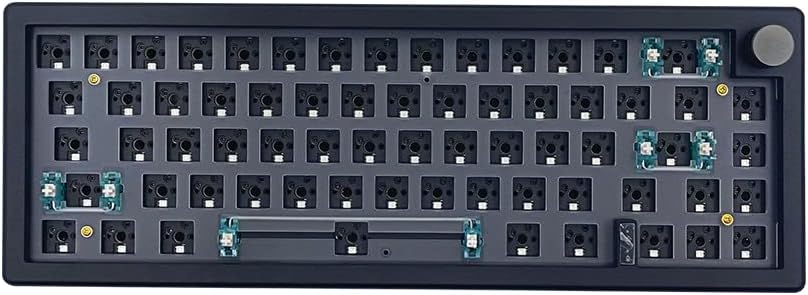


The GMK104 Barebones Keyboard Kit stands out with its integrated smart display and multimedia knob. It offers a premium DIY experience for users who want a full-size mechanical keyboard with advanced customization capabilities.
We may earn a commission when you buy through this link, at no additional cost to you.
Its tri-mode connectivity allows seamless switching between Bluetooth, 2.4GHz, and wired connections. The gasket-mounted structure provides a cushioned typing feel while the hot-swappable PCB enables easy switch changes without soldering.
Although the screen offers real-time updates, initial setup may require some technical familiarity. The software customization for macros and lighting is powerful but could be more intuitive for beginners.
This kit is ideal for enthusiasts seeking a full-size layout with unique visual features. Its robust feature set makes it a top contender for custom keyboard builders.
The built-in screen allows real-time image updates and media control for a highly interactive user experience.
Support for Bluetooth 5.0, 2.4GHz wireless, and Type-C wired modes ensures flexibility across multiple devices.
We may earn a commission when you buy through this link, at no additional cost to you.
The BOYI GMK67 delivers exceptional value for builders seeking a compact 65% layout. Its gasket-mounted design and preinstalled foam provide a satisfying typing experience without breaking the budget.
We may earn a commission when you buy through this link, at no additional cost to you.
VIA support allows extensive key mapping and macro creation. The multifunction knob adds convenience for media control, enhancing workflow efficiency during both work and gaming sessions.
The kit excludes optical switches compatibility which may limit some enthusiasts. However, its solid build and included polycarbonate plate ensure quality construction right out of the box.
For those looking to start their custom keyboard journey affordably, this kit offers a strong balance of features and performance. It is an excellent choice for budget-conscious DIYers.
Despite its low cost, the kit includes high-quality materials like foam and a polycarbonate plate for durability.
The VIA software enables users to tailor key assignments and lighting effects to their specific workflow needs.
We may earn a commission when you buy through this link, at no additional cost to you.
The GMK108 offers a full-size layout with numpad and arrow keys for comprehensive productivity. Its tri-mode connectivity and programmable VIA features cater to users needing flexibility across devices.
We may earn a commission when you buy through this link, at no additional cost to you.
The gasket-mounted structure ensures a cushioned typing experience with reduced vibrations. Hot-swap support simplifies switch replacements, allowing users to experiment with different mechanical switches easily.
Aesthetically it is more conservative compared to kits with screens. The larger size may require more desk space, but it is ideal for tasks requiring a numpad or extensive navigation keys.
This kit is a practical choice for office workers and gamers who prioritize function over flash. It provides a reliable platform for custom builds without unnecessary complexity.
Equipped with 108 keys, this kit supports complete NKRO and essential navigation keys for efficient data entry.
The long-lasting battery ensures extended wireless use, making it suitable for mobile workstation setups.
We may earn a commission when you buy through this link, at no additional cost to you.
The white version of the GMK104 combines premium aesthetics with advanced features like a smart display and volume knob. It achieves a high user rating due to its robust build and functional design.
We may earn a commission when you buy through this link, at no additional cost to you.
Its gasket-mounted PCB and south-facing RGB backlighting enhance both the typing feel and visual appeal. The metal knob provides precise volume control, adding a tactile element to media management.
The smart display requires some customization effort but offers unique personalization. The higher price reflects its premium materials and advanced feature set compared to standard barebones kits.
For users seeking a high-end custom keyboard with visual flair, this kit is an excellent choice. It balances functionality with style for a polished desktop setup.
The gasket mount and metal knob create a refined typing experience that users appreciate for long work sessions.
Real-time image updates on the screen allow users to express their personality through dynamic displays.
We may earn a commission when you buy through this link, at no additional cost to you.
The black variant of the BOYI GMK67 offers a compact 65% layout ideal for gaming setups. Its solid construction includes ample foam and a polycarbonate plate for a stable typing platform.
We may earn a commission when you buy through this link, at no additional cost to you.
Hot-swappable terminals allow easy switch changes without soldering. The south-facing RGB lighting provides a vibrant visual experience while optimizing switch compatibility with most keycaps.
While it lacks optical switch support, it works well with standard mechanical switches. The multifunction knob simplifies media control making it a practical choice for daily gaming and typing tasks.
This kit is a strong option for gamers seeking a compact form factor with customization potential. Its balanced feature set makes it accessible for both beginners and experienced DIYers.
The 65% layout saves desk space while retaining arrow keys and essential navigation features for gaming.
South-facing LEDs allow for better switch compatibility while delivering bright and customizable lighting effects.
We may earn a commission when you buy through this link, at no additional cost to you.
The GMK87 white kit features an interactive TFT-LCD screen that displays custom images and data. This innovative design strikes a balance between functionality and space-saving compactness for modern workstations.
We may earn a commission when you buy through this link, at no additional cost to you.
It supports triple-mode connectivity and includes a metal knob for volume control. The gasket-mounted design reduces vibrations ensuring a satisfying typing experience for users focusing on comfort.
Software customization for macros and lighting is available though it may have a steeper learning curve. The screen adds novelty but requires updates to maintain functionality and visual relevance.
This kit appeals to users seeking unique visual elements in their keyboard setup. Its blend of compact design and smart features makes it a distinctive option in the DIY market.
The TFT-LCD screen allows real-time customization of images and time displays enhancing user engagement.
Dual-stage kickstands offer adjustable height options for comfortable typing positions during extended use.
We may earn a commission when you buy through this link, at no additional cost to you.
The M87 kit focuses on providing a silent typing experience with sound absorption foam and silicon bottom pads. It is designed for users who need quiet operation in shared environments or late-night work sessions.
We may earn a commission when you buy through this link, at no additional cost to you.
Its 75% layout offers a compact footprint while retaining essential navigation keys. The south-facing RGB and hot-swap switches allow customization without compromising the quiet profile.
The software allows for factory-set lighting effects and macros. While the silent design is a clear strength it may appeal less to enthusiasts who prefer a more audible mechanical feedback.
This kit is ideal for office environments or quiet home offices. Its attention to acoustic comfort and portability makes it a practical choice for daily productivity.
High-quality silencing pads ensure a whisper-quiet typing experience without sacrificing responsiveness or feel.
The detachable USB-C cable enhances portability making it easy to transport the keyboard between locations.
We may earn a commission when you buy through this link, at no additional cost to you.
The black variant of the GMK87 provides similar features to its white counterpart including a TFT-LCD screen and gasket mount. It is designed for users seeking a compact mechanical keyboard with visual interactivity.
We may earn a commission when you buy through this link, at no additional cost to you.
Its triple-mode connectivity supports seamless device switching. The dynamic RGB effects and VIA programmability allow extensive customization of lighting and macro functions for specific workflow needs.
The kit may require technical familiarity to fully utilize the screen and software features. However its compact design and smart features make it a standout for tech enthusiasts.
This kit is best suited for users interested in integrating visual elements into their mechanical keyboard. It offers a modern approach to customization with smart display technology.
The TFT-LCD screen allows customization of images and time displays adding a dynamic layer to the keyboard.
VIA software enables users to create custom macros and lighting effects tailored to specific tasks or games.
We may earn a commission when you buy through this link, at no additional cost to you.
The BOYI GMK67Pro kit supports both QMK and VIA firmware for advanced customization. Its 65% layout is designed for users seeking a compact keyboard with extensive programmability and modern connectivity options.
We may earn a commission when you buy through this link, at no additional cost to you.
Gasket mounting and PORON gaskets reduce cavity sound while enhancing typing comfort. The south-facing RGB LEDs ensure compatibility with a wide range of keycaps and switch types.
While it does not support optical switches it is optimized for mechanical switches like Cherry MX. The included multimedia knob adds convenience for volume and media control.
This kit is ideal for power users who value firmware flexibility. It offers a solid foundation for building a highly customized compact mechanical keyboard for daily use.
Support for QMK and VIA allows deep customization of keymaps and macros to suit specific workflows.
PORON gaskets minimize cavity resonance providing a more refined and satisfying typing sound profile.
We may earn a commission when you buy through this link, at no additional cost to you.
The white M87 kit offers a silent 75% TKL layout with sound absorption features for quiet typing. It is suitable for users who prioritize discretion and comfort during extended work sessions.
We may earn a commission when you buy through this link, at no additional cost to you.
Its hot-swap PCB supports 3-pin and 5-pin switches allowing easy customization. The south-facing RGB adds visual flair while maintaining compatibility with standard switch options.
While it provides factory-set lighting effects it may have fewer software customization options than more advanced kits. The detachable USB-C cable enhances portability for mobile users.
This kit is a solid choice for those seeking a quiet and portable keyboard. It balances functionality with simplicity for practical everyday use in various environments.
High-quality silencing pads absorb keystroke noise ensuring a whisper-quiet experience for shared workspaces.
The detachable USB-C cable makes the keyboard easy to carry for mobile work or travel.
We may earn a commission when you buy through this link, at no additional cost to you.
Selecting the right barebones keyboard kit involves considering layout, connectivity, and customization options. This guide outlines key factors to help you make an informed decision.
Layout determines the number of keys and desk space required. Full-size kits offer numpads while compact 65% or 75% layouts save space without sacrificing essential keys.
Tri-mode connectivity including Bluetooth, 2.4GHz wireless, and wired Type-C ensures flexibility. Choose based on your need for wireless convenience and stable wired performance.
Hot-swap support allows you to change switches without soldering. This feature is essential for enthusiasts who want to experiment with different switch types easily.
Gasket-mounted designs provide a cushioned feel and reduce vibration. Plate mounts are stiffer and more direct. Consider your preference for typing comfort versus tactile feedback.
Look for kits supporting VIA or QMK firmware. These allow deep customization of keymaps macros and lighting effects to tailor the keyboard to your workflow.
Materials like aluminum cases or polycarbonate plates affect durability and acoustics. Preinstalled foam improves sound quality and is a valuable feature in budget kits.
South-facing RGB improves switch compatibility. Consider whether you want standard backlighting or advanced features like screens or multifunction knobs for media control.
Ensure compatibility with your OS such as Windows or Mac. Some kits include dedicated software that may have limited support across different systems.
After assembling your kit, use VIA software to remap keys and set up macros. This ensures the keyboard functions exactly as you need for daily tasks or gaming.
Yes, many kits include preinstalled foam and straightforward instructions. However, beginners should expect a learning curve for software customization and assembly steps.
Most kits are barebones meaning they include the PCB case and sometimes switches. You may need to purchase keycaps separately for a complete setup.
If the kit has a hot-swap PCB you can replace switches easily without soldering. Always verify compatibility with 3-pin or 5-pin mechanical switches.
Gasket mounting isolates the PCB from the case reducing vibration and providing a softer typing feel. It also often minimizes cavity sound for a cleaner profile.
Most kits support both Windows and macOS. Always check product specifications to ensure dedicated keys and software work correctly on your system.
A multifunction knob typically controls volume or brightness and can be customized for other actions via software. It adds a convenient tactile control to your setup.
Basic tools like a screwdriver are usually sufficient. Many kits include necessary screws and accessories simplifying the build process without extra purchases.
Most supported kits are designed for mechanical switches. Check product details as optical switches often require specific PCBs or sockets not included in these kits.
The ten kits reviewed offer diverse options for every budget and preference. From compact designs to smart displays there is a solution for any enthusiast or daily user.