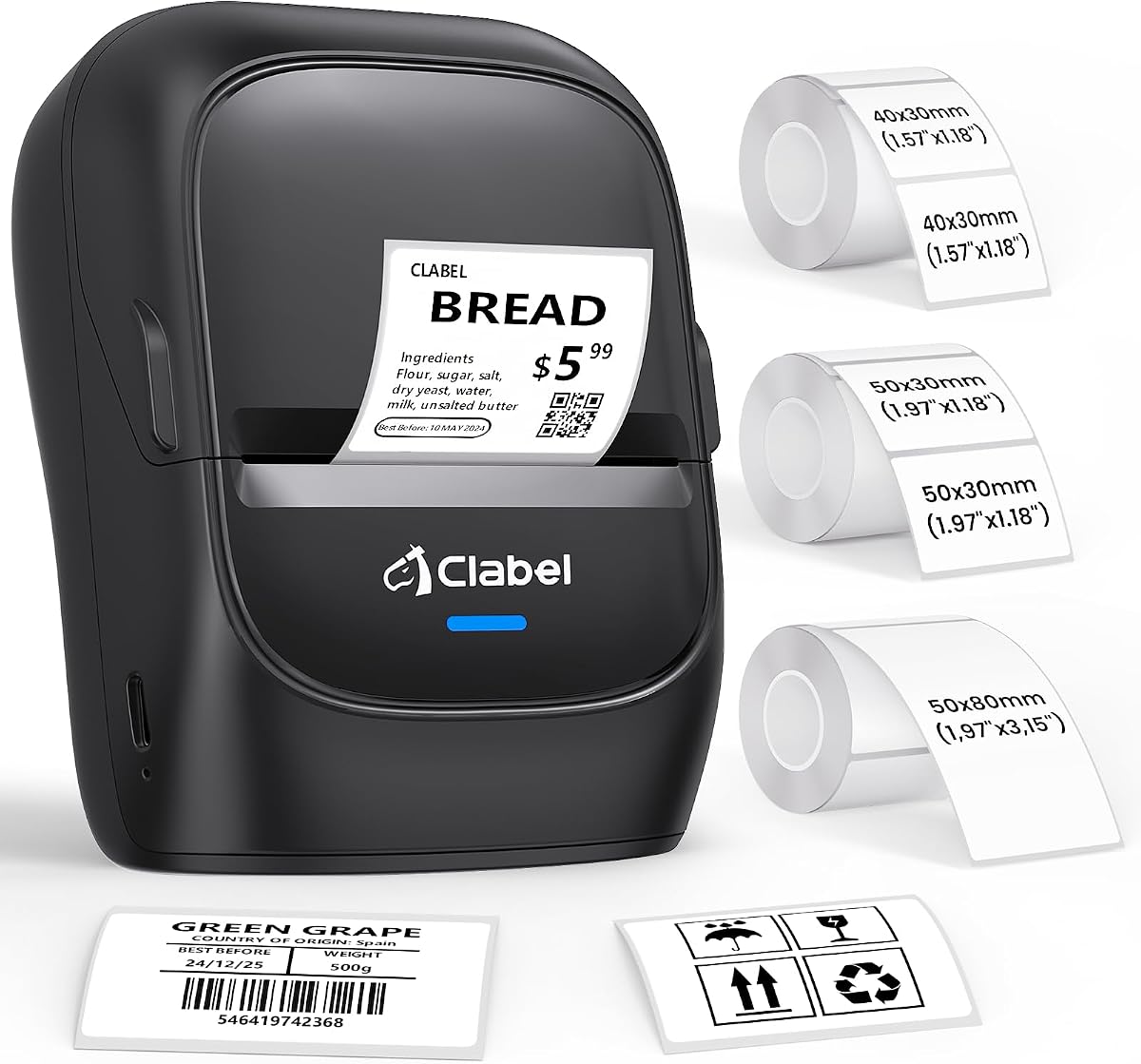
CLABEL 221B
4.3Editor score
Affordable Bluetooth connectivity
Includes three label rolls
No RFID chip restrictions
Finding the right barcode printer for inventory management is essential for streamlining operations and reducing errors in any business setting. Modern devices offer wireless connectivity, high-resolution thermal printing, and versatile label compatibility to meet diverse tracking needs efficiently.
This comprehensive guide evaluates ten leading models based on their performance, ease of use, and adaptability to various inventory workflows. We examine critical aspects like print speed, software support, and long-term operational costs to help you make an informed decision.
Each selection highlights unique strengths tailored to specific business sizes and labeling tasks ranging from retail shelves to shipping docks. Please note that product availability and features may vary over time so verify current specifications before purchasing.
4.3Editor score

4.6Editor score

4.5Editor score
As an Amazon Associate we earn from qualifying purchases.
The following comparison table provides a quick overview of key specifications across all ten selected models to assist in narrowing down choices based on specific operational requirements and budget constraints.


The iDPRT SP310 stands out as a robust solution for businesses needing reliable high-volume inventory labeling with its impressive 80ppm speed and crystal-clear 203 DPI output ensuring every barcode scans accurately without delays.
We may earn a commission when you buy through this link, at no additional cost to you.
Its open system design eliminates proprietary microchip restrictions allowing users to purchase affordable third-party thermal labels which significantly reduces long-term operational costs while maintaining professional quality standards for FBA boxes and SKU tags.
Although it lacks wireless connectivity the dedicated USB connection provides rock-solid stability crucial for heavy-duty office environments where interruptions can slow down packing or receiving lines significantly during peak operational hours.
For organizations prioritizing speed and cost-efficiency this printer delivers exceptional value through its intelligent calibration features and free software suite making it the top choice for scaling inventory management tasks effectively.
The unlocked mechanism bypasses proprietary roll limitations letting you use any standard thermal paper brand to lower ongoing expenses without compromising print quality or reliability.
Built-in sensors automatically detect label gaps and sizes ensuring precise alignment every time to prevent skipped labels and reduce waste during high-volume production runs.
We may earn a commission when you buy through this link, at no additional cost to you.
The SUPVAN T50M Pro offers unparalleled convenience for on-the-go labeling tasks thanks to its Bluetooth connectivity and intuitive mobile app that allows staff to create custom labels directly from smartphones or tablets anywhere.
We may earn a commission when you buy through this link, at no additional cost to you.
Its versatile app includes over 30 fonts 50 frames and 660 icons enabling highly customized branding for retail product tags or storage bins without requiring advanced design skills or expensive software subscriptions.
While it handles smaller label widths well up to 2 inches it may not meet the needs of large warehouse operations but it excels in home offices retail counters or field work scenarios requiring mobility.
For businesses needing quick ad-hoc labeling solutions this unit provides a budget-friendly entry point with no registration fees and broad compatibility ensuring neat and tidy organization across various environments.
The completely free application offers auto label size recognition and extensive customization options like icons and fonts making professional labeling accessible to anyone without hidden costs.
With Bluetooth integration users can design and print labels instantly from mobile devices reducing data entry errors and speeding up identification tasks in dynamic settings.
We may earn a commission when you buy through this link, at no additional cost to you.
The CLABEL 221D combines affordability with flexibility offering a hybrid connection approach that supports both USB for bulk desktop printing and Bluetooth for instant mobile labeling at the counter or point of sale.
We may earn a commission when you buy through this link, at no additional cost to you.
Its direct thermal technology delivers sharp 203 DPI barcodes and QR codes essential for retail checkout accuracy while eliminating the need for expensive ink or toner supplies that drain small business budgets.
Users benefit from a no brand lock-in policy allowing them to source universal thermal paper online which drastically cuts long-term maintenance costs compared to proprietary systems requiring specific branded consumables.
Ideal for retail shops warehouses and offices this printer balances performance with ease of use ensuring staff can quickly set up and manage inventory tracking without technical hurdles or downtime.
Absence of chip restrictions means you can buy standard thermal paper from various vendors lowering your cost per label and increasing profit margins on small-scale inventory operations.
Bluetooth capability allows instant printing from iOS or Android devices right at the work area speeding up tagging processes and reducing manual transcription errors effectively.
We may earn a commission when you buy through this link, at no additional cost to you.
The CLABEL 221D Desktop is designed for space-conscious workstations with its lightweight and compact build allowing easy relocation around an office or home setup while still delivering reliable 2 inch width thermal printing for.
We may earn a commission when you buy through this link, at no additional cost to you.
It supports a wide range of label sizes from 20 to 50mm wide enabling versatile tasks like price tagging product labeling and content marking without needing multiple devices for different job requirements.
The companion app provides extensive customization including fonts icons and templates plus an Excel printing feature that streamlines batch processing and helps minimize manual entry mistakes during high-volume labeling tasks.
For users seeking a simple cost-effective device this printer offers hassle-free setup and reusability of existing rolls ensuring consistent quality and operational flexibility for diverse everyday labeling needs.
Installation takes less than five minutes with plug-and-play connectivity and straightforward software download ensuring you can start printing inventory labels immediately without technical delays.
Excel integration allows importing bulk data to generate multiple labels automatically which saves significant time and reduces errors when managing large inventory spreadsheets.
We may earn a commission when you buy through this link, at no additional cost to you.
The Labeer Bluetooth printer is tailored for e-commerce sellers and shipping departments needing fast reliable 4×6 thermal label output with its 203 DPI precision ensuring shipping barcodes remain scannable throughout delivery chains without issues.
We may earn a commission when you buy through this link, at no additional cost to you.
Its FlashLabel Pro app enables direct PDF printing from iPhones or Android devices which streamlines the packing workflow by allowing warehouse staff to print return labels or order tags instantly from mobile devices.
Supporting labels from 1.57 to 4.41 inches wide it accommodates various packaging needs from small parcels to larger shipment boxes while the auto calibration function keeps alignment precise even during continuous run printing.
For businesses managing high order volumes this wireless solution eliminates cluttered cables and offers flexible connectivity options ensuring packaging tasks remain efficient and organized during daily dispatch operations effectively.
Downloading labels as PDFs from platforms like Amazon or Shopify and printing them directly from a phone removes the need for a computer connection simplifying the packing process significantly.
Automatic gap detection and calibration prevent misaligned prints and reduce waste saving time and resources when handling continuous batches of shipping labels throughout the day.
We may earn a commission when you buy through this link, at no additional cost to you.
The CLABEL CT327D stands out with its wide 3 inch maximum width capability handling labels from 20 to 80mm which eliminates the need for multiple printers when dealing with diverse inventory tags product labels and price markers.
We may earn a commission when you buy through this link, at no additional cost to you.
With a rapid print speed of 152mm per second it processes batches faster than most competitors in its class ensuring that high-volume retail and warehouse environments maintain smooth workflows without bottlenecks.
Its smart backfeed technology precisely repositions labels before printing to align the first label accurately which reduces waste during setup and ensures consistent output quality across thousands of printed labels.
Ideal for complex labeling needs this model supports gap black-mark perforated and continuous papers offering maximum flexibility while providing both USB and Bluetooth options for seamless integration into any workflow.
Supporting widths from 20 to 80mm allows one device to handle everything from small asset tags to wide shipping labels reducing equipment clutter and simplifying inventory management.
High-speed printing at 152mm per second keeps up with demanding commercial requirements ensuring staff spend less time waiting on labels and more time fulfilling orders accurately.
We may earn a commission when you buy through this link, at no additional cost to you.
The iDPRT SP310 delivers high-speed performance up to 80 sheets per minute of standard 2×3 labels making it an efficient tool for businesses needing to print large volumes of FBA box codes or return address labels quickly.
We may earn a commission when you buy through this link, at no additional cost to you.
Its intelligent label calibration uses built-in sensors to automatically detect size and gap boundaries ensuring accurate alignment and preventing skipped prints which is critical for maintaining professional quality in inventory tracking.
Users benefit from an unlocked open system that bypasses proprietary microchip roll limitations significantly reducing operating costs over time compared to models that force the use of expensive branded consumables only.
For offices prioritizing reliability and cost the dedicated USB connection and free HereLabel software provide a robust platform for designing serialized inventory codes and custom office templates without any subscription fees.
With print speeds up to 50% faster than common printers this model handles intensive tasks without bottlenecking ensuring efficient output for large-scale online store packaging and shipping lines.
Advanced identification learning modules detect label parameters automatically after manual calibration ensuring consistent precise alignment and preventing waste during media replacement processes.
We may earn a commission when you buy through this link, at no additional cost to you.
This Bluetooth Thermal Shipping Printer combines speed and mobility with a rapid 150mm per second output ideal for handling holiday rushes and continuous warehouse batch printing without the latency issues often associated with wireless setups.
We may earn a commission when you buy through this link, at no additional cost to you.
It supports full Bluetooth connectivity for both Windows and macOS including Apple M1 and M2 chips while also offering a stable USB option for heavy workloads ensuring seamless integration across diverse IT environments.
The device features an adjustable guide fitting labels from 1.54 to 4.1 inches wide which accommodates standard shipping labels FBA barcodes and product tags making it a versatile all-in-one labeling solution for small businesses.
Backed by a two-year warranty and responsive tech support this model provides peace of mind for scaling operations ensuring you can focus on business growth rather than equipment troubleshooting or frequent replacements.
Flawless support for Apple M1 and M2 chips ensures macOS users experience no connectivity drops or performance lags when printing directly from desktop or laptop computers.
Printing up to 72 crisp labels per minute at 150mm per second keeps dispatch workflows moving quickly during peak seasons ensuring orders are processed and shipped without delays.
We may earn a commission when you buy through this link, at no additional cost to you.
The Phomemo M110 is a versatile portable label maker designed for quick tasks on the move featuring a built-in display and Bluetooth 4.0 connection that pairs with mobile devices within seconds to streamline labeling workflows.
We may earn a commission when you buy through this link, at no additional cost to you.
Its powerful Print Master app includes Optical Character Recognition which can recognize text from images in four seconds converting photos into editable text for labels saving time on data entry tasks.
Users can access hundreds of creative templates and fonts via the app and utilize Excel batch printing to manage inventory lists efficiently making it a practical tool for home offices and small businesses.
Ideal for labeling clothing jewelry cables or files this compact unit supports widths from 20 to 50mm ensuring neat professional organization while remaining small enough to fit in a desk drawer or pocket easily.
Convert text from images into editable formats quickly allowing you to create labels from existing photos or documents without retyping information manually.
Excel batch printing enables rapid generation of multiple labels from a spreadsheet reducing manual input errors and accelerating inventory tagging workflows significantly.
We may earn a commission when you buy through this link, at no additional cost to you.
The CLABEL 221B offers an excellent entry point for small businesses needing reliable thermal labeling with its inclusion of three label rolls and support for standard widths ranging from 25 to 50mm for diverse tagging needs.
We may earn a commission when you buy through this link, at no additional cost to you.
Its durable matched thermal labels are waterproof and oil-proof ensuring that price tags and barcodes remain sharp and legible even in demanding environments like high-traffic retail shelves or busy kitchens.
The Clabel trade app enables quick Bluetooth connection without registration and supports Excel batch printing which helps staff create professional inventory labels with minimal effort or technical training time.
For budget-conscious users seeking immediate usability this model delivers high-quality smudge-free results and flexibility to choose affordable paper options without being tied to proprietary RFID chip restrictions.
Comes with three label rolls pre-installed or included allowing you to start printing inventory tags immediately without waiting for extra supplies to arrive.
Waterproof and oil-proof label materials ensure printed text remains clear and intact even when exposed to moisture or friction in commercial settings.
We may earn a commission when you buy through this link, at no additional cost to you.
Selecting the right barcode printer for inventory involves evaluating several technical factors that directly impact operational efficiency and long-term costs.
Connectivity determines how you integrate the printer into your existing workflow. USB provides stable high-speed connections ideal for desktop use while Bluetooth enables mobile labeling tasks from phones or tablets. Consider if you need wireless flexibility or if wired reliability is more critical for your operation.
Evaluate whether your staff needs to print from mobile devices at packing stations or if a stationary desktop setup suffices for your inventory management needs.
Label width defines the variety of tags you can print. Standard models support widths between 20mm to 50mm which covers most SKU tags and price labels. Larger units up to 80mm accommodate shipping labels and product branding. Ensure the selected model matches your typical label size requirements.
Choose a printer that handles your most frequent label sizes to avoid needing multiple devices for different tagging tasks.
Print resolution affects barcode readability. Most inventory printers offer 203 DPI which is sufficient for standard scanning at retail checkouts and warehouse sorting. Higher resolutions improve fine detail rendering but may slow down speed. For most inventory tasks 203 DPI is the industry standard.
Prioritize 203 DPI models to ensure all printed codes remain scannable and reliable across various handheld devices.
Operating costs include ongoing expenses for labels and maintenance. Printers with open systems allow you to buy generic thermal paper instead of proprietary branded rolls. This can reduce costs by up to 40% over time. Look for features that eliminate brand locks to maximize long-term savings.
Check if the printer supports standard rolls to avoid being locked into expensive manufacturer-specific consumables.
Software support affects label design ease. Many models offer free apps or desktop tools for creating custom templates and batch printing. Excel integration is valuable for importing inventory lists directly. Ensure the provided software is intuitive and compatible with your operating system.
Confirm that the included design tools support batch processing to streamline high-volume inventory labeling tasks.
Print speed determines how quickly labels are produced. Faster printers like those offering 80ppm or 150mm per second reduce bottlenecks in packing lines. Slower models may suffice for occasional use but can delay operations during peak times. Match speed to your daily volume requirements.
Opt for higher speeds if you process hundreds of labels daily to maintain efficient workflow and avoid staff waiting on the device.
Calibration features ensure accurate print alignment. Smart sensors that detect label gaps automatically reduce setup time and prevent skipped labels. Manual calibration options provide additional control when switching media types. Reliable alignment is critical for professional inventory tags.
Prioritize models with auto-calibration sensors to minimize waste and ensure every label is perfectly positioned on the page.
Portability matters for field work or small offices. Compact lightweight designs allow easy movement between desks or packing stations. If you need to label items at different locations choose a model that is easy to transport and set up quickly.
Select a portable option if your inventory tasks involve moving around the warehouse or working at multiple desks.
Begin by installing the designated drivers or app on your computer or mobile device to establish a secure connection. Follow the manufacturer instructions to set up Bluetooth pairing or plug in the USB cable ensuring all ports are clean and functional.
Load your chosen thermal label rolls into the printer compartment making sure the paper path is clear of any obstructions. Use the built-in calibration feature to detect the label size and gap boundaries before printing your first batch.
Clean the print head regularly with a soft lint-free cloth to remove dust or debris that could degrade print quality over time. Store the printer in a dry environment away from direct sunlight and excessive moisture to maintain internal component reliability.
No most inventory barcode printers use direct thermal technology which means they do not require ink cartridges or toner. They print using heat-sensitive labels that darken when heated which makes them cost-effective and low maintenance for continuous use.
For standard inventory tags widths between 20mm and 50mm are ideal. These sizes accommodate product SKU labels price tags and small shipping addresses efficiently. If you need larger labels choose a printer supporting up to 80mm or 4 inches.
Many modern models allow the use of third-party labels by eliminating proprietary chip restrictions. Always check if the printer has an open system to avoid forced branding and reduce ongoing operational costs significantly.
Inventory printers vary from 50mm to 150mm per second depending on the model. High-speed options reach 80 pages per minute ensuring fast throughput during busy shipping or receiving times in warehouse environments.
Bluetooth is convenient for small batches but USB provides more stability for continuous high-volume workloads. If you are printing thousands of labels daily a stable USB connection prevents dropouts and ensures consistent performance.
Most units offer free companion apps or desktop tools like HereLabel or Trade App. These allow custom templates barcode generation and batch printing. Some even support Excel imports for large inventory lists.
Thermal labels typically last 1 to 2 years depending on storage conditions. They can fade over time if exposed to heat or sunlight. For long-term archival consider using resin ribbon printers if available.
The iDPRT SP310 leads the category with high-speed performance and open system flexibility making it the top choice for businesses needing efficient reliable inventory tracking.
For those prioritizing mobility and compact setups the CLABEL 221D and SUPVAN T50M Pro offer excellent wireless solutions that support on-the-go labeling tasks.
Always verify current product details and availability as features may vary to ensure your final selection meets your specific operational requirements accurately.