
AULA F75 Wireless Mechanical Keyboard
4.6Editor score
Compact 75% layout
Pre-lubed switches
RGB lighting effects
This comprehensive guide compares the top Aula Mechanical Keyboard models for performance, build quality, and features to help you choose the perfect typing
Finding the right mechanical keyboard can transform your daily computing experience. The Aula Mechanical Keyboard lineup offers a diverse range of options tailored for gamers, professionals, and enthusiasts alike. Each model brings unique features like wireless connectivity, hot-swappable switches, and premium build quality to meet specific needs.
We have carefully evaluated ten standout models from the Aula Mechanical Keyboard series. Our analysis focuses on connection versatility, switch quality, battery life, and overall user experience. This list covers everything from compact 75% layouts to full-size boards with smart displays, ensuring you find the right fit for your setup.
Each product entry highlights key specifications, pros, cons, and real-world applications. We provide detailed insights into typing feel, customization options, and durability. Please note that product availability and pricing may change over time, so always check the latest details before making a purchase decision.
4.6Editor score

4.6Editor score

4.5Editor score
The following table provides a side-by-side comparison of all ten models. It highlights key specifications like layout size, switch type, battery capacity, and unique features to help you quickly identify the best option for your needs.
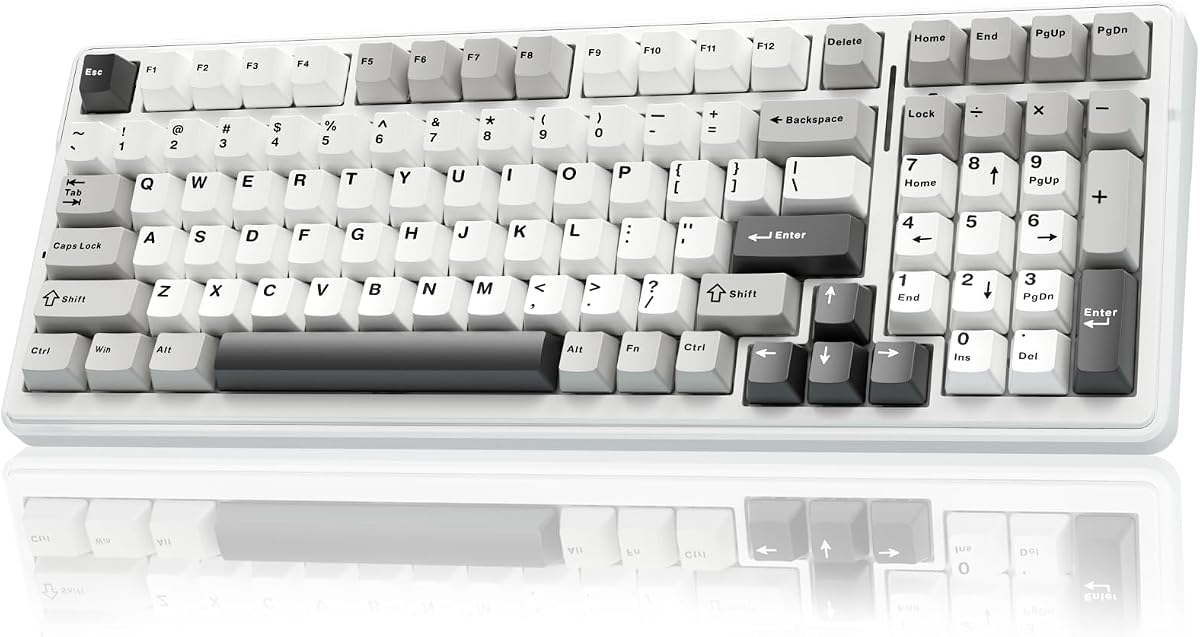


The AULA F75 Pro Wireless Mechanical Keyboard stands out as a top-tier option in the current market. With a solid 4.6 rating, it offers a blend of wireless connectivity, hot-swappable switches, and premium materials that appeal to both gamers and professionals.
We may earn a commission when you buy through this link, at no additional cost to you.
Its tri-mode connection supports Bluetooth 5.0, 2.4GHz, and USB-C, allowing seamless switching between up to five devices. The pre-lubed Reaper switches deliver a smooth, creamy typing experience, while the side-printed PBT keycaps ensure durability and aesthetic appeal.
While the driver software requires some setup time on Windows, the customization options for macros and lighting are extensive. The 4000mAh battery provides long-lasting performance, making it suitable for extended use without frequent charging interruptions.
This keyboard is ideal for users seeking a compact 75% layout with full functionality. Whether you prioritize gaming performance or office productivity, the F75 Pro delivers a balanced experience that justifies its position as a top recommendation.
The 2.4GHz mode ensures low latency for gaming, while Bluetooth 5.0 is perfect for multitasking across multiple devices like tablets and laptops.
Hot-swap support allows you to experiment with different switches without soldering, making it easy to tailor the keyboard to your preferred typing feel.
We may earn a commission when you buy through this link, at no additional cost to you.
The AULA F99 Wireless Mechanical Keyboard offers exceptional value for users seeking a full-size experience in a compact form factor. Its 96% layout saves desk space while retaining the numeric keypad, making it ideal for productivity tasks.
We may earn a commission when you buy through this link, at no additional cost to you.
Equipped with an 8000mAh battery, it ensures extended usage between charges. The tri-mode connection allows flexibility across devices, and the hot-swap PCB supports customization for those looking to upgrade switches later.
While the weight might feel substantial for portable use, it contributes to stability on the desk. The RGB lighting provides 16 effects and music rhythm modes, though advanced customization is limited to Windows users with the driver.
For budget-conscious buyers needing both gaming and office capabilities, the F99 is a strong contender. It balances performance, battery life, and layout efficiency without compromising on essential features.
The high-capacity battery means you can work or game for days without plugging in, reducing interruptions and enhancing portability.
The 96% layout compresses the standard keyboard into a smaller footprint, giving you more mouse space without sacrificing number pad utility.
We may earn a commission when you buy through this link, at no additional cost to you.
The AULA F75 Wireless Mechanical Keyboard in White & Blue brings a visually striking design to the mix. With a 4.6 rating, it combines aesthetic appeal with the mechanical performance expected from the brand.
We may earn a commission when you buy through this link, at no additional cost to you.
Its tri-mode connection ensures seamless transitions between PC, laptop, and mobile devices. The pre-lubed Reaper switches offer a creamy, smooth typing experience that is consistent across all keys, reducing the break-in period.
While the software is functional, it may not offer the deep customization available on competitors. The 4000mAh battery is sufficient for typical daily use, though heavy RGB usage may require more frequent charging.
This model is perfect for users who value clean design and reliability. It delivers on core mechanical keyboard features without unnecessary complexity, making it a straightforward choice for home or office setups.
The white and blue colorway stands out in any setup, offering a modern look that complements minimalist or RGB-themed desk arrangements.
Out of the box, the keyboard requires minimal setup. Pairing via Bluetooth or 2.4GHz is straightforward, ensuring you can start typing immediately.
We may earn a commission when you buy through this link, at no additional cost to you.
The AULA F108 PRO Wireless Mechanical Keyboard redefines what a premium board can offer. Featuring a built-in TFT color display and multi-function knob, it serves as a command center for your PC setup.
We may earn a commission when you buy through this link, at no additional cost to you.
Its full-size layout ensures no key compromises, making it suitable for heavy data entry and gaming. The 8000mAh battery supports long sessions, and the hot-swappable base allows for deep customization without tools.
The software enables GIF customization, macro recording, and system info display. While it requires Windows for full functionality, the convenience of on-screen feedback justifies the investment for power users.
If you seek a keyboard that combines utility with advanced tech, the F108 PRO is unmatched. It offers a unique experience that integrates practical features into a single, cohesive unit.
The smart screen shows battery status, time, and system mode, giving you instant access to info without needing to check your monitor.
With driver support for macros and custom images, you can tailor every aspect of the board to match your workflow or gaming preferences.
We may earn a commission when you buy through this link, at no additional cost to you.
The AULA F99 Wireless Mechanical Keyboard is designed for gamers who need seamless switching between platforms. Compatible with PC, Xbox, and PS5, it ensures consistent performance across different gaming ecosystems.
We may earn a commission when you buy through this link, at no additional cost to you.
The 96% layout keeps the number pad while maintaining a compact footprint. The 8000mAh battery supports marathon sessions, and the tri-mode connectivity allows you to pair with multiple devices simultaneously.
Pre-lubed linear switches deliver a smooth and quiet typing experience, ideal for shared spaces. While it is heavier than some competitors, the stability it offers during intense gaming sessions is a significant benefit.
For multi-platform gamers, the F99 Pro is an excellent choice. It balances essential gaming features with the convenience of wireless connectivity, ensuring you never miss a beat.
Optimized for major consoles, the keyboard works out of the box with minimal configuration, making it a plug-and-play solution for your gaming setup.
With an 8000mAh capacity, you can enjoy weeks of use on a single charge, depending on your RGB usage and connection settings.
We may earn a commission when you buy through this link, at no additional cost to you.
The AULA F75 Wireless Mechanical Keyboard in White & Brown offers a classic look that fits any environment. With a 4.6 rating, it provides reliable performance and a satisfying typing experience.
We may earn a commission when you buy through this link, at no additional cost to you.
Its 75% layout saves space without sacrificing essential keys. The pre-lubed linear switches ensure a smooth keystroke, while the RGB lighting adds a modern touch to the traditional aesthetic.
While the software offers macros and lighting customization, it requires some setup. The 4000mAh battery is efficient, allowing for long periods of use without needing frequent recharges.
This model is ideal for users who appreciate a balanced design. It combines functionality with style, making it a versatile choice for both work and play.
The white and brown color scheme provides a professional look that stands out from the typical all-black gaming keyboards.
Every key offers the same tactile feedback, ensuring a uniform typing experience that reduces finger fatigue over long sessions.
We may earn a commission when you buy through this link, at no additional cost to you.
The AULA S98 Pro Wireless Mechanical Gaming Keyboard blends compact size with smart features. Its 96-key layout offers full functionality in a space-efficient design, making it perfect for modern desks.
We may earn a commission when you buy through this link, at no additional cost to you.
The smart LCD screen displays essential info like time and battery status, while the multi-function knob allows quick adjustments to volume and lighting. This interaction adds a layer of convenience to daily use.
With an 8000mAh battery, it supports extended use. The hot-swap base enables customization, ensuring the board can evolve with your preferences over time.
This model is a strong choice for those who want a smart keyboard without a full-size footprint. It balances utility, design, and performance effectively for most users.
The screen and knob provide immediate access to settings without needing to open software, streamlining your workflow.
The 96% layout provides a number pad while remaining compact enough to leave space for mouse movements during gaming.
We may earn a commission when you buy through this link, at no additional cost to you.
The AULA F99 Wireless Mechanical Keyboard features a gasket structure that significantly improves typing sound and feel. With a 4.5 rating, it delivers a thocky, hollow sound that enthusiasts love.
We may earn a commission when you buy through this link, at no additional cost to you.
The tri-mode connection ensures compatibility with various devices, while the 8000mAh battery supports long-term use. The hot-swap PCB allows for switch experimentation, making it future-proof.
While the keyboard is slightly heavier, this contributes to its stable typing experience. The RGB lighting offers 16 effects, creating a dynamic atmosphere for gaming sessions.
For those prioritizing sound and build quality, the F99 Gasket is an excellent choice. It brings high-end features to a competitive price point.
The gasket mount and multi-layer sound dampening create a consistent, deep sound profile that is pleasing to the ear.
The soft mounting allows for a gentle keystroke bounce that reduces finger fatigue during long typing sessions.
We may earn a commission when you buy through this link, at no additional cost to you.
The AULA F75 Wireless Mechanical Keyboard with Greywood Switches offers a distinct sound profile. With a 4.6 rating, it delivers a deep, thocky experience that sets it apart from standard models.
We may earn a commission when you buy through this link, at no additional cost to you.
Its 75% layout is ideal for compact setups. The side-printed PBT keycaps ensure durability, while the RGB lighting adds a modern touch to the cool black design.
The 4000mAh battery supports daily use, and the tri-mode connection provides seamless switching between devices. Hot-swap support allows further customization if desired.
This model is perfect for enthusiasts looking for unique audio feedback. It balances compact design with high performance, making it a standout choice.
The Greywood switches provide a deep, satisfying sound that appeals to users who enjoy acoustic customization.
With durable materials and a solid build, this keyboard is designed to withstand heavy daily use over the years.
We may earn a commission when you buy through this link, at no additional cost to you.
The AULA S75 PRO Wireless Mechanical Gaming Keyboard merges compact size with smart features. With a 4.6 rating, it offers a 75% layout that saves space while retaining essential keys.
We may earn a commission when you buy through this link, at no additional cost to you.
The LCD screen and multi-function knob allow quick adjustments to settings like volume and RGB. The tri-mode connection ensures compatibility across multiple devices, making it versatile for work and play.
The 5000mAh battery provides sufficient power for daily tasks. Hot-swap switches allow customization, ensuring the board can adapt to changing preferences over time.
For users seeking a compact, smart solution, the S75 PRO is an excellent choice. It combines utility with modern design elements for a seamless experience.
The combination of screen and knob makes managing settings intuitive, removing the need to dive into software menus.
Despite its small size, the keyboard delivers robust performance and connectivity options suitable for complex workflows.
We may earn a commission when you buy through this link, at no additional cost to you.
Selecting the right keyboard requires evaluating several key factors. This guide breaks down the most important aspects to consider before making a purchase.
The layout determines the physical footprint and number of keys available. Options range from 75% compact boards to full-size 104-key layouts with numeric pads.
Choose a layout based on your available desk space and need for specific keys like number pads or function rows.
Mechanical switches define the tactile and auditory experience of typing. Linear switches are smooth and quiet, while tactile and clicky switches offer feedback.
Consider your preferred feel and whether you value silence or tactile feedback when selecting a switch type.
Wireless, Bluetooth, and wired connections offer different benefits. Tri-mode connectivity allows seamless switching between devices like PCs and phones.
Ensure the keyboard supports the connection types required by your specific devices and usage scenarios.
Battery capacity impacts how long you can use the keyboard between charges. Options typically range from 4000mAh to 8000mAh for extended use.
Higher capacity batteries are ideal for users who frequently travel or dislike frequent charging interruptions.
Materials like PBT keycaps and aluminum housings enhance durability and typing feel. Gasket mounts reduce noise and improve tactile feedback.
Prioritize keyboards with premium materials if you want a product that will last through years of heavy use.
Hot-swap PCBs allow easy switch replacement without soldering. Software support enables macro programming and lighting customization.
Choose a board with customization features if you plan to tweak your setup over time.
Prices vary based on features like smart displays, advanced connectivity, and build materials. Determine a realistic range based on your needs.
Focus on models that offer the best value for the specific features you prioritize most.
Driver software is often needed for advanced customization like macros and RGB effects. Most models support Windows primarily.
Check system requirements to ensure full functionality with your operating system before purchasing.
To maintain optimal performance, keep the keyboard clean by regularly removing dust and debris from the keycaps. Use a soft brush or compressed air to prevent buildup that can interfere with switch mechanics.
For wireless models, ensure the battery is charged regularly to maintain signal stability. Store the keyboard in a cool, dry environment to protect the internal circuitry from humidity.
Customize the RGB and macro settings through the official software to suit your workflow. Adjust the brightness and sensitivity to reduce eye strain during long sessions.
Many models support basic functionality on Mac, but advanced driver features like macros may require Windows. Check the product details for specific OS limitations before purchasing for macOS.
Depending on the capacity, wireless models can last from a few days to several weeks on a single charge. Usage of RGB lighting and connection type significantly impacts total runtime.
Most models in this lineup feature hot-swappable PCBs, allowing you to replace switches without soldering. Simply use the included puller to remove old switches and install new ones.
Yes, several models are compatible with major consoles like Xbox and PlayStation. Ensure you use the appropriate connection mode for optimal performance on those devices.
The 75% layout is more compact without a dedicated number pad, while the 96% layout includes it. Choose based on whether you prioritize desk space or full number pad functionality.
Side-printed and double-shot PBT keycaps are designed to be highly durable and resistant to fading. They maintain their vibrance and legibility even after extended use.
Whether you seek the compact efficiency of the F75 series or the full functionality of the F108 PRO, Aula Mechanical Keyboard offers diverse options for every user. The top picks balance performance, design, and connectivity effectively.
Prioritize factors like switch feel, layout size, and connectivity based on your daily workflow. Whether you are gaming, typing documents, or switching between devices, there is a model suited to your needs.
Remember that product availability and pricing can change. Always verify the latest details and warranty terms before making your final decision.