
MAYFLASH F300
4.5Editor score
Wide platform compatibility
Sanwa part support
Affordable price point
This guide compares the top 10 Arcade Fight Stick for Switch 2 options including features connectivity and build quality to help you choose the right controller
Finding the right Arcade Fight Stick for Switch 2 can transform your gaming experience by offering precise controls and a classic arcade feel. Whether you are a competitive player or a casual enthusiast, having the right hardware ensures your inputs are registered accurately and quickly during intense matches.
We have evaluated ten top-tier models based on their compatibility build quality and feature sets to bring you this comprehensive roundup. Each product was selected for its ability to deliver smooth gameplay on the Switch 2 and other platforms while providing the durability needed for long gaming sessions.
Every pick in this list highlights key strengths and potential trade-offs to help you make an informed decision. Prices and availability can change quickly so be sure to verify current details before purchasing your next controller to ensure you get the best value possible.
4.5Editor score
4.7Editor score

4.6Editor score
Here is a side-by-side comparison of all ten products to help you quickly identify the model that fits your specific needs and budget requirements.




This 8Bitdo Arcade Stick for Switch 2 stands out as a top-tier option for serious gamers looking for precision and style. With a 4.7 rating it delivers reliable performance across multiple platforms including the latest Switch 2 console. Its standout quality is the dynamic button layout that visually updates when switching modes.
We may earn a commission when you buy through this link, at no additional cost to you.
The build quality is exceptional with a tempered glass faceplate that offers a premium look and smooth tactile feedback during play. You can connect via Bluetooth 2.4G or USB-C ensuring low latency whether you are playing wireless or wired. The inclusion of two dedicated macro buttons P1 and P2 allows for quick access to complex combos without fiddling with settings.
While it comes at a higher price point the durability and feature set justify the investment for many users. The hidden compartment for the 2.4G receiver keeps your setup clean and protected from damage. Some users might find the modding options limited compared to fully custom boards but the stock configuration is robust.
If you prioritize a sleek design and seamless mode switching this stick is the ideal choice for your setup. It is perfect for fighting game enthusiasts who want a reliable tool that looks as good as it performs on your desk or travel bag.
The layout changes right before your eyes keeping your combos smooth during mode switching between platforms.
The tempered glass faceplate provides a smooth scratch-resistant surface that stays sleek through heavy use.
We may earn a commission when you buy through this link, at no additional cost to you.
The MAYFLASH F300 is an excellent entry point for anyone looking to try arcade sticks without breaking the bank. It supports a massive range of platforms including Switch 2 PS4 Xbox and PC making it incredibly versatile. Its affordable price does not mean it compromises on the ability to swap in better parts later.
We may earn a commission when you buy through this link, at no additional cost to you.
You can easily customize this stick with Sanwa Denshi buttons and joysticks which are the gold standard for fighting games. It supports both XINPUT and DINPUT on PC ensuring broad software compatibility. The turbo functions allow for different speed settings which can be useful for executing specific moves repeatedly.
It is important to note that this model does not have wireless connectivity so you will need to stay tethered during gameplay. The basic build materials are sturdy but may feel less premium than higher end options. However for the price you get a reliable platform that grows with your skills and preferences.
Ideal for beginners or those on a tight budget this stick offers great value. It is perfect for players who want to learn the ropes of arcade controllers and might upgrade parts later as they become more serious about competitive play.
Compatible with Sanwa Denshi buttons and joystick that is perfect for customization over time.
Supports the XINPUT and DINPUT when being used on PC for broader software compatibility.
We may earn a commission when you buy through this link, at no additional cost to you.
This Retro Wireless model from 8Bitdo offers a balance of classic style and modern connectivity features. With a 4.5 rating it is well regarded for its ability to be customized heavily to suit individual preferences. The universal mounting plate allows you to swap out virtually any joystick ever made.
We may earn a commission when you buy through this link, at no additional cost to you.
It offers three connection ways including Bluetooth and a 2.4G receiver which stores in a hidden compartment for safe transport. The battery life is impressive providing up to 40 hours on 2.4G and 30 hours on Bluetooth per charge. You can create macros with any button combination using the Ultimate Software to streamline your gameplay.
The design focuses heavily on modding which might be overwhelming for some casual users who want plug-and-play. The higher price point reflects the build quality and feature set compared to budget alternatives. However for those who want control over every aspect of their controller this is a strong candidate.
Recommended for enthusiasts who enjoy tinkering with their gear this stick delivers on flexibility. It is a great choice if you want a wireless option that still supports deep customization and long play sessions without needing constant recharging.
You can swap out 30mm/24mm arcade buttons with a universal mounting plate supporting Sanwa JLF.
Create controller profiles and switch between them at any time using the Ultimate Software suite.
We may earn a commission when you buy through this link, at no additional cost to you.
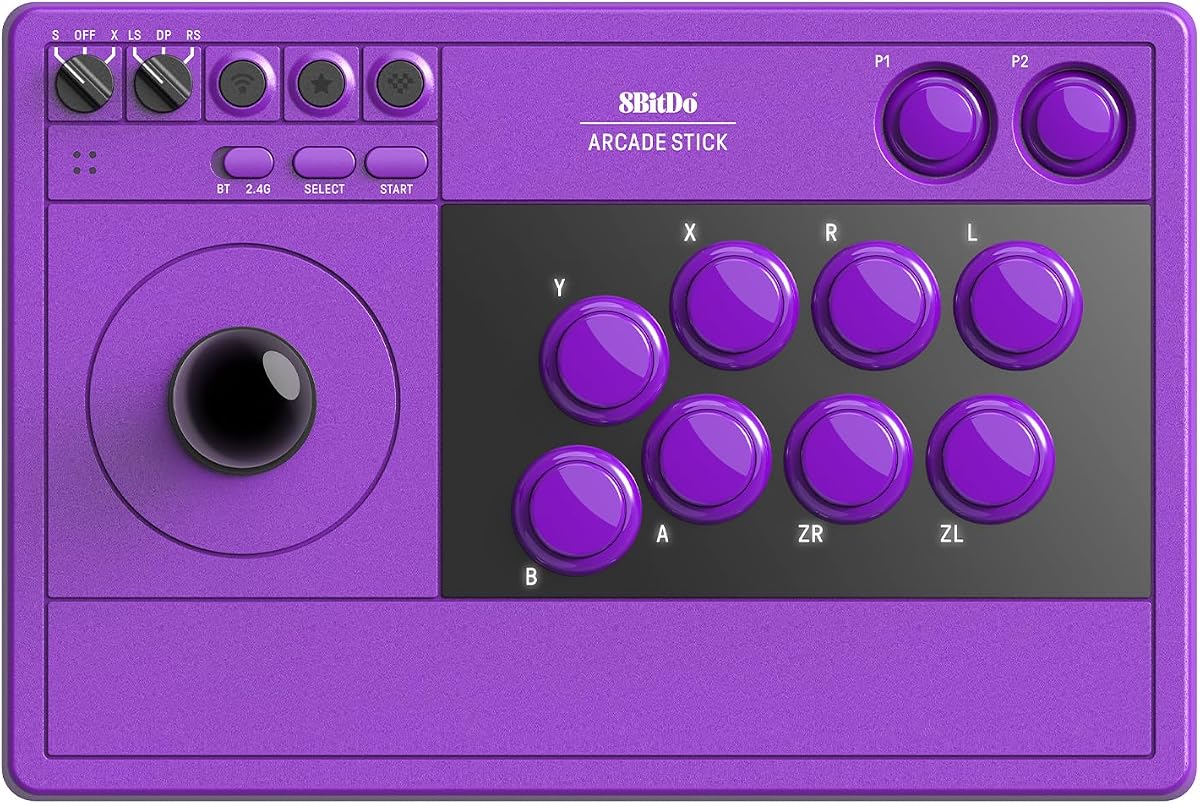
This Purple edition from 8Bitdo focuses on delivering a sleek and modern arcade experience for Switch 2 users. It shares the dynamic button layout and macro capabilities of other models but stands out for its visual appeal. The tempered glass faceplate offers a premium finish that resists scratches during intense gaming sessions.
We may earn a commission when you buy through this link, at no additional cost to you.
You can connect via Bluetooth 2.4G or wired USB-C ensuring you always have a stable connection option available. The dedicated macro buttons P1 and P2 make it easier to execute complex commands without interrupting your flow. Firmware updates are supported to keep the stick compatible with future system changes.
While it is a premium offering it might be overkill for casual players who just want a simple controller. The glass surface can be slippery for some users so handling requires attention. Overall it is a solid choice for those who value design as much as function.
If you are looking for a controller that looks great on your desk and performs well in matches this is a top pick. It suits players who want a high-quality device that fits seamlessly into a modern gaming setup without compromising on usability.
Switch between Switch and PC modes and the Arcade Stick instantly updates its visual button layout.
Features a sleek tempered glass faceplate for a premium look smooth feel and durable finish.
We may earn a commission when you buy through this link, at no additional cost to you.
The Saitake stick offers a unique feature set including a display screen and encoder for volume control. With a 4.6 rating it is appreciated for its versatility across platforms like PC Android iOS and Switch 2. The 1000mAh battery ensures extended usage time so you can play longer without interruptions.
We may earn a commission when you buy through this link, at no additional cost to you.
It supports standard turbo and auto turbo modes which help execute rapid bursts and precise inputs effortlessly. The 3.5mm headphone jack allows you to listen to game audio directly through the controller which is a handy feature for mobile setups. The hidden compartment for the 2.4G receiver keeps everything organized.
The design might not appeal to purists who prefer a classic look without digital displays. As a less common brand support and firmware updates might be less frequent than major names. However its feature richness makes it a compelling option for those who want more than basic controls.
Perfect for gamers who want added audio and visual feedback this stick provides a distinct advantage. It is a great choice if you need a versatile controller that supports many platforms and offers unique features not found in standard arcade sticks.
Featuring a display screen and encoder supporting Volume Lighting Effects and Brightness Adjustment.
Includes a 3.5mm Headphone Jack for direct audio monitoring during gameplay.
We may earn a commission when you buy through this link, at no additional cost to you.
This F700 model is designed specifically for fighting games on platforms like PS5 and Switch 2. It supports Bluetooth and 2.4G wireless connectivity which is rare at this price point. The included receiver has a hidden compartment to store it safely during transport.
We may earn a commission when you buy through this link, at no additional cost to you.
You can update the firmware to ensure compatibility with Switch 2 via Bluetooth. It supports Sanwa Denshi parts for customization and includes a wired headset output for background music on PS5. The turbo functions allow different speed settings to match your play style accurately.
It does not support Xbox Series S/X so it is not a universal stick for all console families. The focus is strictly on fighting games and not other genres which limits its utility for casual gamers. For dedicated fighters it provides a solid wireless experience on PlayStation.
Recommended for PlayStation users who need wireless support this stick is a strong contender. It is ideal for those who want to avoid cables while playing competitive titles on PS5 or Switch 2 without sacrificing performance or convenience.
Compatible with PS5 only for fighting games like SF6 Tekken 8 MK1 and more.
Supports wired headsets to output background music and online chat on PS5 and PC.
We may earn a commission when you buy through this link, at no additional cost to you.
The Elite version of the F700 comes with premium Sanwa components for reliable strikes game after game. It offers a precision 4-way joystick and eight highly responsive buttons that maintain peak performance. The anti-slip rubber mat helps hold the stick firmly in place on any surface.
We may earn a commission when you buy through this link, at no additional cost to you.
This model supports three ways to connect and includes a 2.4G receiver stored in a hidden compartment. You can update the firmware to work with Switch 2 via Bluetooth ensuring future compatibility. It is designed for fighting games like Street Fighter 6 and Tekken 8 only.
It is not compatible with Xbox Series S/X so Xbox users should look elsewhere. The higher price reflects the included high-end parts which usually have to be bought separately. For professionals who want top-tier stock performance this is a worthwhile investment.
Ideal for serious competitors this stick removes the need for immediate upgrades out of the box. It is perfect for players who demand the highest quality components and want a reliable tool for competitive matches.
By using premium quality Sanwa components you can reliably strike instantly and surely.
A full size anti-slip rubber mat works to hold the fighting stick firmly in place.
We may earn a commission when you buy through this link, at no additional cost to you.
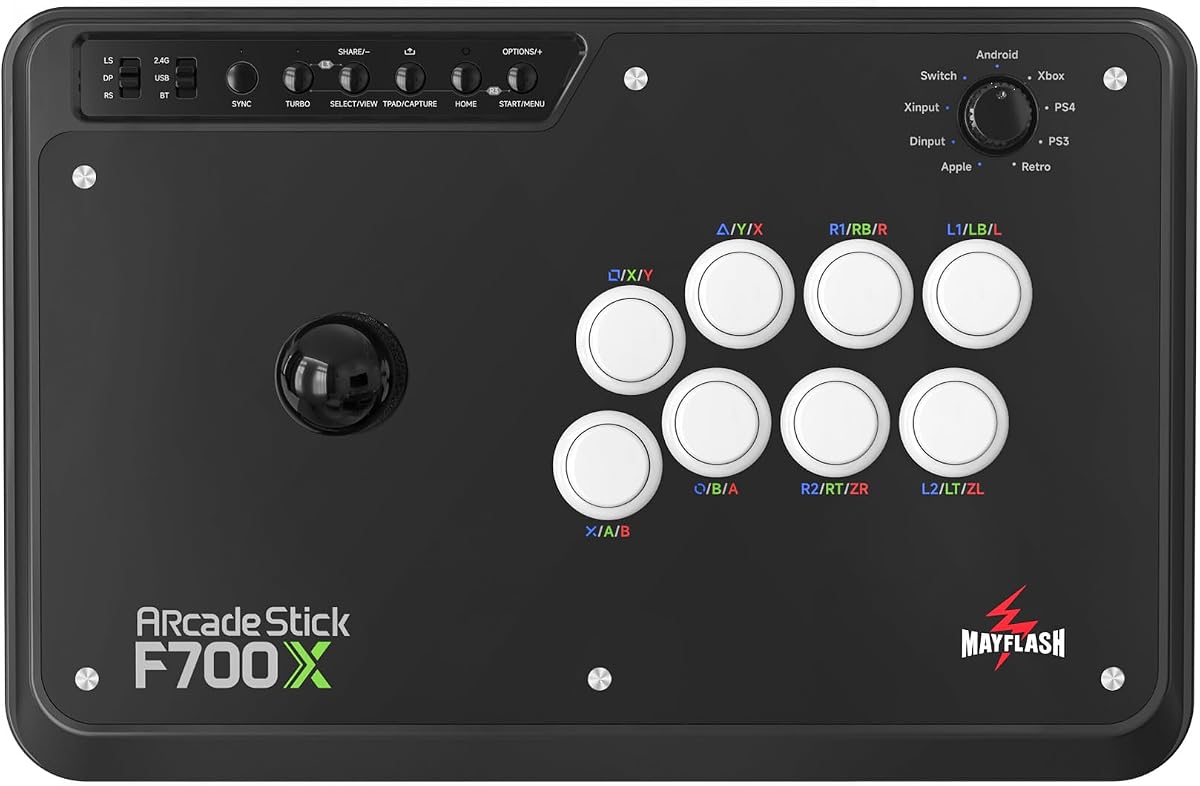
This F700X variant is optimized for Xbox Series X/S users who need a wireless fight stick. It also supports Switch 2 Windows and Android making it versatile for mixed households. The 2.4G receiver stores in a hidden compartment to prevent loss during travel.
We may earn a commission when you buy through this link, at no additional cost to you.
It supports wired headsets for background music and online chat on Xbox and PC. The turbo functions allow different speed settings to match your specific needs. You can update the firmware to work with Switch 2 via Bluetooth ensuring broad compatibility.
Do note that it does not work with PS5 so PlayStation players should consider the standard F700. The lower rating compared to other models might indicate mixed experiences with wireless stability or durability. However for Xbox users it remains one of the few good wireless options.
Recommended for Xbox gamers this stick fills a niche for wireless connectivity on the platform. It is ideal for those who need to play on Xbox Series and Switch 2 without buying multiple controllers.
Compatible with Xbox Series X/S and does not support PS5 wirelessly.
Supports wired headsets to output background music and online chat on Xbox.
We may earn a commission when you buy through this link, at no additional cost to you.
This Fusion Wireless stick is officially licensed for Nintendo Switch ensuring compatibility without third-party issues. It features Japanese arcade style domed buttons and a toggle switch to change between d-pad and stick modes. The design allows you to print your own face-card for a custom look.
We may earn a commission when you buy through this link, at no additional cost to you.
It includes a metal shaft joystick with a dust cover which adds to its durability over time. You can play wirelessly via Bluetooth 5.0 or wired via USB-C depending on your preference. The two-year limited warranty adds peace of mind for buyers looking for reliability.
Battery life is extended up to 30 hours using two AA batteries which are not included in the box. The rating is lower than premium options suggesting that performance may not match high-end competitors. However for Switch owners it offers a safe and convenient choice.
Best for casual Switch players who want a familiar brand this stick works well for home use. It is suitable for those who appreciate official branding and customizability without needing advanced competitive features.
Design and print your own face-card via downloadable template to match your style.
Official Licensed Product with two-year limited warranty from PowerA for support.
We may earn a commission when you buy through this link, at no additional cost to you.
The V3 Edition brings updates to the 8Bitdo line with real-time label changes for mode switching. It is compatible with Switch 2 and Windows offering seamless transitions between modes. The battery life is supported by a 1000mAh Li-ion battery ensuring long play sessions.
We may earn a commission when you buy through this link, at no additional cost to you.
You can toggle between Switch mode and PC mode and the button layout refreshes labels instantly. Firmware updates are free and keep compatibility tight for the latest games. The support team responds rapidly to setup guides and macro tips for help.
As a newer model it has less community history compared to older versions. The tempered glass faceplate ensures the device stays sleek and scratch-resistant over time. For those who value software support this stick offers a modern approach.
Recommended for users who want the latest software features this stick ensures future compatibility. It is a strong choice for tech-savvy gamers who appreciate regular updates and responsive customer support.
The layout changes right before your eyes keeping your combos smooth during mode switching.
For setup guides macro tips and FAQs the team responds rapidly with help.
We may earn a commission when you buy through this link, at no additional cost to you.
Selecting the right arcade stick involves considering compatibility build quality and features that match your gaming habits.
Ensure the stick supports Switch 2 and any other consoles you own to avoid connectivity issues. Look for models that support Bluetooth 2.4G and wired USB-C for broad flexibility.
Check official compatibility lists to confirm support for the latest systems before purchasing your controller.
Wireless options like Bluetooth offer freedom of movement but wired USB-C ensures the lowest latency for competitive play. Some sticks offer a 2.4G receiver that provides a stable wireless alternative to Bluetooth.
Choose a model that offers multiple connection types to suit both wired and wireless scenarios easily.
Materials like tempered glass or aluminum increase durability and prevent scratches during heavy use. Look for anti-slip mats or rubber feet to keep the stick steady on your desk.
Prioritize builds that feel solid and resistant to wear for long-term performance reliability.
Sticks designed for modding allow you to swap buttons and joysticks for personalized feel and maintenance. Check if the model supports standard parts like Sanwa components for easy upgrades.
Opt for a universal mounting plate to ensure you can upgrade parts without needing a new stick.
If you choose a wireless model verify the battery capacity to ensure it lasts through your typical sessions. Look for rechargeable Li-ion batteries rather than AA cells to reduce waste and cost.
Select a model with at least 30 hours of play time to minimize charging interruptions during use.
Dedicated macro buttons allow for quick execution of complex combos without needing to open menus. Some sticks support software to customize mappings and create profiles for different games.
Look for buttons that can be remapped easily to support your specific play style and game needs.
Established brands often provide better firmware updates and customer support when issues arise. Check reviews for mentions of support quality and responsiveness to ensure help is available.
Prefer brands that actively update firmware to maintain compatibility with new console systems.
Budget sticks are great for beginners but might lack premium features like wireless connectivity. Consider how long you plan to use the stick to decide if a higher investment is worth it.
Balance the price with features you actually need to avoid overspending on unnecessary capabilities.
Connect the stick via USB-C or Bluetooth to your Switch 2 console and verify that the buttons map correctly in settings. If using a 2.4G receiver insert it into a USB port or OTG adapter to establish the connection.
Clean the faceplate regularly with a soft dry cloth to prevent dust buildup on the sensors or buttons. Store the receiver in its hidden compartment when not in use to avoid losing it during transport.
Update the firmware through the official software if available to ensure compatibility with new games. Avoid applying excessive force on the joystick or buttons to extend the lifespan of internal components.
Not all models support wireless connectivity. Some are designed for wired use only while others offer Bluetooth or 2.4G options. Check the product specs to confirm wireless support before purchasing for a cord-free experience.
Many models support modding with standard parts like Sanwa components. Some are designed with a universal mounting plate to make swapping easy. Others might have fixed internal structures that limit customization options.
Use the official software provided by the manufacturer to connect via USB and check for updates. This ensures compatibility with new console systems and fixes any bugs affecting performance.
Support varies by model. Some are designed for Switch and PC only while others add Xbox or PlayStation compatibility. Check the product description for platform support before buying.
Wireless models typically offer between 30 to 40 hours on a single charge. Some use AA batteries while others use rechargeable Li-ion packs. Check specs for exact battery capacity.
Dynamic layouts adjust visual labels when switching between console modes like Switch and PC. This helps prevent confusion during gameplay so you know which button corresponds to which action.
Basic functions work plug-and-play but macro configuration often requires dedicated software. This allows you to customize button mappings and create profiles for different games effectively.
Yes most sticks work with platformers and action games. Some high-end models focus specifically on fighting titles so check compatibility for your preferred genres before purchasing.
We have reviewed ten top models that range from budget-friendly options to premium builds suited for competitive play. Each offers unique strengths whether it is moddability wireless connectivity or aesthetic design.
Prioritize features that match your specific needs such as platform compatibility and connection methods to ensure satisfaction. Consider whether you prefer wireless freedom or the stability of a wired setup for gameplay.
Remember that prices and stock can change quickly so verify the latest details before making a purchase. Check current availability to ensure you get the best value and fit for your gaming setup.