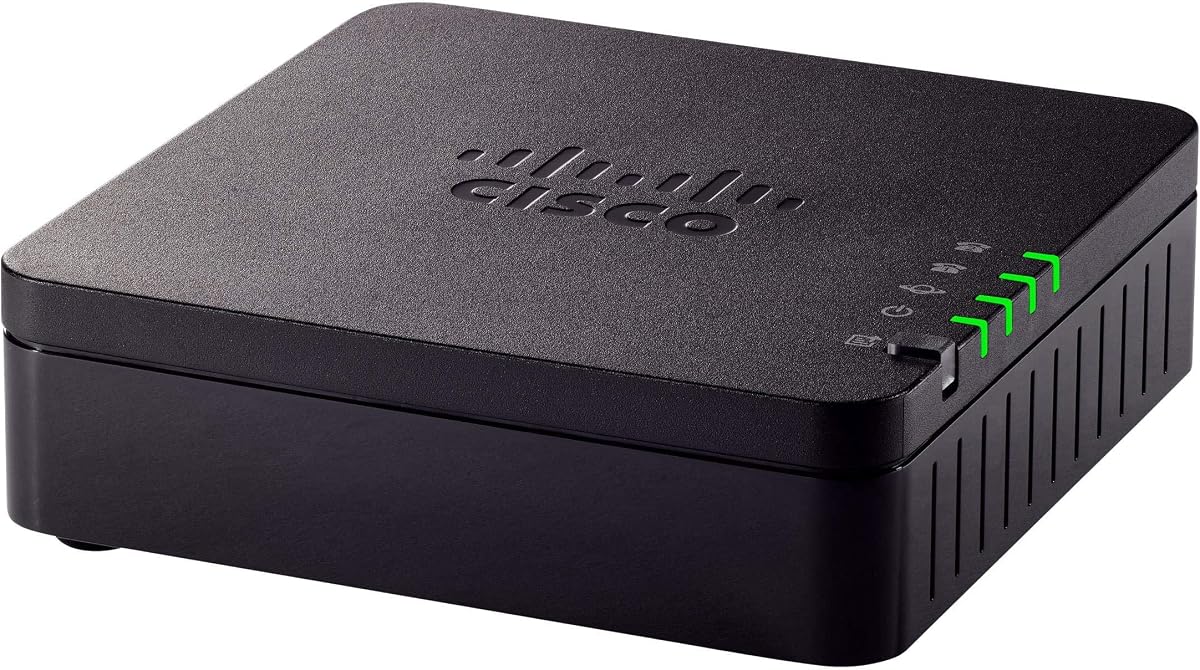
Cisco ATA 191
4.2Editor score
Natural voice quality
Advanced echo cancellation
One year hardware warranty
This comprehensive guide compares the top 10 Analog Telephone Adapter models for 2026, evaluating features like fax support, encryption, and voice quality to
Analog Telephone Adapters bridge the gap between legacy devices and modern VoIP networks. These devices allow traditional phones, fax machines, and paging systems to connect to the internet for voice communication. Choosing the right adapter ensures reliable call quality and security for your specific needs.
We evaluated ten leading models based on port capacity, security protocols, and ease of provisioning. Our comparison covers both budget-friendly options and enterprise-grade solutions from top manufacturers. Each product was assessed against real-world usage scenarios to determine overall value and performance.
Each pick highlights key specifications and ideal use cases for different environments. Prices fluctuate frequently so always verify current costs before purchasing. Our goal is to provide clear insights that help you select the most suitable adapter for your voice network.
4.2Editor score

4.5Editor score

4.1Editor score
The following table provides a side-by-side comparison of all ten selected models. It highlights key specifications such as port count, encryption standards, and specific features to help you quickly identify the best fit for your infrastructure.


The Grandstream HT802 V2 stands out as a top choice for small to medium businesses needing reliable VoIP connectivity. It holds a 4.5 rating and offers dual FXS ports for connecting two traditional devices. Its security features and auto provisioning make it a robust gateway for modern networks.
We may earn a commission when you buy through this link, at no additional cost to you.
Security is a major strength with TLS and SRTP encryption protecting your calls and account data from interception. The device supports automated provisioning via TR-069 and XML files which simplifies mass deployment. Failover SIP server capabilities ensure calls continue even if the primary server loses connection.
Users should note the strong recommendation to upgrade firmware immediately to version 1.0.19.11 or later for optimal performance. The interface is functional but not the most intuitive for novice users. Despite this the reliability and feature set justify the minor setup adjustments required.
This adapter is ideal for offices using Grandstream UCM series IP PBXs due to zero configuration provisioning. It is also excellent for any environment needing secure fax over IP via T.38. We recommend it for businesses prioritizing security and multi-line support in a compact form.
TLS and SRTP encryption ensure that your voice communications remain private and secure from external threats.
TR-069 and XML config files allow IT teams to deploy and manage devices remotely with minimal effort.
We may earn a commission when you buy through this link, at no additional cost to you.
The Grandstream HT801 is a single-port adapter trusted by some of the largest service providers globally. With a 4.1 rating it offers a straightforward solution for connecting one analog phone to a VoIP network. It maintains the same security standards as larger models in the series.
We may earn a commission when you buy through this link, at no additional cost to you.
This device supports one SIP profile through a single FXS port and includes TLS and SRTP encryption to protect calls. Automated provisioning options like TR-069 make it easy to integrate into managed networks. It also supports 3-way voice conferencing which is useful for small teams.
The limitation is that it only connects one device so it is not suitable for multi-line setups. It does not explicitly highlight T.38 fax support in its core description which may be a drawback for offices needing fax capabilities. However for voice-only users it is a solid reliable choice.
We recommend this for home offices or small desks where only one phone line is required. Its simplicity and provider trust make it a dependable option for basic voice communication needs. Ensure your service provider supports the specific features before final deployment.
Deployed by major service providers worldwide ensuring compatibility and reliability across various networks.
Supports 3-way voice conferencing allowing small groups to join calls without extra hardware.
We may earn a commission when you buy through this link, at no additional cost to you.
The Grandstream HT802 provides a solid foundation for connecting two analog devices to a VoIP system. It carries a 4.3 rating and shares key security and provisioning features with the V2 version. This model is a workhorse for basic business environments needing dual line support.
We may earn a commission when you buy through this link, at no additional cost to you.
It supports two SIP profiles through two FXS ports ensuring both lines operate independently. TLS and SRTP encryption technology protects call data and accounts from unauthorized access. Automated provisioning options include TR-069 and XML config files for flexible network management.
While it is a reliable device users may prefer the V2 version for improved firmware and additional features. The lack of explicit T.38 fax mention in the summary suggests it might be limited compared to newer iterations. It remains a good value for users who need simple dual port functionality.
This adapter is suitable for small businesses or reception areas requiring two phone lines. It works well with standard SIP providers that support XML configuration. Consider upgrading to the V2 if you need advanced security or fax capabilities.
Connect two separate analog phones to the internet for independent VoIP service usage.
XML config files allow custom settings adjustments for specific network environments.
We may earn a commission when you buy through this link, at no additional cost to you.
The Cisco ATA 191 is a versatile IP phone adapter designed to bring traditional analog devices into the IP world. With a 4.2 rating it focuses heavily on audio quality and reliability. Its advanced preprocessing ensures clear natural-sounding voice communication for daily business use.
We may earn a commission when you buy through this link, at no additional cost to you.
It supports the latest encryption with Transport Layer Security and Secure Real-time Protocol cipher suites for robust security. Hardware features include two RJ-11 FXS ports and one Ethernet port. Voice activity detection and comfort noise generation enhance the user experience by reducing background noise.
The main trade-off is the price point which is higher than some entry-level adapters. The warranty is limited to one year which may be less than competitors offer for enterprise gear. However the audio processing capabilities are superior for environments where call clarity is critical.
We recommend this adapter for businesses prioritizing voice quality and security. It is ideal for offices with existing analog handsets that need to transition to VoIP. Check current warranty terms before purchase to ensure they meet your long-term support needs.
Advanced preprocessing and echo cancellation deliver clear natural voice quality for professional calls.
Supports TLS and sRTP to meet modern security standards for voice over IP traffic.
We may earn a commission when you buy through this link, at no additional cost to you.
The FLYINGVOICE FWR8101 offers a unique combination of VoIP adaptation and wireless connectivity. With a 3.1 rating it aims at business professionals and IT consultants needing flexible deployment. It works as a professional analog telephone adapter with one FXS port and one SIP line.
We may earn a commission when you buy through this link, at no additional cost to you.
A standout feature is its ability to double as a temporary Wi-Fi router using AP mode. It supports 2.4GHz frequency with 300 Mbps speed making it useful for co-working spaces or field teams. The repeater mode allows for wider Wi-Fi coverage alongside your voice communications.
The device supports T.30 and T.38 Fax over SIP which is vital for industries like healthcare or law. However it requires PBX or SIP services and is not suitable for casual home users. The lower rating suggests potential connectivity issues for non-technical users.
This adapter is best for IT professionals who need a reliable VoIP solution for advanced deployments. It is perfect for mobile professionals needing instant secure mini-networks in temporary offices. Ensure you have the necessary SIP registration before purchasing for full functionality.
AP and repeater modes turn the device into a temporary network hub for remote work.
Supports T.38 Fax protocols to seamlessly integrate fax machines into VoIP networks.
We may earn a commission when you buy through this link, at no additional cost to you.
The Cisco ATA 192 turns traditional telephone fax machines and overhead paging devices into IP devices. With a 4.1 rating it is ideal for enterprise networks and cloud UCaaS environments. This adapter helps customers protect their analog investments during the transition to IP networks.
We may earn a commission when you buy through this link, at no additional cost to you.
It is designed for daily use in small offices and large enterprise settings alike. The multiplatform support ensures compatibility with various operating systems and network architectures. This makes it a great fit for organizations with diverse hardware requirements.
The renewed condition means it is tested and refurbished which may affect physical aesthetics slightly. Premium pricing is expected for Cisco enterprise gear. However the functionality of converting fax and paging systems to IP is hard to match in a single box.
We recommend this for businesses transitioning legacy infrastructure to modern networks. It is particularly useful for offices that still rely on analog paging systems. Verify the renewal warranty coverage to ensure long-term reliability for your critical operations.
Seamlessly converts fax machines and overhead paging systems to VoIP without replacing hardware.
Optimized for UCaaS from the cloud ensuring smooth integration with modern communication services.
We may earn a commission when you buy through this link, at no additional cost to you.
The renewed version of the Cisco ATA 191 offers the same features at a potentially lower price point. It carries a 4.3 rating and maintains the high standards of the original model. This provides a cost-effective way to access enterprise-grade audio and security features.
We may earn a commission when you buy through this link, at no additional cost to you.
It brings traditional analog devices into the IP world with clear natural-sounding voice quality. The security suite includes TLS SHA-2 encryption and sRTP cipher suites. Hardware remains consistent with two RJ-11 FXS ports and one 10/100 Mbps RJ-45 Ethernet port.
Buying renewed hardware carries some risk regarding cosmetic condition though functionality is tested. The warranty is limited to one year hardware which may be shorter than new units. It is a smart choice for those on a budget who need Cisco reliability.
This option is ideal for small offices needing to equip two lines economically. It ensures peace of mind with tested hardware and warranty coverage. Always check the specific terms of the renewal warranty before finalizing your purchase.
Get enterprise features for less by choosing a tested and certified refurbished unit.
Maintains the same advanced preprocessing and echo cancellation as the new model.
We may earn a commission when you buy through this link, at no additional cost to you.
The ATA 187 is a refurbished Cisco analog telephone adapter that has held a high user rating over time. It is noted for RoHS and Weee compliance ensuring environmental safety standards. This unit connects to the network via a single RJ-45 port.
We may earn a commission when you buy through this link, at no additional cost to you.
While detailed features are not expanded in the summary it is known as a legacy gateway for analog phones. It allows users to connect traditional handsets to existing IP infrastructure. The refurbished nature makes it accessible for experimental or budget projects.
This model is older and may lack modern security protocols or high-definition voice codecs found in new devices. It is best suited for labs or specific legacy environments where new equipment is not feasible. Compatibility with current SIP providers should be verified first.
We recommend this only for specific legacy compatibility needs or educational purposes. It offers a low-cost way to explore VoIP bridging but may not be ideal for production business use. Ensure the refurbishment source offers a return policy.
Meets RoHS and Weee standards for safe disposal and environmentally responsible manufacturing.
Provides a bridge for older analog devices that cannot be replaced immediately.
We may earn a commission when you buy through this link, at no additional cost to you.
The Grandstream Powerful 8 Port FXS Gateway combines a robust analog telephone adapter with a Gigabit NAT Router. With a perfect 5.0 rating it excels in high-density environments needing multiple lines. It features two RJ-45 ports and eight FXS ports for extensive device connectivity.
We may earn a commission when you buy through this link, at no additional cost to you.
This unit is designed for offices that need to connect eight analog phones directly to a single gateway. The built-in Gigabit Ethernet ensures fast data transfer alongside voice traffic. It simplifies cabling by integrating the router and adapter functions into one box.
The main trade-off is the complexity and cost compared to standard two-port adapters. It requires a dedicated power source and space on the desk. However for small businesses needing eight lines this eliminates the need for multiple devices.
We recommend this for small offices or call centers requiring eight simultaneous analog connections. It is a powerful solution that reduces hardware clutter while maintaining call quality. Verify your network bandwidth can handle the combined voice and data load.
Eight FXS ports allow you to connect multiple phones without needing several gateways.
Gigabit NAT router functionality streamlines network setup and reduces cabling needs.
We may earn a commission when you buy through this link, at no additional cost to you.
The Grandstream HT812 V2 is a VoIP ATA designed for secure and high-quality voice communication. It carries a 4.5 rating and features strong AES encryption with a security certificate per unit. This ensures secure connections for two FXS ports on your network.
We may earn a commission when you buy through this link, at no additional cost to you.
It supports T.38 Fax for reliable Fax-over-IP which is crucial for document transmission. The high performance NAT router simplifies network setup for small offices. It offers 3-way voice conferencing per port and exceptional voice quality with wideband HD codecs.
While it is a powerful device it comes at a slightly higher price tier than basic models. The security certificate per unit adds administrative overhead but enhances trust. Users should ensure their network environment supports the specific HD codec settings.
This adapter is recommended for users prioritizing security and voice clarity. It fits well in businesses where encrypted calls and fax reliability are mandatory. Check your SIP provider compatibility before deployment to ensure full feature utilization.
Strong AES encryption and a unique security certificate per unit protect against unauthorized access.
Wideband HD codec delivers exceptional voice quality for clearer conversations.
We may earn a commission when you buy through this link, at no additional cost to you.
Selecting the right Analog Telephone Adapter depends on your network size security needs and budget. This guide outlines key factors to consider before making a purchase.
Port capacity determines how many analog devices can connect to the VoIP network simultaneously. Choose a single-port adapter for basic home use or multi-port gateways for offices with multiple phones.
Match the number of FXS ports to your actual device count to avoid unnecessary costs.
Secure voice transmission is critical to prevent eavesdropping on sensitive calls. Look for devices supporting TLS and SRTP encryption to ensure data privacy.
Always verify that the adapter supports current encryption standards to protect your accounts.
Automated provisioning simplifies the setup process for IT administrators and remote users. Options like TR-069 and XML config files allow remote configuration without physical access.
Choose a model that supports your preferred management method to reduce setup time.
If you rely on fax machines you need an adapter that supports T.38 Fax protocols. Standard VoIP may not reliably transmit fax data without this feature.
Confirm T.38 support if faxing is a daily requirement for your business operations.
Clear audio is essential for professional communication. Look for features like echo cancellation and wideband HD codecs to ensure natural sound.
Prioritize models with voice activity detection for better noise reduction in busy environments.
A reliable warranty ensures you have recourse if the hardware fails. Some vendors offer one-year limited hardware warranties while others provide extended support.
Check the warranty terms to ensure long-term peace of mind for your investment.
Prices vary significantly between basic single-port units and enterprise multi-port gateways. Define your budget early to narrow down options that fit your financial plan.
Balance cost against features to ensure you get the value needed for your specific case.
Ensure the adapter is compatible with your chosen VoIP service provider and network equipment. Some devices work better with specific PBX systems or SIP servers.
Consult your provider documentation to confirm compatibility before purchasing hardware.
Connect the adapter's Ethernet port to your router and plug your analog phone into the FXS port. Then power on the device using the included adapter to begin the initialization process.
Access the web interface by entering the device's IP address in your browser. Follow the provisioning guide to enter your SIP credentials and apply the configuration settings.
Keep the firmware updated through the web portal to ensure security patches are installed. Periodically check for error logs to maintain optimal performance and call quality.
An Analog Telephone Adapter allows traditional analog phones and fax machines to connect to a VoIP network. It converts analog signals into digital data packets to enable internet-based communication.
Yes you need a VoIP service provider that supports SIP protocols. The adapter connects your existing phone to this service to handle calls over the internet.
Yes but you need an adapter that supports T.38 Fax protocols. Standard VoIP often struggles with fax transmission unless this specific feature is enabled.
Connect the device to your network and enter its IP address into a browser. Use the web interface to input your SIP credentials and apply the configuration settings.
Modern adapters support TLS and SRTP encryption to protect voice traffic. Ensure you keep firmware updated to maintain strong security standards against threats.
FXS ports connect analog phones and faxes to the adapter while FXO ports connect to a traditional phone line. Most consumer adapters use FXS ports for connecting devices.
Yes an ATA can fully replace a landline by routing all voice traffic through your internet connection. This reduces costs and integrates easily with digital phone systems.
The number depends on the number of FXS ports on the adapter. Single-port devices support one phone while multi-port gateways can support several simultaneously.
Our top picks highlight the Grandstream HT802 V2 for its balance of security and feature depth. The Cisco ATA 191 offers excellent voice quality for businesses focused on clarity.
Prioritize security protocols and port capacity when evaluating options to match your operational needs. Consider warranty terms and support availability for long-term reliability.
Prices and availability change frequently so check current listings before making your final decision. This ensures you get the best value for your specific communication requirements.