
MATX Case Micro ATX Case B2Pro
5.0Editor score
Full aluminum 3mm thickness
Compact 17.8L capacity
Mesh side panels for heat
This guide compares the top aluminum PC cases for 2026, evaluating build quality, thermal performance, and compatibility for enthusiasts and professionals.
Aluminum PC cases offer a premium blend of durability and aesthetics that steel alternatives often lack. These chassis provide superior heat dissipation and a sleek look that complements high-end builds. Choosing the right one ensures your components stay cool while showcasing your hardware effectively.
We evaluated ten leading aluminum cases based on airflow design, compatibility, and build materials. Our analysis focuses on real-world performance metrics and user feedback to identify the most reliable options available today. This list covers everything from compact SFF designs to massive full towers.
Each pick highlights specific strengths like portability, open-frame flexibility, or silent operation. Readers will find detailed breakdowns of specs and practical advice for different use cases. Keep in mind that prices and availability can change rapidly in the current market.
5.0Editor score
4.4Editor score

4.6Editor score
The following table provides a side-by-side look at key specifications for all ten selected cases. Compare dimensions, compatibility limits, and unique features to find the perfect fit for your setup.




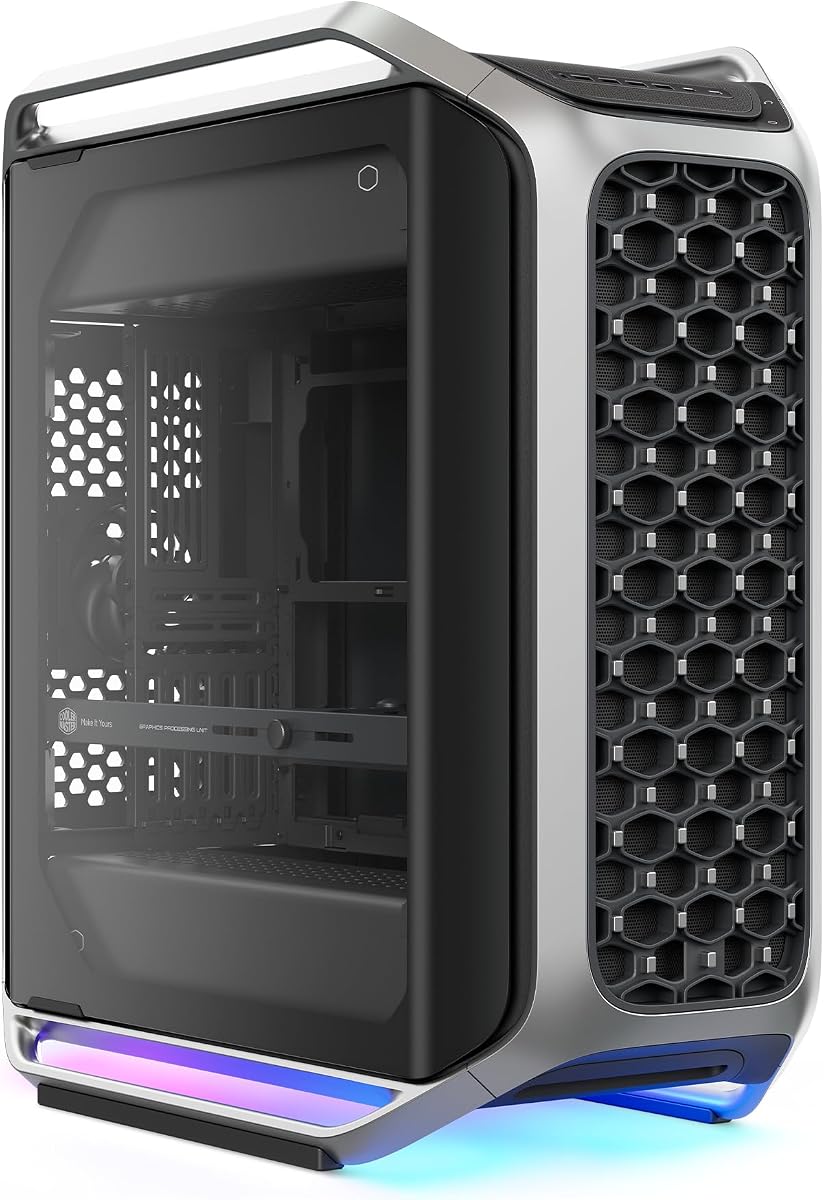
The Cooler Master Cosmos Alpha stands out as a flagship option for enthusiasts seeking a premium aluminum build. With a 4.4 rating, it delivers exceptional aesthetics and thermal performance through its curved aluminum frame and full tempered glass panels.
We may earn a commission when you buy through this link, at no additional cost to you.
Its FreeForm 2.0 layout allows components to rotate left or right, offering unprecedented flexibility for airflow and visual presentation. The case supports GPUs up to 400mm and PSUs up to 240mm, ensuring it handles flagship hardware without compromising on expansion.
While the size is substantial, the modular sliding motherboard tray makes switching between air and liquid cooling layouts easy. The only trade-off is the significant desk space required and the higher price point compared to standard steel cases.
This case is ideal for high-end workstation builders or showcase systems where visual impact and cooling efficiency are paramount. If you need space for E-ATX boards and want a unique aluminum design, this is the top recommendation.
The rotatable design lets users orient components for optimal airflow or desk placement without sacrificing structural integrity.
Front I/O includes USB-C 20Gbps ports for ultra-fast data transfer with modern devices and peripherals.
We may earn a commission when you buy through this link, at no additional cost to you.
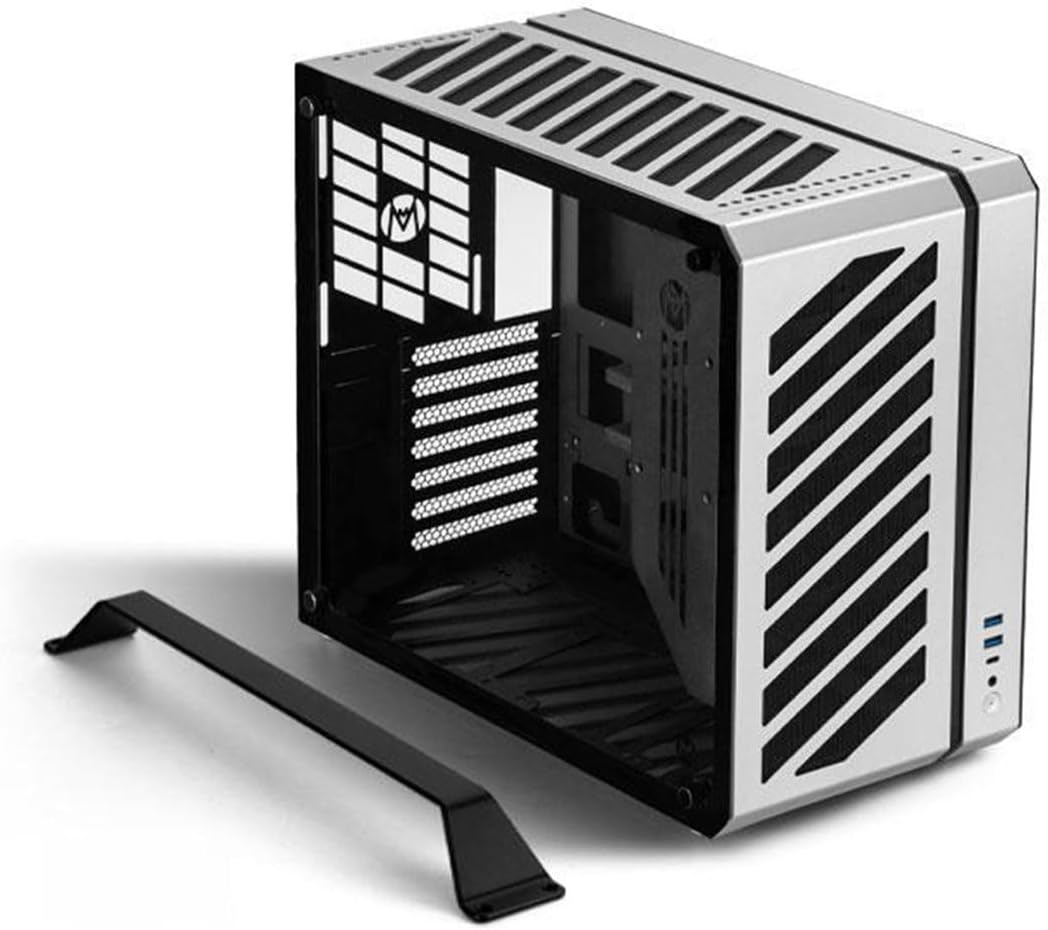
The MATX Case B2Pro offers a rare combination of full aluminum construction and an incredibly compact footprint. Its 5.0 rating reflects user satisfaction with the build quality and thoughtful design features like the mesh side panels.
We may earn a commission when you buy through this link, at no additional cost to you.
Constructed with 3mm thick aluminum for the frame, this case provides robust protection and excellent passive cooling. The unique exterior design includes foot stands and a handle, making it convenient to move around a desktop environment effortlessly.
While it supports standard ATX power supplies, the chassis is optimized for micro ATX and ITX motherboards, which keeps the volume down to 17.8 liters. This is a significant constraint for those needing larger boards, but perfect for compact builds.
Buyers looking for a portable, high-quality aluminum chassis that does not compromise on thermal performance should strongly consider this option. It balances budget-friendly pricing with premium materials better than almost any competitor.
The mesh side panels provide perfect heat dissipation for the chassis while maintaining a sleek silver anodized look.
Exquisite foot stand and handle design make it very convenient to stand and move on the desktop.
We may earn a commission when you buy through this link, at no additional cost to you.
Fractal Design is renowned for silent computing, and the Define 7 XL continues this legacy with a premium brushed aluminum exterior. Its 4.6 rating highlights the reliability and thoughtful engineering that goes into this full tower chassis.
We may earn a commission when you buy through this link, at no additional cost to you.
This case excels at storage, easily accommodating up to 18 HDDs in its default layout. For water cooling enthusiasts, it can be converted to an open layout to fit radiators up to 480mm, offering immense flexibility for custom loops.
The brushed aluminum encase a refined front door with reversible hinges and magnetic latching, blending aesthetics with utility. While it is heavy and takes up significant space, the modularity ensures it adapts to changing hardware needs over years.
Workstation users and silent PC builders will appreciate the balance of drive capacity, cooling support, and acoustic dampening. If you need a premium case that grows with your storage and cooling requirements, this is the ideal choice.
Multi-brackets convert unused fan positions into HDD or SSD mounts for massive storage expansion.
Brushed aluminum encases the front door for a refined look that fits professional and home office setups.
We may earn a commission when you buy through this link, at no additional cost to you.
The Open Air Frame Computer Case is designed for enthusiasts who prioritize airflow and accessibility over traditional enclosure. With a 4.4 rating, users appreciate the robust construction using aerospace magnesium aluminum alloy.
We may earn a commission when you buy through this link, at no additional cost to you.
The product features an actual thickness of 8mm, providing an extremely solid foundation for testing and benchmarking components. It supports standard MATX and ATX motherboards and accommodates various water-cooled setups up to 360mm.
Being an open frame, it eliminates dust filters and panels entirely, which improves cooling but leaves components exposed to debris. Note that the product ships as an unassembled shell, requiring some effort to set up the frame.
This case is perfect for system builders who need to swap hardware frequently or test water cooling setups without obstruction. The high-quality aluminum ensures it lasts long despite the lack of typical chassis protection features.
Surface treatment reduces corrosion and improves service life, ensuring the frame remains stable for years.
Supports integrated water-cooled installation with drainage for various radiator sizes like 240mm or 360mm.
We may earn a commission when you buy through this link, at no additional cost to you.
The Mechanic Master C34 proves that compact designs can still deliver flagship performance with standard ATX components. A 4.6 rating indicates high satisfaction with its build quality and ease of transport.
We may earn a commission when you buy through this link, at no additional cost to you.
Designed for portability, this case includes a built-in carry handle, making it ideal for LAN parties or moving workstations. It fits standard ATX motherboards and full-size ATX power supplies without feeling cramped.
While it supports CPU coolers up to 162mm, the internal layout recommends SFX power supplies for the cleanest cable management. This slight trade-off allows for better airflow and a more streamlined visual presentation inside the chassis.
If you need a portable solution that does not force you to downgrade to ITX hardware, this case is an excellent choice. Its attention to detail ensures a premium feel despite its ultra-compact dimensions.
The integrated handle makes it easy to transport your powerful desktop PC to LAN events or workstations.
Supports 240mm liquid cooling radiators to maintain optimal temperatures in a small chassis.
We may earn a commission when you buy through this link, at no additional cost to you.
The MasterFrame 500 embraces the open-frame philosophy with a FreeForm 2.0 aluminum exo-structure that allows for unique builds. With a 4.2 rating, it appeals to modders and custom cooling enthusiasts seeking maximum ventilation.
We may earn a commission when you buy through this link, at no additional cost to you.
Equipped with two pre-installed 200mm fans, the case delivers powerful airflow right out of the box. The modular design supports motherboards up to E-ATX and offers interchangeable panels for personalized configurations.
While the open layout maximizes cooling potential, it requires careful dust management in non-ideal environments. The interchangeable panels and open-frame layout provide flexibility that few enclosed cases can match.
This case is perfect for modders who want to build a showcase system with massive radiators and custom layouts. If you prioritize airflow and modding potential over dust resistance, the MasterFrame 500 is a standout.
Interchangeable panels and open-frame layout offer flexibility for personalized builds and extensive modding.
Accommodates up to 7 fans and 360mm radiators for reliable thermal performance under heavy loads.
We may earn a commission when you buy through this link, at no additional cost to you.
The Mechanic Master C34Pro combines portability with surprising interior space, supporting ATX and E-ATX motherboards in a compact form. It has a 3.9 rating which indicates room for improvement compared to top tier options.
We may earn a commission when you buy through this link, at no additional cost to you.
Its robust build features a 2mm aluminum shell and a 1mm steel frame, providing a solid base for gaming components. The design fits GPUs up to 420mm and radiators up to 360mm, making it capable of high-performance setups.
Multi-zone fan mounts with dust filters ensure stable cooling, but the mix of materials might not appeal to those seeking pure aluminum construction. The carry handle adds convenience for transport to events.
This case is a strong contender for gamers needing portability without sacrificing GPU size. If you prioritize component clearance and have a flexible build layout, it offers good value for the price.
Supports GPUs up to 420mm and 360mm radiators to handle the latest gaming hardware.
Multiple power supply mounting positions accommodate various build layouts and component arrangements.
We may earn a commission when you buy through this link, at no additional cost to you.
The Lian Li V100 offers exceptional value with a high 4.8 rating and a feature-rich design that includes 4x pre-installed PWM fans. It supports ATX and Micro-ATX motherboards with tool-less side panels for easy access.
We may earn a commission when you buy through this link, at no additional cost to you.
Its sleek black design includes an integrated ARGB strip and daisy-chain connectivity for vibrant lighting. The case fits GPUs up to 420mm and offers a 360mm top radiator mount for serious cooling potential.
While the fans provide excellent airflow, some users may find the noise level slightly higher under load. The tool-less design streamlines the build process significantly, making it ideal for quick upgrades.
This case is perfect for users who want a polished aluminum aesthetic with top-tier cooling and lighting out of the box. It balances performance and convenience better than many rivals in this price range.
Integrated 26-LED ARGB strip offers full spectrum color control and synchronization with motherboard software.
Tool-less mounting mechanisms for side panels streamline your build process and easy access to internals.
We may earn a commission when you buy through this link, at no additional cost to you.
The LIAN LI O11D EVO RGB continues to be a favorite for its seamless view and adjustable internal layout. With a 4.7 rating, it balances aesthetics and functionality better than most tempered glass cases.
We may earn a commission when you buy through this link, at no additional cost to you.
The front support pillar can be removed for an uninterrupted view of the components, enhancing the visual experience. It supports GPUs up to 455.7mm and radiators up to 420mm, making it suitable for high-end liquid cooling.
Cable management is simplified with Velcro straps and dual-layered clips, keeping the back side tidy. The two height options for motherboard installation provide different performance options and aesthetics for custom builds.
If you want a premium case that highlights your hardware with minimal obstruction, this is the ideal choice. Its flexibility for builders ensures you can optimize airflow and routing without sacrificing the view.
Removing the front support pillar allows for a completely uninterrupted view of everything inside the chassis.
Internal layout can be adjusted with different motherboard heights for varied fan and cooler setups.
We may earn a commission when you buy through this link, at no additional cost to you.
The JOYJOM Mini ITX Case is one of the smallest options available with a 4.3L capacity, designed for ultra-compact gaming rigs. Its 4.1 rating reflects the challenges of fitting performance hardware into such a small space.
We may earn a commission when you buy through this link, at no additional cost to you.
Constructed from 2.0mm aluminum alloy, the body offers good heatsink performance despite the tight confines. It supports standard ITX motherboards and comes with a PCIe 3.0 riser cable for GPU placement.
Cooling is limited to CPU coolers under 36mm, and the GPU must fit within 17*10*4cm dimensions. While this restricts hardware choices, it allows for a highly portable desktop that fits on a shelf or under a monitor.
This case is perfect for home theater setups or limited desk spaces where size is the primary constraint. If you can work within the strict thermal limits, it offers a reliable aluminum solution for ITX builds.
The case is only 4.3L capacity with dimensions of 7.3×4.1×8.8 inches for ultra small form factor builds.
Includes a Mini ITX Case and a PCIe 3.0 Riser to enable standard GPU usage in small space.
We may earn a commission when you buy through this link, at no additional cost to you.
Selecting the right aluminum case involves balancing aesthetics, thermal performance, and component compatibility. Consider these factors to ensure your new chassis meets your specific needs.
Aluminum cases vary in thickness from 1.5mm to 3mm or more. Thicker aluminum provides better structural rigidity and heat dissipation but may increase weight. Look for cases with reinforced frames if you plan to move the system frequently.
Prioritize cases with at least 2mm thickness for a balance of durability and weight. Thinner materials might feel less premium and offer less passive cooling potential.
Open-frame aluminum cases offer maximum airflow but expose components to dust. Enclosed cases often feature mesh panels or strategic vents to balance cooling with protection. Ensure the case supports enough fans for your cooling strategy.
Check the fan mount locations and pre-installed fan counts. Good airflow is critical for maintaining stable temperatures during gaming or rendering tasks.
Aluminum cases range from ITX only to E-ATX support. Always verify the maximum motherboard size before purchasing to avoid fit issues. Some compact cases may require specific I/O shield adjustments.
Choose a case that supports your motherboard size with extra clearance for easy installation. Future-proofing is key if you plan to upgrade components later.
Modern GPUs can be large, often requiring 300mm or more of clearance. Similarly, power supplies come in standard ATX or compact SFX forms. Check the internal layout to ensure both fit without cable conflicts.
Prioritize cases with generous length limits for GPUs. This flexibility allows you to upgrade graphics cards without needing a new chassis.
Aluminum naturally conducts heat better than steel, but case design matters most. Mesh front panels and open sides help dissipate heat efficiently. Ensure you have adequate intake and exhaust points.
Look for cases designed to handle high heat loads. Thermal performance directly impacts component lifespan and system stability.
If you move your PC often, features like built-in handles and lightweight materials are essential. Aluminum is generally lighter than steel which aids in transport. Check if the case is designed for LAN party use.
Handles and reinforced edges protect the case during travel. Portable cases should be sturdy enough to handle the weight of high-end hardware.
Good cable routing keeps airflow unrestricted and improves aesthetics. Look for cases with rubber grommets and tie points. Some models offer dedicated PSU shrouds to hide cables effectively.
Effective cable management prevents hotspots and improves overall system look. Take time to read reviews regarding build ease.
Aluminum cases range from budget-friendly to premium expensive models. Premium options often include better finishes, tool-less panels, and RGB features. Decide which features add value to your specific build.
Balance the price with the features you truly need. Often a mid-range aluminum case offers the best value for most users.
When installing your motherboard, use standoffs provided with the case to prevent electrical shorts. Ensure all components are secured tightly to avoid rattling during transport or operation.
Clean your aluminum case regularly using a soft cloth and mild cleaner to prevent corrosion and dust buildup. Pay attention to mesh panels which can trap lint and reduce airflow efficiency.
Monitor your internal temperatures after setup to ensure the aluminum chassis is dissipating heat as intended. Adjust fan curves if needed to maintain optimal thermal performance during peak loads.
Aluminum cases often offer better heat dissipation and a premium look. They are generally lighter than steel but may cost more. Both materials are durable but aluminum excels in conductivity and aesthetics.
Yes, most high-quality aluminum cases support water cooling. Look for radiator clearance specs to ensure your setup fits. Many aluminum cases are designed to optimize cooling for custom loops.
Some aluminum cases support E-ATX boards while others are limited to ATX. Always check the product specifications for motherboard support. Full towers often offer the most flexibility for large boards.
Use a microfiber cloth and mild soap to clean aluminum. Avoid abrasive cleaners that might scratch the finish. Regular dusting keeps the case looking new and ensures vents remain clear.
Many aluminum cases include pre-installed fans but not all. Check the product details to confirm if fans are included. If not, you may need to purchase additional fans for optimal cooling.
Some aluminum cases are designed for silence with acoustic dampening panels. Open frames may be noisier due to lack of noise barriers. Look for specific 'silent' models if quiet operation is a priority.
The top three picks cover a wide range of needs from budget-friendly to premium builds. The Cosmos Alpha leads in design while the B2Pro excels in compact value. The Define 7 XL is the choice for maximum storage.
Prioritize your requirements such as portability, cooling, or aesthetics before making a final decision. Each case offers unique strengths that fit specific build goals. Take time to review the detailed specs.
Remember to check current pricing and availability as these details can change frequently. Your perfect case depends on your specific components and usage scenarios.