
Thermalright TL-C12C-S X5
4.7Editor score
S-FDB bearing reduces noise
PWM speed control up to 1550 RPM
17 lighting modes with motherboard sync
This guide compares the top 10 addressable RGB fans for PC builds, evaluating airflow, noise, lighting sync, and bearing quality to help you choose the right
Addressable RGB fans transform your PC build into a visual spectacle while delivering essential cooling performance. These fans synchronize with your motherboard to create dynamic lighting effects that enhance your setup aesthetics without compromising thermal efficiency for modern hardware.
We evaluated ten top-rated models based on airflow capacity, noise levels, bearing technology, and lighting customization options. Each product was analyzed for compatibility with standard cases, ease of installation, and overall value to ensure you find the perfect match for your system.
Each pick highlights unique strengths such as daisy chaining convenience or reverse blade designs. Keep in mind that availability and pricing fluctuate frequently so verify current details before purchasing to ensure you get the best deal for your specific build needs.
4.7Editor score

4.8Editor score
4.8Editor score
The following table provides a side-by-side comparison of all ten selected addressable RGB fans to help you quickly identify key specifications and features.





This five-pack set delivers impressive cooling performance at a budget-friendly price point. With a high rating of 4.7 stars it stands out for its reliable S-FDB bearing and efficient PWM control.
We may earn a commission when you buy through this link, at no additional cost to you.
The fans generate up to 66.17 CFM of airflow while maintaining low noise levels around 25.6 dBA. The ARGB lighting is soft and evenly distributed thanks to the atomized fan blade design which reflects light effectively without harsh glare.
One trade-off is the dependency on motherboard support for full lighting customization. Users without compatible headers may need a separate controller for full effects. This is acceptable given the price value and cooling efficiency.
Ideal for budget-conscious builders who need multiple fans for case intake exhaust or radiators. This set ensures consistent airflow and style without breaking the bank on a new system build.
The automatic speed control adjusts fan RPM based on motherboard temperature ensuring efficient cooling during load while staying quiet at idle.
High-brightness LED blades reflect light for a softer effect that matches coolers and cases perfectly with up to 17 color modes.
We may earn a commission when you buy through this link, at no additional cost to you.
The CORSAIR RS120 ARGB combines high static pressure with a streamlined daisy-chain connection for easy installation. It earned an Editor's Choice badge for its balance of performance and ease of use in modern cases.
We may earn a commission when you buy through this link, at no additional cost to you.
Fans reach speeds of 2100 RPM delivering 72.8 CFM of airflow which is excellent for radiator setups. The Magnetic Dome Bearing ensures quiet operation and longevity. AirGuide technology pushes air where you need it reducing hot spots.
While the triplet pack is convenient you may need additional sets for larger cases. Compatibility with motherboard ARGB headers is required for lighting control. These minor constraints are outweighed by the robust cooling performance.
Buy this if you need reliable airflow for liquid cooling systems and want a clean cable setup. It is perfect for users prioritizing thermal efficiency and simple connectivity.
Anti-vortex vanes direct airflow at hot components pushing air exactly where needed for concentrated cooling on radiators or heatsinks.
Daisy-chain fans with one 4-pin PWM and one ARGB connector reducing cable clutter and simplifying installation in tight cases.
We may earn a commission when you buy through this link, at no additional cost to you.
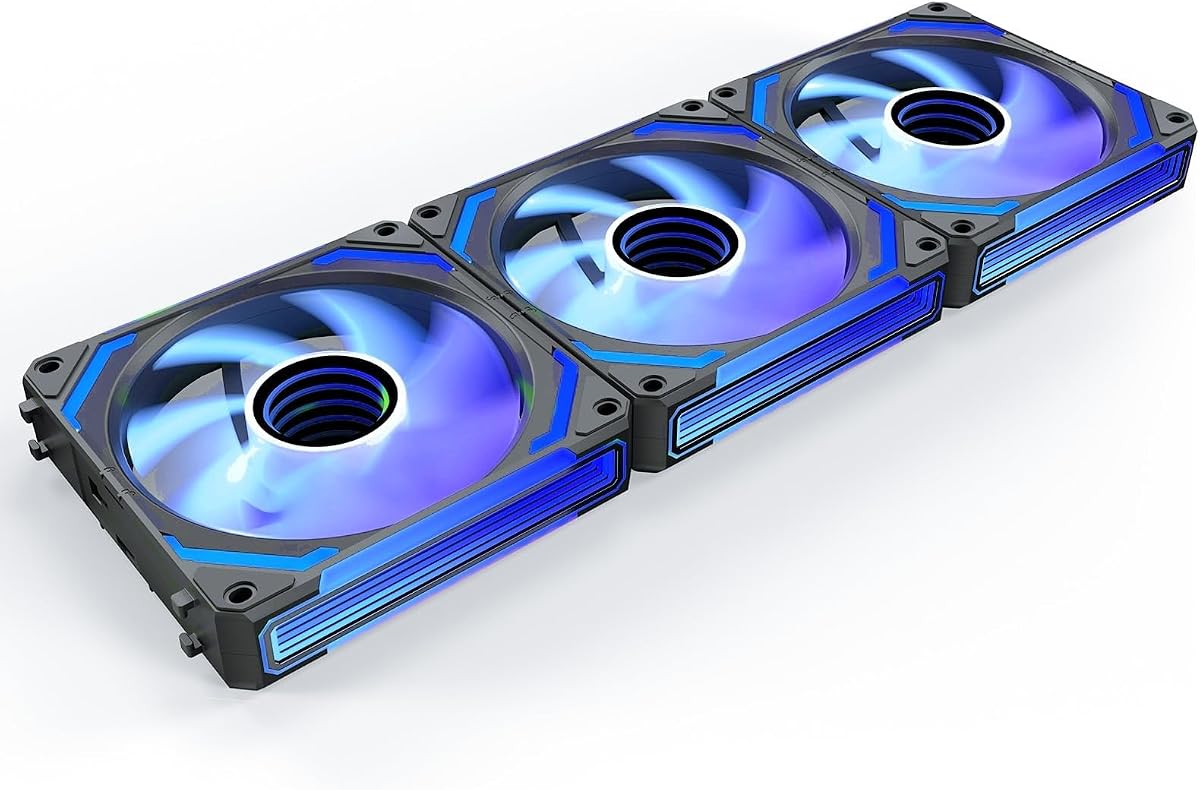
This premium set features a unique infinity mirror design that creates a layered visual effect unmatched by standard fans. With a 4.8 rating it offers high-end aesthetics alongside solid cooling performance for demanding builds.
We may earn a commission when you buy through this link, at no additional cost to you.
The reverse blades allow lighting to remain visible when used as intake fans keeping your build consistent. Sound pickup module enables music sync modes that react to game or music audio enhancing immersion during use.
The higher price reflects the advanced lighting and controller included. It may be more than some users need but the visual payoff is significant. Ensure your case supports reverse fan orientation for best results.
Choose this for builds where visuals are paramount. It suits modders and gamers wanting a unique look with effective heat dissipation and minimal noise even at high speeds.
Features stunning layered luminous design that transforms your chassis into a desktop landscape with efficient heat dissipation.
Built-in sound pickup supports eight music rhythm light modes that change with ambient audio for a dynamic lighting experience.
We may earn a commission when you buy through this link, at no additional cost to you.
The ARCTIC P12 Pro A-RGB delivers extreme performance with a max speed of 3000 RPM. Its high static pressure design makes it ideal for pushing air through dense radiators and panels efficiently.
We may earn a commission when you buy through this link, at no additional cost to you.
Manufacturing precision ensures minimal vibration and smooth running. The FDB bearing minimizes noise during operation. With a wide PWM range you have full control over fan speeds and even stops completely below 5% PWM.
While powerful it requires a compatible motherboard for ARGB sync. The speed range might be overkill for quiet builds but offers flexibility for enthusiasts. It balances raw power with reliable engineering.
Buy this if you need maximum airflow and pressure for radiators. It suits high-performance systems where thermal headroom is critical.
Efficient even with resistance the generated airflow penetrates dense radiators and mesh structures ensuring reliable cooling.
Self-lubricating FDB bearing minimizes noise during operation for quiet efficient cooling and a long reliable service life.
We may earn a commission when you buy through this link, at no additional cost to you.
Thermaltake CT120 EX features MagForce 2.0 magnetic design for simplified daisy-chaining. The three-pack offers consistent cooling and lighting with a clean cable layout using just one connection.
We may earn a commission when you buy through this link, at no additional cost to you.
Optimized hydraulic bearing ensures silent operation. The anti-vibration system reduces noise transmission. With 5V motherboard sync you can control 16.8 million colors across all fans seamlessly for a cohesive look.
Some users may need to adjust mounting for magnetic alignment. RGB control depends on software compatibility but setup is straightforward. This kit offers solid reliability for standard case builds.
Ideal for users seeking a balance of cooling and style without complex wiring. Perfect for mid-tower cases needing multiple intake exhaust fans.
MagForce 2.0 magnetic design optimizes fan daisy-chaining allowing you to connect multiple fans with only one cable.
9 addressable LEDs per fan controlled by 5V motherboard sync software for vibrant color options.
We may earn a commission when you buy through this link, at no additional cost to you.
This pack includes four forward and two reverse fans optimized for chassis airflow. The reverse blades keep lighting visible even when mounted on bottom or side intake positions ensuring visual consistency.
We may earn a commission when you buy through this link, at no additional cost to you.
Each fan contains 28 bright ARGB LEDs offering 25% more than typical fans. The 2-in-1 hub simplifies control of lighting and speed. PWM technology adjusts speeds based on temperature feedback automatically.
Cable management might still require care despite the hub. The visual effect is striking but ensure compatibility with your case mounting. It is a versatile kit for comprehensive cooling upgrades.
Buy this for full case cooling with visual flair. Suits builds needing balanced intake exhaust airflow and bright lighting.
Includes 4 forward and 2 reverse 120mm fans purpose-built for three-dimensional chassis cooling to balance visual consistency and airflow.
Each fan packs 28 high-brightness ARGB LEDs offering 25% more LEDs than typical fans for superior brilliance.
We may earn a commission when you buy through this link, at no additional cost to you.
The Thermalright TL-C12C-S X3 offers a compact three-pack solution for cooling needs. It maintains the same performance as larger sets with S-FDB bearings and soft lighting effects.
We may earn a commission when you buy through this link, at no additional cost to you.
Speeds up to 1550 RPM deliver 66.17 CFM airflow. The ARGB effect is managed via motherboard sync with up to 17 modes. Silent operation ensures minimal noise interference.
You may need to daisy-chain carefully due to 55cm cable limits. It is effective for small to medium builds needing three reliable fans for consistent cooling.
Choose this for small builds needing three fans without bulk. Ideal for those prioritizing low noise and steady cooling.
Carefully developed S-FDB bearings solve blade shaking keeping noise to a minimum while providing maximum cooling performance.
Size 120 by 120 by 25mm with noise up to 25.6 dBA for quiet efficient operation.
We may earn a commission when you buy through this link, at no additional cost to you.
This five-pack focuses on silent performance and intelligent control. It automatically adjusts speed based on temperature and supports up to 17 lighting modes via motherboard sync.
We may earn a commission when you buy through this link, at no additional cost to you.
Noise levels stay under 25.6 dBA making it suitable for quiet builds. The LED atomized design ensures soft light reflection. It is versatile for use with CPU coolers and radiators.
If you prefer fixed speeds you must switch to DC mode manually. This is a minor step for the convenience of auto control. It balances silence and cooling efficiency.
Buy this for silent workstations or gaming rigs needing multiple fans. Perfect for users prioritizing noise reduction.
PWM temperature control automatically sets variable speed based on temperature removing need for manual speed adjustments.
Suitable for cases CPU coolers and radiators taking away dry heat from case and high CPU temperature for maximum cooling.
We may earn a commission when you buy through this link, at no additional cost to you.
The CT120 ARGB 2-pack features a redefined 7-blade design for optimized pressure and airflow. It reduces cable clutter with daisy-chain design and supports up to 2000 RPM.
We may earn a commission when you buy through this link, at no additional cost to you.
The solid frame and anti-vibration mounting ensure stability during operation. 9 LEDs per fan offer vivid lighting controlled via 5V sync software. It is a reliable choice for dual-fan configurations.
Larger cases may require additional packs. The daisy-chain simplifies setup significantly. This pack is cost-effective for standard dual-fan cooling needs.
Ideal for dual-slot coolers or dual fans. Suits builds needing simple cable management and solid cooling.
Redefined 7-blade fan design optimizes CFM and mm-H20 air pressure for efficient cooling.
Anti-vibration mounting system with solid structure frame reduces vibration noise for a quieter build.
We may earn a commission when you buy through this link, at no additional cost to you.
The LE120 ARGB offers 66.1 CFM airflow with 9 blades for efficiency. It includes a PWM splitter for quick installation and uses daisy chain cables for tidy setups.
We may earn a commission when you buy through this link, at no additional cost to you.
Lighting is synced via 5V motherboard software. The fan operates smoothly and delivers strong performance at 1500 RPM. It is reliable for both case cooling and radiator use.
Cable organization still requires care for best aesthetics. The included splitter helps avoid extra adapters. This set is practical for standard 120mm applications.
Buy this for efficient cooling and simple lighting sync. Perfect for standard builds needing reliable airflow and clean cables.
9 blades at 1500 RPM deliver up to 66.1 CFM of airflow and 1.41mm-H20 Static Pressure for reliable cooling.
Daisy chain ARGB cables make wiring easy and leaves room for other devices in tight cases.
We may earn a commission when you buy through this link, at no additional cost to you.
Choosing the right addressable RGB fans involves balancing airflow, noise, and lighting features to match your case and motherboard capabilities.
Airflow measured in CFM determines how much air the fan moves while static pressure helps push air through restricted areas like radiators or dense cases. Higher CFM is better for case ventilation whereas higher static pressure is needed for radiators and heatsinks.
Look for fans that balance both if you use liquid cooling or have dense case filters.
Noise is measured in decibels (dBA) and impacts how quiet your system is. Fans with fluid dynamic bearings or optimized blade designs often run quieter at high speeds. Consider your tolerance for fan noise especially for workstations or quiet gaming setups.
Choose fans under 25 dBA for silent environments and those up to 30 dBA for performance builds.
PWM control allows precise speed adjustment based on temperature providing better efficiency and quieter idle. DC control varies voltage but may be less precise. Most modern fans support PWM which works well with motherboard control for auto tuning.
Prioritize PWM fans for automatic temperature regulation and lower noise during idle periods.
Addressable RGB requires a 5V 3-pin header on your motherboard. Ensure your board supports ARGB or plan to add a controller hub. Daisychaining fans reduces cable clutter and simplifies wiring across multiple fans.
Verify motherboard compatibility before purchasing to avoid needing extra controllers or adapters.
Fluid dynamic and magnetic dome bearings offer long life and reduced noise compared to standard sleeve bearings. These bearings minimize vibration and maintain performance over time. Higher-end models use these for silent operation.
Choose FDB or magnetic bearings for long-term reliability and low noise.
Check fan size and thickness to ensure they fit your case. Standard 120mm fans fit most cases but thicker models may block other components. Also consider clearance for radiators or other hardware.
Measure your case mounting points before buying to confirm fit and avoid installation issues.
Reverse blade fans allow intake fans to display lighting while facing inward maintaining aesthetic consistency. They are useful for cases with side panels or bottom intakes where blade direction matters visually.
Consider reverse fans if you want intake fans to show lighting as well as exhaust.
Some kits include hubs controllers or daisy-chain cables that reduce the need for extra purchases. Check what is included to avoid additional costs and ensure you have what is needed for setup.
Look for kits with controllers if your motherboard lacks ARGB headers or PWM headers.
Install the fans securely using anti-vibration mounts to prevent rattling and ensure airflow direction matches your case design. Connect the PWM and ARGB cables to the correct motherboard headers or included controller hubs.
Use your motherboard software to customize lighting modes and fan curves. Set temperature thresholds so fans ramp up during load and slow down at idle for noise reduction.
Dust the fan blades and housing periodically using compressed air to maintain cooling efficiency. Ensure cable management is tidy to improve airflow and avoid obstruction that causes noise or heat.
Addressable RGB fans require a 5V 3-pin ARGB header. If your motherboard lacks one you can use a compatible controller or USB connector. Check your board specs before buying to ensure compatibility.
Most ARGB fans use standard connectors but mismatched LED counts may cause uneven lighting. Stick to same-brand kits for consistent effects or use a controller that supports mixed fans.
Not if your motherboard supports ARGB sync. If headers are limited controllers simplify wiring and allow software control without extra motherboard features. Some kits include hubs as part of the package.
PWM allows precise speed control via signal voltage reducing noise during idle. DC varies voltage directly which is simpler but less efficient. Most modern boards support PWM for automatic temperature-based speed.
Use compressed air to blow dust from blades and housing avoiding water or liquids. Hold fans steady to prevent spinning which can damage bearings. Clean periodically to maintain cooling efficiency.
Not necessarily. ARGB adds lighting but performance depends on bearing and blade design. Many ARGB models match quiet standard fans with optimized blades and fluid dynamic bearings for low noise.
RGB uses fixed color cycling while ARGB allows individual LED control. You can use both but lighting won't sync perfectly unless you use a controller that supports both types.
RGB lighting itself does not change cooling. Performance depends on airflow and static pressure. ARGB fans with efficient designs provide the same cooling as non-RGB models while adding aesthetics.
This guide highlighted ten top addressable RGB fans offering a range of performance and visual options from budget sets to premium designs with reverse blades and music sync features.
Prioritize airflow and bearing quality to ensure cooling and low noise while checking motherboard compatibility for ARGB control. Consider reverse fans and daisy-chaining for easier cable management and aesthetics.
Always verify current prices and stock before purchasing as availability fluctuates regularly. Choosing the right fan ensures your build looks great and stays cool under load.