
ARCTIC P9 PWM PST
4.5Editor score
Wide RPM range
High static pressure
Includes cable splitter
This guide compares the top 92mm case fans for quiet cooling, static pressure, and PWM control to help you choose the right model for your build.
Finding the right cooling solution is essential for maintaining system stability. A high-quality 92mm case fan ensures optimal airflow while keeping noise levels low during intense workloads.
We evaluated ten leading models based on bearing technology, PWM control, and acoustic performance. Our analysis focuses on real-world reliability and compatibility with compact chassis designs.
Each selection highlights specific strengths like static pressure or low-profile designs. Please note that availability and terms may vary, so verify details before finalizing your purchase.
4.5Editor score

4.8Editor score

4.8Editor score
The following table provides a side-by-side look at key specifications and features for every model considered in this comprehensive review.


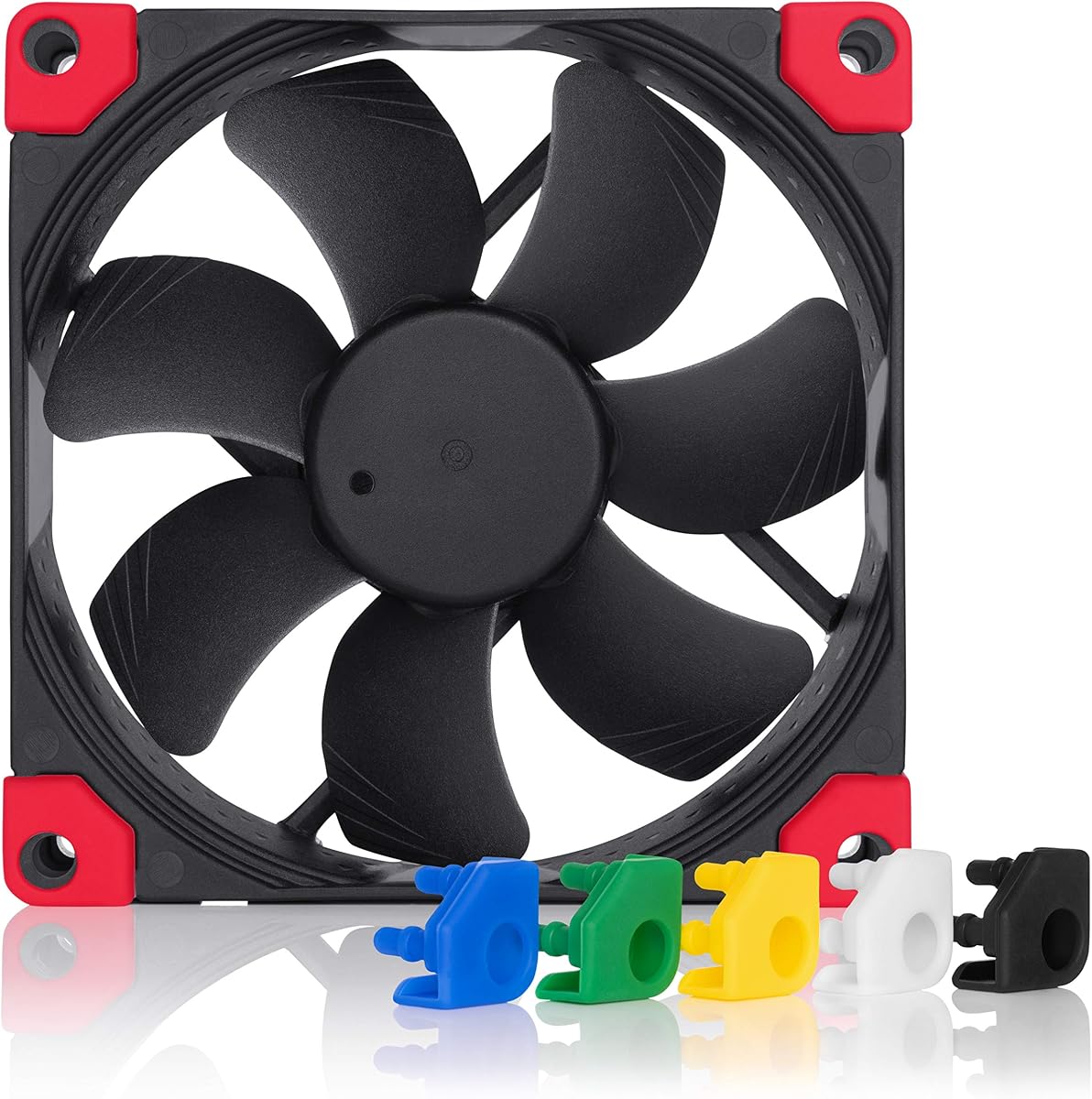


This fan stands out as a premier choice for quiet computing. It offers a 4.8 rating and is celebrated for its advanced acoustic optimization technology.
We may earn a commission when you buy through this link, at no additional cost to you.
The Flow Acceleration Channels enhance efficiency while minimizing turbulence. The SSO2 bearing ensures smooth operation over the claimed lifespan of 150,000 hours.
While the price is higher, the included accessories like the Y-cable and Low-Noise Adaptor add significant value. The noise levels are minimal even at full speed.
If you prioritize silence and longevity, this is the definitive choice for small form factor builds or NAS enclosures.
The frame includes rounded corners and integrated anti-vibration pads to reduce resonance and unwanted noise.
With a broad speed range of 400 to 2000 RPM, you can precisely tune performance via motherboard headers.
We may earn a commission when you buy through this link, at no additional cost to you.
For budget-conscious builders, this fan delivers exceptional value without sacrificing core performance. It holds a 4.5 rating for its robust cooling capabilities.
We may earn a commission when you buy through this link, at no additional cost to you.
The high static pressure makes it ideal for restricted spaces like radiators or dense heat sinks. The speed range of 200 to 3000 RPM offers great flexibility.
The PST feature allows multiple fans to be daisy-chained to a single header, saving valuable motherboard connections. Noise remains low even under load.
It is the perfect solution for those who need reliable cooling for a minimal investment in small chassis or NAS builds.
The integrated splitter allows you to connect multiple fans in a series, simplifying cable management.
The motor is designed to be barely perceptible at low speeds for an unobtrusive user experience.
We may earn a commission when you buy through this link, at no additional cost to you.
This ultra-slim variant is designed specifically for low-profile cooling solutions. It carries a 4.8 rating and is ideal for tight spaces where depth is a constraint.
We may earn a commission when you buy through this link, at no additional cost to you.
The 14mm thickness allows it to fit easily on compact CPU coolers without obstructing RAM modules. It maintains superior airflow despite its slim design.
The chromax.black.swap edition provides a sleek all-black look with customizable anti-vibration pads in six colors to match your build theme.
Choose this model if you need premium airflow in a constrained environment or want to customize the aesthetic of your compact system.
The 14mm thickness ensures compatibility with slim heat sinks like the NH-L9 series for better RAM clearance.
Self-adhesive anti-vibration pads come in six colors allowing you to personalize your fan appearance easily.
We may earn a commission when you buy through this link, at no additional cost to you.
The standard brown version of the slim 92mm fan offers the same performance with a classic industrial aesthetic. It holds a 4.8 rating for reliability and low noise.
We may earn a commission when you buy through this link, at no additional cost to you.
Designed for 14mm clearance, this model is perfect for low-profile heat sinks. The A-Series blade geometry ensures efficient static pressure and airflow balance.
It features the trusted SSO2 bearing which reduces vibration and increases service life significantly. It is a staple for small form factor enthusiasts.
Select this option for a cost-effective slim solution that retains the trusted performance of the full-sized A-series fan.
The blade design maximizes air displacement while reducing noise through carefully calculated aerodynamic profiles.
This proprietary bearing design ensures stable rotor balance even at high speeds for longer lifespan.
We may earn a commission when you buy through this link, at no additional cost to you.
Thermalright offers a compelling option with a 4.7 rating for those seeking performance without premium pricing. It is a strong contender for budget builds.
We may earn a commission when you buy through this link, at no additional cost to you.
The 7-blade design combined with S-FDB bearings provides a good balance of airflow and noise reduction. Vibration damping pads are included to further minimize resonance.
It is versatile enough for use as a case fan or on CPU coolers. The PWM control allows for seamless speed adjustments based on system temperatures.
This fan is recommended if you need reliable cooling for everyday use and want to save money for other components.
Sealed Fluid Dynamic Bearings are used to ensure quiet operation and long durability under daily use.
Four soft silicone feet reduce friction and vibration transmission to the chassis during operation.
We may earn a commission when you buy through this link, at no additional cost to you.
This model is optimized for users who prefer a fixed speed setup or have simple power headers. It holds a 4.6 rating for consistent silent performance.
We may earn a commission when you buy through this link, at no additional cost to you.
The high static pressure ensures it pushes air effectively through dense radiators. The alloy and lubricant bearing reduces friction and prevents heat buildup over time.
Although it lacks PWM, you can still adjust speed via voltage control if your motherboard supports it. It is a workhorse for stable cooling.
Ideal for passive enthusiasts or simple NAS systems where constant airflow is more important than dynamic speed changes.
The blades are shaped to maintain efficient airflow even when facing increased resistance from filters or heatsinks.
A proprietary mixture reduces friction within the bearing to ensure long-term silent operation.
We may earn a commission when you buy through this link, at no additional cost to you.
For those who want the classic Noctua performance with a modern black aesthetic, this is the perfect choice. It holds a 4.8 rating for reliability and silence.
We may earn a commission when you buy through this link, at no additional cost to you.
The all-black frame and blades blend seamlessly into dark chassis interiors. It includes six colors of anti-vibration pads to match any motherboard theme.
Internally it retains the same A-series blade geometry and high-quality construction. It is ideal for builds where visual consistency is key.
Choose this model to eliminate the brown-beige look while keeping the top-tier acoustic and thermal performance you expect.
This edition allows you to replace the anti-vibration pads with different colors using self-adhesive strips.
Includes anti-vibration mounts and screws for secure installation without introducing unwanted noise or vibration.
We may earn a commission when you buy through this link, at no additional cost to you.
This 15mm slim fan is a solid option for those needing high RPM in a compact space. It holds a 5.0 rating for its performance-to-price ratio.
We may earn a commission when you buy through this link, at no additional cost to you.
The airflow reaches 42.58CFM which is impressive for a slim fan. It includes vibration damping pads to reduce noise transmission to the chassis.
While it lacks premium bearings, it offers robust cooling for the price. It is ideal for tight spaces like slim desktop PC cases.
Select this for high airflow in a low profile without spending extra on premium features you might not need.
The 15mm thickness ensures it fits into cases and coolers where standard fans cannot be installed.
Four vibration damping pads are included to reduce friction and lower operational noise during use.
We may earn a commission when you buy through this link, at no additional cost to you.
This FLX version uses a 3-pin connector instead of PWM. It holds a 4.7 rating for its straightforward operation and consistent quality.
We may earn a commission when you buy through this link, at no additional cost to you.
It comes with Low-Noise and Ultra-Low-Noise adaptors that provide three fixed speed settings. This simplifies speed control without requiring motherboard headers.
Ideal for systems where you want a set-and-forget solution. It ensures your fans run quietly without complex BIOS configuration.
Choose this model if you prefer simple electrical connections and reliable performance over dynamic speed control.
Reduces the voltage to provide three distinct speed steps for fine-tuned manual control.
The 3-pin design is compatible with many older fans and power supplies without needing complex wiring.
We may earn a commission when you buy through this link, at no additional cost to you.
This max version offers the highest performance specs in the budget category. It holds a 4.6 rating for its robust cooling capability and wide speed range.
We may earn a commission when you buy through this link, at no additional cost to you.
The static pressure of 6.17mm H2O is excellent for pushing air through restrictive components. The fluid dynamic bearing ensures smooth operation and longer life.
It supports 0dB mode for silent standby and can run up to 4300 RPM for maximum cooling. It is a workhorse for demanding thermal loads.
Select this fan if you need extreme performance on a budget and can tolerate higher noise levels when cooling is required.
The motor supports speeds from 450 to 4300 RPM allowing precise control over cooling and noise.
This feature allows the fan to stop completely when temperatures are low for total silence.
We may earn a commission when you buy through this link, at no additional cost to you.
Selecting the right fan requires balancing noise, airflow, and physical constraints to suit your specific build needs.
While 92mm refers to width and height, depth varies between 15mm and 25mm. A slim 15mm or 14mm fan is essential for low-profile CPU coolers to avoid RAM interference. Standard 25mm fans offer better airflow but need more clearance in compact cases.
Measure your available space carefully before purchasing to ensure the fan fits without obstructing other components.
The bearing type dictates the lifespan and noise level of the fan. Fluid Dynamic Bearings (FDB) and SSO2 bearings are top-tier options that reduce friction and wear over time. Avoid basic sleeve bearings for long-term use as they may become noisy.
Look for MTTF ratings above 100,000 hours to ensure your fan lasts through years of daily operation.
PWM (Pulse Width Modulation) allows precise speed control via motherboard headers. It is ideal for dynamic cooling where speed adjusts to temperature. 3-pin fans use voltage control and often require adapters to set speeds manually.
Choose PWM if your motherboard supports it for smarter thermal management. Use 3-pin if you need a simple solution for older hardware.
Static pressure measures the fan's ability to push air through obstacles like radiators or dust filters. High pressure is needed for radiators and heatsinks. Airflow (CFM) measures general air movement suitable for open case intake.
Prioritize static pressure for radiators and airflow for general case ventilation to optimize thermal performance.
Noise is a critical factor for home offices and living room PCs. Decibels (dB(A)) ratings indicate how loud the fan is. Look for fans with acoustic optimization features like anti-vibration mounts or optimized blade shapes.
Check the noise rating at full speed versus low speed to ensure it remains pleasant under typical load.
Quality fans often include anti-vibration mounts, screws, and adapters. These accessories make installation easier and reduce noise transfer to the chassis. Y-cables and extension cables add convenience.
Verify that the package includes all necessary mounting screws to avoid needing extra parts later.
A fan frame made of sturdy plastic prevents warping and resonance. Look for reputable brands that offer warranties. High-quality materials ensure the fan runs smoothly for years.
Select models with proven track records and positive user feedback to ensure reliability.
Install the fan using the included screws to ensure it is secure. Use anti-vibration mounts whenever possible to reduce noise transfer.
Connect the fan to a PWM header on your motherboard for automatic speed control. Configure the curve in BIOS to balance cooling and noise.
Clean dust regularly with compressed air. Keep the blades free of debris to maintain performance and prevent bearing strain.
92mm fans are smaller and used in compact cases or coolers. They have less airflow than 120mm fans but fit in tight spaces. They are essential for small form factor builds where larger fans cannot fit.
Yes, especially models with high static pressure. Radiators often require fans that can push air through dense fins. High pressure 92mm fans are often designed specifically for this application.
Many modern models include 4-pin PWM connectors. This allows speed to be adjusted automatically by the system. Check the specs to confirm if the model supports PWM before buying.
Use anti-vibration mounts to prevent chassis resonance. Lower the fan speed in BIOS or use noise adaptors. Ensure the fan is clean and balanced for smooth operation.
High-quality fans often last over 150,000 hours. This depends on bearing quality and operating temperature. Look for MTTF ratings to estimate service life accurately.
3-pin fans use voltage control and lack the PWM signal wire. They are compatible with most headers but rely on motherboard voltage settings for speed control. Modern systems support both types.
Low-profile fans are thinner (14mm to 15mm) and fit on compact coolers. They help clear RAM modules in small cases. They maintain performance while saving vertical space.
Most come with the necessary screws. Some include Low-Noise Adaptors to lower voltage. Check the package contents to see what is included.
We found that Noctua and Arctic offer the best range of solutions for this form factor. Our top picks cover premium reliability budget performance and slim profiles to suit every builder.
Prioritize acoustic optimization and bearing quality if you want a silent and durable setup. Match static pressure to your cooling requirements for the best thermal results.
Prices and availability can change quickly so verify current details on the product pages before buying. Choose the model that best fits your specific hardware and noise preferences.