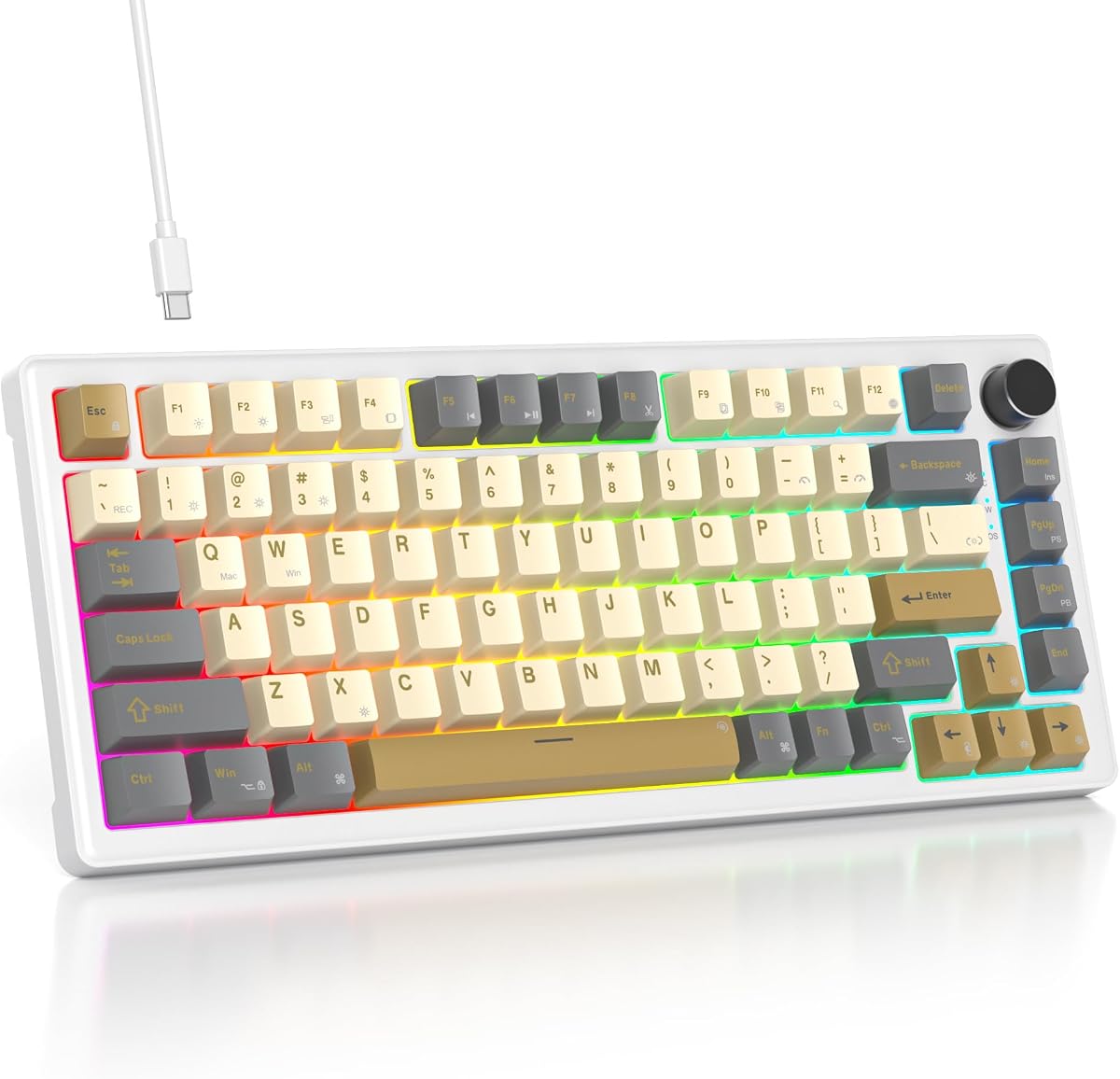
75% Retro Mechanical Keyboard Gasket
4.6Editor score
Five-layer padding design included
Hot-swap PCB supports custom switches
Compact 75 percent layout efficient
Discover the best 75 percent mechanical keyboards in October 2026. We compare top wireless and wired models for gaming, typing, and customizability.
75 percent mechanical keyboards offer the perfect balance between compact design and functional layout. They retain essential arrow keys and function rows while saving valuable desk space for gamers and professionals alike.
We compared ten top models based on build quality, connectivity options, switch types, and customization features. Our analysis focuses on gasket mounts, hot-swap capabilities, and wireless performance to help you choose wisely.
Each pick highlights specific strengths like RGB lighting, multi-device support, or premium sound dampening. Note that product availability and features may change over time so check current listings before purchasing.
4.6Editor score

4.6Editor score

4.6Editor score
This side-by-side comparison highlights key specifications across all ten selected 75 percent mechanical keyboards. From connectivity types to switch compatibility and layout features, these details help you narrow down your options quickly.


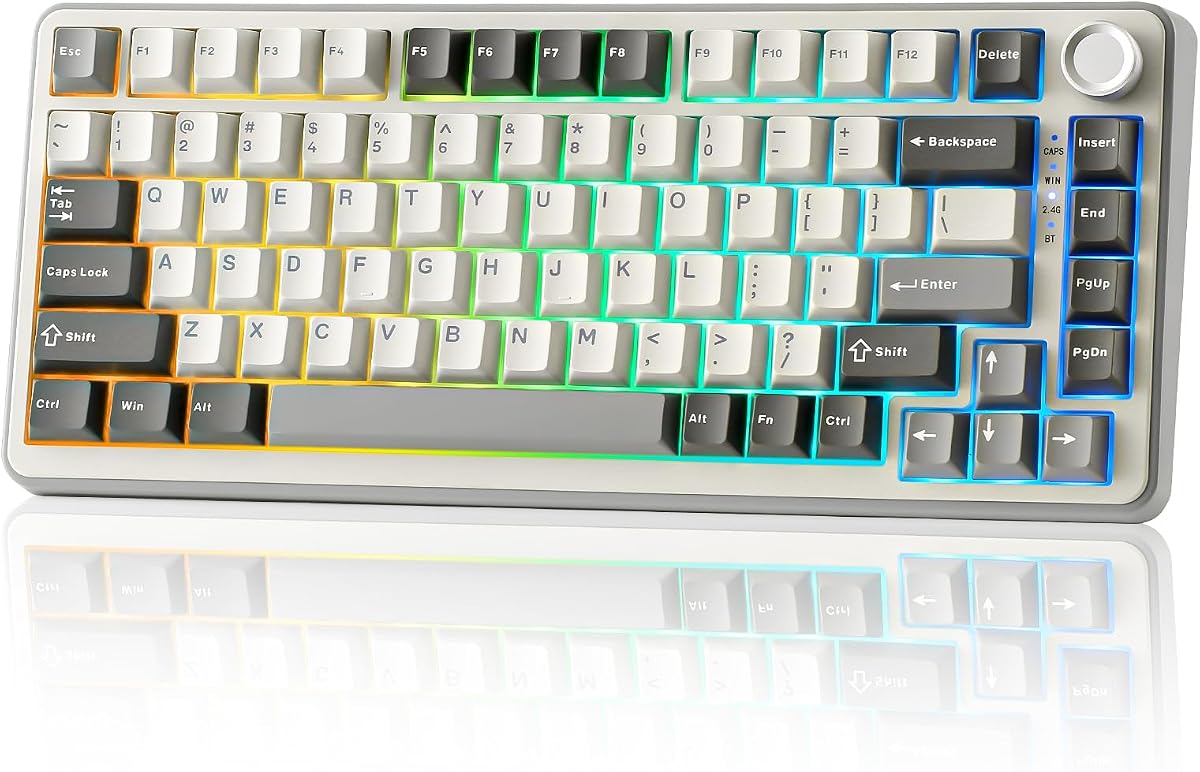


The AULA F75 Pro stands out as a top-tier 75 percent mechanical keyboard offering robust connectivity and a satisfying typing experience. With a rating of 4.6 stars it appeals to users seeking versatility across devices without sacrificing build quality or acoustic performance.
We may earn a commission when you buy through this link, at no additional cost to you.
Its tri-mode connection supports Bluetooth 5.0 2.4GHz wireless and USB-C allowing seamless switching between up to five devices. The pre-lubed Reaper switches deliver a creamy sound while the five layers of filling silencer minimize cavity noise effectively.
While the RGB lighting is vibrant with 16.8 million colors the driver software is limited to Windows systems which may inconvenience Mac users. Additionally setting up music rhythm effects requires extra steps compared to simpler onboard controls.
This keyboard is ideal for gamers and professionals who need a compact layout with reliable wireless performance. If you value sound dampening and switch customization the F75 Pro delivers exceptional value in its class.
Tri-mode support ensures you can stay connected across PCs phones and consoles effortlessly.
Multiple silencer layers and pre-lubed switches create a quiet yet responsive typing feel.
We may earn a commission when you buy through this link, at no additional cost to you.
This 75 percent retro mechanical keyboard offers a surprising amount of premium features at a budget-friendly price point. Its gasketed mount and five-layer padding provide stability and comfort making it an excellent choice for entry-level enthusiasts.
We may earn a commission when you buy through this link, at no additional cost to you.
The white jade linear switches are pre-lubed for smooth operation while the hot-swap PCB allows easy customization without soldering. Macro programmability enhances gaming efficiency and the RGB backlight adds a stylish touch to your workspace.
While it lacks wireless connectivity the wired design ensures zero latency and consistent performance. Some users may find the driver dependency for RGB adjustments slightly cumbersome compared to onboard-only solutions.
If you prioritize acoustic comfort and build quality without breaking the bank this keyboard delivers outstanding value. It suits typists and casual gamers looking for a reliable compact setup with customization potential.
Gasket mount and padding mimic high-end board performance at an accessible price.
Hot-swap sockets and macro programming empower users to tailor the board to preferences.
We may earn a commission when you buy through this link, at no additional cost to you.
The AULA S75 PRO distinguishes itself with an integrated LCD screen offering real-time insights and interactive customization. This premium feature combined with tri-mode connectivity makes it a standout choice for tech-savvy users seeking advanced control.
We may earn a commission when you buy through this link, at no additional cost to you.
Tri connectivity supports Bluetooth 2.4GHz and wired modes ensuring reliable performance across platforms. The side-engraved PBT keycaps resist wear and the five-layer damping provides a thocky sound profile appreciated by mechanical enthusiasts.
Customizing the screen displays needs Windows software and a wired connection which adds initial setup complexity. Additionally keeping RGB and screen active may reduce battery life during extended wireless sessions.
Ideal for users who want visual feedback and robust wireless support the S75 PRO delivers a unique blend of style and function. It justifies its premium positioning with innovative design and solid overall performance.
The screen shows battery status and allows GIF image uploads for personal flair.
Tri-mode connectivity ensures seamless transitions between devices with minimal latency.
We may earn a commission when you buy through this link, at no additional cost to you.
The RK ROYAL KLUDGE R75 offers a balanced mix of premium aesthetics and practical wireless features. Its gasket mount and cream switches deliver a smooth typing experience while the metal knob adds a tactile control element appreciated by power users.
We may earn a commission when you buy through this link, at no additional cost to you.
With triple-mode connectivity the keyboard supports up to three devices making it efficient for multitasking environments. The 4000mAh battery ensures extended usage and hot-swap sockets allow further personalization without soldering skills.
Some users may find the RGB lighting less vivid compared to competitors and software options remain basic. Additionally the cream switches while smooth may not satisfy those seeking tactile feedback for typing-focused tasks.
This keyboard suits professionals and gamers who value build quality and versatile connectivity over flashy RGB. It provides a reliable platform for daily use with enough customization to keep things fresh.
The CNC metal knob provides precise audio adjustment and a premium touch feel.
Triple-mode options ensure you can switch between work and play devices quickly.
We may earn a commission when you buy through this link, at no additional cost to you.
The MageGee 75% mechanical gaming keyboard presents a straightforward and affordable solution for users seeking reliable wired performance. Its red switches offer fast response times and the LED blue backlight enhances visibility in low-light conditions.
We may earn a commission when you buy through this link, at no additional cost to you.
With 87 keys it maintains essential arrow and function keys while maximizing desk space. Full N-key rollover ensures accurate input during intense gaming sessions and the double-color injection keycaps provide clear legends.
The ABS keycaps may develop shine over time with heavy use and the lack of wireless limits portability. Additionally backlight customization relies on hardware shortcuts rather than intuitive software controls.
Best suited for budget-conscious gamers needing a compact wired board this model delivers consistent performance. It avoids unnecessary complexity while providing core features for typing and gaming alike.
No drivers needed for plug-and-play setup ensuring immediate usability across systems.
The 87-key design keeps essentials while freeing room for mouse movement.
We may earn a commission when you buy through this link, at no additional cost to you.
This gasket-mounted keyboard emphasizes acoustic comfort and build durability with premium features like sound absorbing pads and PBT keycaps. It delivers a satisfying typing feel with minimal noise which is ideal for shared workspaces.
We may earn a commission when you buy through this link, at no additional cost to you.
The hot-swap socket allows easy switch changes while the full key anti-ghosting ensures flawless input accuracy. RGB lighting is customizable through software enhancing the visual appeal and gaming immersion.
Being wired only limits portability and the driver software supports Windows systems which may exclude Mac users. However the stability and sound dampening benefits often outweigh these drawbacks for desktop users.
For those prioritizing a quiet and durable typing experience this keyboard offers excellent value. It is a strong candidate for enthusiasts who want a refined acoustic profile without wireless complications.
Sound absorbing pads reduce vibration ensuring a quiet and comfortable typing experience.
PBT keycaps resist wear and maintain texture longer than standard ABS materials.
We may earn a commission when you buy through this link, at no additional cost to you.
The Keychron K2 75% layout is tailored for Mac users seeking a reliable Bluetooth mechanical keyboard. Its Super Red switches deliver smooth linear performance while the dual-system support ensures versatility across different operating environments.
We may earn a commission when you buy through this link, at no additional cost to you.
With a massive 4000 mAh battery it offers up to 72 hours of typing on a single charge. The white LED backlight provides clear visibility and the USB-C wired mode allows for stable input when needed.
While it lacks RGB lighting some users may prefer the simplicity of static white backlighting. The price is higher than many competitors but the build quality and Mac integration justify the investment for many.
This keyboard is ideal for creatives and developers who need Mac-specific keys and reliable wireless connectivity. It stands out as a premium choice for those prioritizing system compatibility and endurance.
Built-in Mac layout keys ensure full functionality without needing extra keycaps.
The large battery capacity ensures weeks of use before needing a recharge.
We may earn a commission when you buy through this link, at no additional cost to you.
The YUNZII B75 PRO is engineered for users who value a creamy and thocky sound profile. Its gasket mount design paired with precision-tuned stabilizers delivers a refined typing experience that stands out among competitors.
We may earn a commission when you buy through this link, at no additional cost to you.
With tri-mode connectivity it offers flexibility for both wireless and wired setups. The cocoa Cream V2 switches are pre-lubed ensuring smooth operation while the south-facing LEDs enhance RGB brightness and visual clarity.
Programming features require Windows drivers which may limit customization for Mac users. Additionally stock colorways are limited so those seeking unique aesthetics might need to purchase separately.
This keyboard is perfect for enthusiasts seeking a premium sound out of the box without modifications. It balances modern features with acoustic refinement making it a top contender for wireless setups.
Five-layer padding and gasket mount create a solid yet soft typing feel.
Bluetooth and 2.4GHz options ensure reliable connectivity across multiple devices.
We may earn a commission when you buy through this link, at no additional cost to you.
The Newmen GM326 offers a straightforward compact mechanical keyboard option for casual users and gamers. Its rainbow LED backlight adds a fun visual touch while the hot-swap design allows for future switch customization.
We may earn a commission when you buy through this link, at no additional cost to you.
The multi-function knob simplifies volume control and the detachable USB-C cable enhances portability. Full key anti-ghosting ensures smooth gameplay and the compact layout saves valuable desk space effectively.
ABS keycaps may develop shine over time with regular use and lack of wireless limits flexibility. However for a budget-friendly wired setup it provides solid core performance without unnecessary complexity.
Ideal for beginners or those needing a portable board for travel this model delivers reliable function. It is a practical choice for users prioritizing affordability and essential features over premium materials.
The small mini size and detachable cable make it easy to carry anywhere.
Multiple LED backlight modes allow users to personalize the look of their setup.
We may earn a commission when you buy through this link, at no additional cost to you.
The Womier SK80 stands out with its vibrant color multimedia screen displaying status and GIF images. This unique feature combined with a gasket mount design delivers a refined typing feel and impressive visual customization potential.
We may earn a commission when you buy through this link, at no additional cost to you.
Its hot-swap PCB supports 3Pin or 5Pin switches offering flexibility for customization. The RGB backlight supports music syncing creating dynamic lighting effects that respond to audio played during gaming.
Setup for the display and macros requires driver software limited to Windows systems. Additionally users must ensure proper calibration for optimal screen angle and image clarity before daily use.
Perfect for gamers wanting a tech-forward look with practical features this board delivers standout aesthetics. It suits those who value visual feedback and customizable lighting to enhance their setup.
The multimedia screen displays system stats and GIFs for a personalized interface.
RGB lighting patterns react to audio for an immersive gaming atmosphere.
We may earn a commission when you buy through this link, at no additional cost to you.
Selecting the right 75 percent mechanical keyboard involves evaluating connectivity build quality switch type and additional features that match your workflow.
Decide if you need wireless Bluetooth or 2.4GHz capabilities or prefer a wired USB-C connection. Wireless offers flexibility for multi-device setups while wired ensures zero latency for competitive gaming.
Check battery life if choosing wireless models to ensure it meets your daily usage needs.
Mechanical switches come in linear tactile or clicky varieties. Linear switches are smooth and quiet while tactile offer feedback for typing and clicky provide audible confirmation.
Consider your preference for sound and feel as well as any hot-swap support for future customization.
Gasket mounts reduce noise and vibration compared to rigid mounts. Look for models with sound-dampening foam and quality materials like aluminum cases for a premium feel.
Premium construction also impacts keycap durability and overall keyboard longevity.
PBT keycaps resist shine and wear better than ABS making them ideal for long-term use. ABS keycaps are cheaper and may feel smoother but degrade faster under heavy typing.
Choose PBT if you value durability and consistent texture over time.
Some keyboards support RGB lighting customization and macro programming via software. Others offer limited onboard control. Ensure compatibility with your operating system.
Check if driver software supports Windows only or includes macOS options.
Features like multi-function knobs volume control and media keys enhance usability. Some models include screens or special lighting modes for added interactivity and style.
Evaluate which extra features matter most to your workflow or gaming experience.
75 percent layouts retain arrow keys while reducing clutter. Ensure the board height and tilt options suit your wrist posture for comfortable extended typing sessions.
Some models include adjustable legs or ergonomic rests for better posture.
Budget models offer essential features while premium boards include advanced tech like screens or high-quality gaskets. Balance your needs against what you are willing to spend.
Consider long-term value if planning to customize switches or keycaps later.
Begin by connecting the keyboard via USB-C or pairing it through Bluetooth settings. If using wireless ensure batteries are charged or connect to power for initial setup.
Install any required driver software to customize RGB lighting macros or media controls. Follow manufacturer instructions to set up hot-swap switches safely if desired.
Maintain your keyboard by regularly cleaning dust from between keycaps and wiping the surface with a dry cloth. Store in a cool dry place away from direct sunlight to preserve materials.
A 75 percent layout keeps arrow keys and function rows while being more compact than a full-size board. This saves desk space for mouse movement and creates a streamlined setup for both gaming and productivity.
Yes they are excellent for gaming due to their compact size and full key rollover support. Many models include RGB lighting and programmable keys that enhance the gaming experience significantly.
Most 75 percent mechanical keyboards are compatible with Mac but some software features may be Windows-only. Check if the model includes dedicated Mac keys or supports dual-system switching.
Modern 2.4GHz wireless and Bluetooth 5.0 technologies provide minimal latency suitable for gaming. However for competitive esports wired connections remain the most reliable option.
Hot-swap switches let you replace mechanical switches without soldering. This allows easy customization of feel and sound without needing technical skills to modify the keyboard.
Turn off the keyboard and remove keycaps gently using a puller. Use compressed air to clear dust between switches and wipe surfaces with a soft dry cloth regularly.
We reviewed ten exceptional 75 percent mechanical keyboards offering a range of features from budget-friendly wired models to premium wireless options with screens.
Prioritize connectivity and switch preference to ensure the keyboard matches your daily tasks and environment. Consider sound dampening and customization if you value a refined typing experience.
Always check current product availability and specifications before buying as features and prices can vary. Your ideal 75 percent mechanical keyboard is waiting to elevate your workspace.