
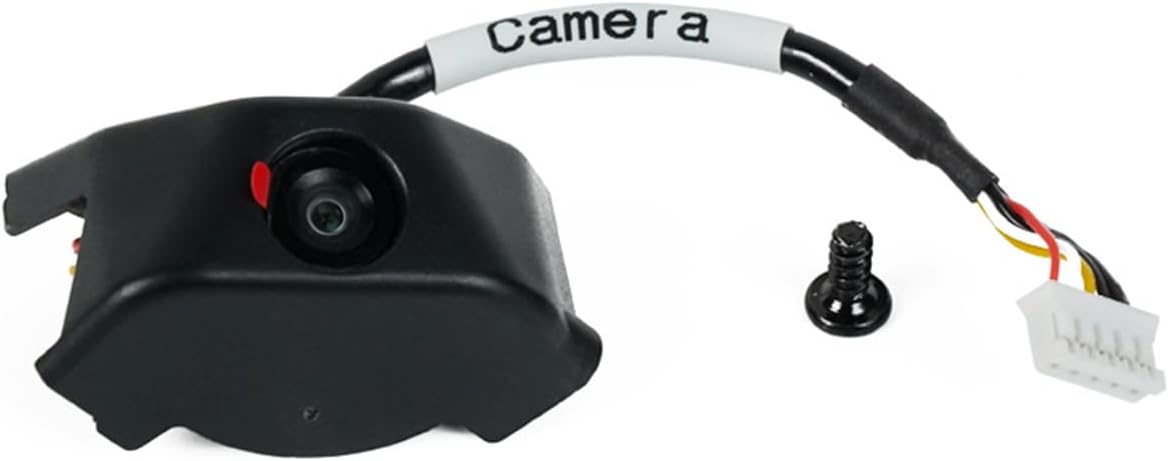
Anycubic Kobra 3 Camera
4.5Editor score
Wide printer compatibility
DIY replaceable frame
Clear resolution details
This guide compares the top 3D Printer Camera for Remote Monitoring options to help you choose the best model for your printer setup and monitoring needs.
Finding the right 3D Printer Camera for Remote Monitoring can transform how you manage your prints. These devices let you watch progress from anywhere, catch errors early, and save valuable filament by stopping failed jobs quickly.
We analyzed ten leading camera kits focusing on compatibility, resolution, app functionality, and ease of installation. Each option was evaluated for its ability to provide clear visuals and reliable alerts during long print runs.
Each pick below shows key features, pros, cons, and ideal use cases. Prices and availability may change, so check the latest details before buying to ensure you get the best value for your specific printer model.
4.5Editor score

4.5Editor score

4.3Editor score
The following table provides a side-by-side overview of all ten cameras. It highlights key specifications like compatibility, resolution features, and connection methods to help you compare options quickly.




The Creality K1 AI Camera stands out as a top choice for users invested in the K1 ecosystem. With a 4.5 rating, it delivers crisp visuals and automated features that simplify monitoring without extra effort.
We may earn a commission when you buy through this link, at no additional cost to you.
Its 1080P resolution ensures every layer is visible, allowing you to spot defects early. The automated time-lapse feature logs your prints to the cloud, making sharing results effortless after completion.
Installation is straightforward since it plugs into a reserved port on compatible printers. While it works best within the Creality environment, the convenience and clarity it offers are unmatched for these specific models.
Buy this if you own a K1, K1 SE, or K1 Max and want a hassle-free monitoring solution. It balances quality and ease of use better than most generic third-party cameras on the market today.
Designed specifically for the K1 series, this camera integrates natively without complex wiring or third-party software dependencies.
Time-lapse videos are generated automatically after printing, saving you manual effort when documenting your successful prints.
We may earn a commission when you buy through this link, at no additional cost to you.
Affordability meets functionality with this Anycubic camera option. Rated 4.5 stars, it provides essential monitoring tools at a lower cost than many competitors while still delivering clear visual feedback.
We may earn a commission when you buy through this link, at no additional cost to you.
Its standout feature is the DIY frame, which lets users customize the look of their printer. It works well with Kobra 3 and even older models, offering flexibility that rigid kits often lack.
The Anycubic app allows you to check print status remotely, helping you save filament by catching jams quickly. While not as advanced as premium models, it covers all the basics effectively.
Choose this camera if you want a budget-friendly entry into monitoring without sacrificing clarity. It is ideal for hobbyists looking to add security to their prints without a large investment.
The replaceable frame allows you to match your printer’s aesthetic or add unique personal touches to your setup.
Priced affordably, this kit makes remote monitoring accessible for users on a tight budget.
We may earn a commission when you buy through this link, at no additional cost to you.
The Creality Nebula Camera offers premium features like 24-hour monitoring and automatic time-lapse creation. With a 4.3 rating, it delivers robust functionality for serious makers who need round-the-clock visibility.
We may earn a commission when you buy through this link, at no additional cost to you.
Its infrared night vision ensures clear images even in dark rooms, preventing blind spots during overnight prints. You can stop prints remotely via the app, saving filament and avoiding potential disasters.
The automatic time-lapse feature requires no manual settings, capturing every layer to build a video automatically. This level of automation makes it a top choice for those who want convenience alongside performance.
Invest in this camera if you need advanced monitoring capabilities. Its combination of night vision, WiFi, and auto-video generation makes it a comprehensive solution for long printing sessions.
Infrared fill light enables clear monitoring in low-light conditions, ensuring visibility even during overnight prints.
No extra settings are needed to generate videos; the system captures layer images automatically to build time-lapses.
We may earn a commission when you buy through this link, at no additional cost to you.
This upgraded Nebula variant focuses on image clarity with a manual focus knob and 1080p resolution. Rated 4.4, it allows precise adjustments to ensure your prints are captured with maximum detail.
We may earn a commission when you buy through this link, at no additional cost to you.
Its night vision capability automatically switches on when needed, providing consistent monitoring day or night. The adjustable lens lets you tilt the camera to frame your build volume perfectly without moving hardware.
The USB connection simplifies setup, while the app provides reliable remote access. Although manual focus adds a small step, the resulting image quality is worth the effort for detailed inspection.
Pick this model if image sharpness is your top priority. It offers a great balance of control and convenience for users who want to optimize their camera view manually.
Rotate the lens knob to achieve the sharpest focus for your specific printer layout and build height.
Infrared lighting activates automatically to maintain clear visibility without requiring manual intervention.
We may earn a commission when you buy through this link, at no additional cost to you.
Designed specifically for Adventurer 5M and AD5X models, this camera ensures seamless integration with Flashforge systems. With a 4.0 rating, it offers reliable monitoring tailored to these devices.
We may earn a commission when you buy through this link, at no additional cost to you.
You can control your printer via the Flash Maker app, checking status or stopping prints remotely. Installation is straightforward, making it a convenient add-on for existing users.
The kit focuses on functionality, delivering real-time visibility and essential remote features. While it lacks some advanced options, it does exactly what is needed for these specific printer series.
Choose this if you own a Flashforge Adventurer model. It is the most reliable way to get official monitoring support without dealing with third-party compatibility issues.
Built specifically for Flashforge machines, it integrates directly with existing interfaces for a smooth experience.
Monitor and control your printer remotely using the compatible Flash Maker application on your phone.
We may earn a commission when you buy through this link, at no additional cost to you.
This Kobra-specific camera simplifies the setup process with minimal steps and clear instructions. Rated 4.4, it is designed for users who want fast installation without complicated wiring.
We may earn a commission when you buy through this link, at no additional cost to you.
It works with multiple Kobra series and supports layer detection alerts. The app connects via WiFi, letting you monitor progress from anywhere while ensuring your prints stay on track.
Technical support is highlighted as a strength, offering life-time assistance to users. While it requires some assembly, the process is described as quick and manageable even for beginners.
Buy this for a straightforward monitoring solution. It is perfect if you want to get up and running quickly while maintaining access to helpful customer service.
Connect via USB and insert into the printer in minutes, with detailed videos provided to guide you.
Professional consultants offer life-time technical support to resolve any issues you might encounter.
We may earn a commission when you buy through this link, at no additional cost to you.
This camera excels at automated recording, capturing every layer to generate a complete time-lapse video. Its 4.5 rating reflects the high satisfaction users feel with its seamless operation.
We may earn a commission when you buy through this link, at no additional cost to you.
The reserved interface on K1 printers makes installation plug-and-play. Once connected, you can check prints via the Creality Cloud app, which handles time-lapse generation automatically.
Cloud storage ensures your videos are safe and easy to share. While it lacks some manual controls, its reliability and high-definition output make it a solid choice for standard use.
Opt for this if you prefer automation over manual settings. It takes the guesswork out of capturing print progress, letting you focus on designing new models.
Videos are generated automatically after printing, removing the need for manual recording setups.
Cloud integration makes it easy to save and share your time-lapse videos with friends and family.
We may earn a commission when you buy through this link, at no additional cost to you.
The Nebula Standard offers reliable monitoring with a focus on adaptability. Its 4.4 rating indicates consistent performance for users who need dependable visuals during prints.
We may earn a commission when you buy through this link, at no additional cost to you.
Rotating the lens allows you to adjust focus for optimal clarity. Night vision ensures you can check prints in any lighting condition, and the USB port makes connections quick.
It supports basic anomaly detection to alert you of errors. While it does not offer automated time-lapses on all models, its stability and ease of use are strong assets.
This model is great for users who want control over their image quality. If you prefer manual adjustments to ensure focus, this camera meets that need efficiently.
Rotating the lens manually ensures you get the sharpest image for your specific setup.
Built-in infrared provides clear images even when the room lights are off.
We may earn a commission when you buy through this link, at no additional cost to you.
This camera stands out for its advanced spaghetti detection feature, which helps prevent wasted filament. With a 4.3 rating, it offers a balance of AI-driven safety and manual control.
We may earn a commission when you buy through this link, at no additional cost to you.
It monitors prints continuously and alerts you to failures in real time. Time-lapse videos are also supported, allowing you to review progress without constant manual checking.
You can adjust focus manually to ensure high-definition clarity. While it requires a compatible controller like the Sonic Pad, its protection features are valuable for busy users.
Choose this if you want smart protection for your prints. Its ability to detect errors automatically makes it a wise choice for unsupervised printing sessions.
The system identifies tangled filament and alerts you, reducing material waste significantly.
Monitor your prints any time of day with reliable connectivity and clear visuals.
We may earn a commission when you buy through this link, at no additional cost to you.
This kit is designed for straightforward recording with easy video export via USB. Rated 4.1, it focuses on reliability and quality for Adventurer 5M and AD5X owners.
We may earn a commission when you buy through this link, at no additional cost to you.
An upgraded longer cable simplifies installation inside the printer enclosure. You can export finished video files to a USB drive for viewing on any device without cloud dependency.
The HD lens ensures clear visuals, while the official design guarantees compatibility. Although it lacks app-based remote features, it remains a strong choice for local recording.
Pick this if you prefer storing videos locally. It provides a secure way to document your prints without needing external servers or complex setups.
Export video files directly to a USB flash drive for easy local storage and sharing.
A longer cable makes installation easier inside the printer enclosure compared to standard kits.
We may earn a commission when you buy through this link, at no additional cost to you.
Selecting the right camera depends on your printer model, desired features, and budget. Use these factors to narrow down the options that fit your setup.
Ensure the camera supports your specific printer model. Some are branded for Creality or Anycubic, while others work across multiple brands. Mismatched hardware can lead to installation issues.
Always check the product description for supported models before purchasing.
Higher resolution like 1080P ensures clear details of your prints. Look for cameras with sharp lenses that capture textures and layer lines effectively.
Clear visuals help you spot defects early, saving time and material on failed prints.
If you plan to print overnight, infrared night vision is essential. It allows you to monitor in dark conditions without external lighting.
Night vision ensures consistent visibility regardless of room lighting conditions.
A good app provides remote viewing, print control, and alerts. Check if it offers features like time-lapse generation or pause functionality.
User-friendly apps make remote monitoring smooth and efficient.
Automatic time-lapse generation saves you from manual recording. Look for systems that create videos layer by layer without extra settings.
This feature helps showcase your prints and analyze the printing process.
USB connections are common and stable, but WiFi allows true remote access. Ensure your printer supports the connection method the camera uses.
WiFi is crucial if you need to monitor from outside your home network.
Some cameras require complex assembly, while others are plug-and-play. Look for kits with detailed guides or pre-assembled frames.
Simple installation saves time and reduces frustration.
Reliable support can help troubleshoot connection or image issues. Brands with dedicated engineers or response teams offer more peace of mind.
Good service ensures your setup runs smoothly over time.
Start by connecting the camera to your printer's USB port or interface. Follow the included guide to attach cables securely and ensure the lens points at the print bed.
Download the app to your smartphone and connect to your printer network. Calibrate the focus by rotating the lens until the print bed is sharp and clear.
Regularly clean the lens with a microfiber cloth to avoid blurry images. Check your app settings to enable time-lapse or alerts if you want automated features.
Most cameras support WiFi for true remote monitoring outside your home network. However, some models work over LAN via USB. If you only check prints from within your house, USB may suffice.
Cameras capture an image at specific intervals or after each layer. This data is combined into a video file. Some models do this automatically via the app.
Yes, as long as the camera connects to WiFi and the app supports remote access. You will be able to view live streams or check status from anywhere with internet.
If the camera and printer lose power, monitoring stops. Some cameras have backup options but generally, you will need to restart the process when power returns.
Most modern kits are designed for easy installation with minimal steps. Look for USB plugs and clear instructions. If you are not tech-savvy, check reviews for setup feedback.
Yes, but generic cameras may not integrate with your printer. software. Official kits ensure better support and features like direct app control or automatic time-lapse.
Some brands require cloud accounts to enable features like remote access. If you prefer local-only control, check if the camera supports LAN viewing without cloud login.
Use a soft microfiber cloth to wipe the lens gently. Avoid harsh chemicals. If the view becomes blurry, check for dust or smudges on the lens surface.
The Creality K1 AI Camera leads with seamless integration, while the Anycubic Kobra 3 Camera offers great value for budget users. The Creality Nebula Camera provides robust features for long-term monitoring.
Consider your printer model and whether you need night vision or time-lapse features. Prioritize app functionality if you plan to watch prints remotely while away from home.
Prices and availability vary. Check the latest details for each model to ensure it meets your specific needs before making a purchase.