
LG Smart Monitor Swing
4.1Editor score
Built-in webOS system
Rolling wheeled base
AirPlay 2 support
Finding the right 32 inch touchscreen monitor can transform your workflow by adding intuitive direct interaction to your display setup. Whether you need precise control for design work or interactive presentations for clients, these screens offer unique versatility that traditional monitors cannot match.
We have analyzed the leading models available in November 2026 focusing on performance, build quality, and feature sets. Our comparison includes options ranging from budget-friendly productivity displays to high-end smart monitors capable of running apps independently without a connected computer.
Each pick highlights specific strengths such as refresh rates, color accuracy, and stand flexibility to match different professional needs. Please note that prices and availability change frequently so verify current details before making your final purchasing decision for your workspace.
4.1Editor score

5.0Editor score

4.2Editor score
As an Amazon Associate we earn from qualifying purchases.
The following table provides a side-by-side comparison of all ten models to help you quickly identify key specifications and differences in connectivity and display technology.



This 32 inch 4K touchscreen monitor stands out as the top choice for users seeking high performance and interactive capabilities. With a perfect five-star rating and robust features like a 144Hz refresh rate and 10-point capacitive touch, it delivers a premium experience for creative professionals and power users alike.
We may earn a commission when you buy through this link, at no additional cost to you.
The display offers breathtaking clarity with 3840×2160 resolution combined with lightning-fast motion rendering that eliminates blur during fast-paced tasks. Its connectivity suite includes HDMI 2.1, DP 1.4, and a full-featured Type-C port which simplifies setup by delivering video power and touch control through a single cable for compatible laptops.
While the monitor supports 10-point touch on most systems, macOS users should note they are limited to 2-point functionality due to protocol restrictions. Additionally, the high-performance panel requires an external power adapter that must be connected before signal cables to ensure stable operation.
Buyers looking for a versatile workspace centerpiece will find this model ideal for design work gaming or interactive presentations. Its height-adjustable and rotatable stand ensures comfortable viewing angles while VESA mount compatibility allows for flexible mounting solutions on arms or walls.
The 144Hz refresh rate ensures buttery-smooth motion ideal for high-end gaming and fluid navigation through complex design software.
Multiple high-bandwidth ports including HDMI 2.1 and Type-C allow seamless connection to desktops laptops and mobile devices with minimal cabling.
We may earn a commission when you buy through this link, at no additional cost to you.
The LG Smart Monitor Swing redefines flexibility with its unique rolling stand and standalone webOS platform that operates without a connected PC. This model earns a premium badge for its ability to transform any room into a collaborative workspace or entertainment hub while maintaining stunning 4K visual quality.
We may earn a commission when you buy through this link, at no additional cost to you.
Its IPS touchscreen delivers rich color accuracy with up to 95% DCI-P3 coverage ensuring vibrant content reproduction for media consumption and design tasks. The fully adjustable wheeled base allows effortless movement around the office or home with a hidden adapter compartment to keep cables neatly organized and concealed.
Users may find the initial setup of webOS features and connectivity options slightly complex compared to standard monitors. The premium pricing also reflects the advanced hardware and smart capabilities which may not be necessary for all basic display needs.
This monitor is perfect for dynamic environments where mobility and standalone functionality are prioritized such as conference rooms or multi-use living spaces. The integration of AirPlay 2 and Screen Share further enhances its utility for seamless content sharing across Apple and Android devices.
Powered by webOS the monitor can run streaming apps and manage office tasks remotely without needing a separate computer connection.
The stable wheeled base enables smooth movement across floors while the torsion spring hinge supports tilt swivel and height adjustments for any angle.
We may earn a commission when you buy through this link, at no additional cost to you.
The FYHXele 32 inch touchscreen monitor offers excellent value for users seeking large screen real estate without compromising on key performance metrics. Its combination of QHD resolution and 100Hz refresh rate makes it a compelling budget-friendly option for gaming office work and multimedia entertainment.
We may earn a commission when you buy through this link, at no additional cost to you.
The display features an IPS panel with 178-degree viewing angles ensuring consistent color and brightness from any position. Connectivity includes a versatile USB-C port that supports video data transmission and charging making it easy to connect laptops and phones with a single cable.
Note that touch functionality is not compatible with certain gaming consoles like PS4 PS5 Xbox Switch or Fire TV devices which limits its use for interactive gaming. The stand offers basic adjustments compared to premium models but supports VESA mounting for more flexible installation options.
This model is ideal for budget-conscious buyers who prioritize visual clarity and smooth motion over advanced smart features. It serves well as a secondary interactive display or primary monitor for tasks requiring detailed imagery and responsive touch input.
The 1440p resolution delivers sharp detailed imagery ideal for text and graphics while 100% color space coverage ensures vibrant accurate hues.
USB-C and HDMI ports provide versatile connection options for PCs and phones enabling video transmission and device charging simultaneously.
We may earn a commission when you buy through this link, at no additional cost to you.
This Xyrio touchscreen monitor balances performance and multimedia features with built-in speakers and stylish RGB ambient lighting. It targets users who want a complete all-in-one entertainment and productivity setup without needing external audio devices or complex mounting.
We may earn a commission when you buy through this link, at no additional cost to you.
The IPS panel offers 100% sRGB coverage and 100Hz refresh rate for crisp visuals and smooth motion. Its stand supports tilt swivel and 90-degree pivot rotation alongside VESA mounting for flexible positioning while the plug-and-play USB-B connection simplifies touch activation.
While it supports a wide range of operating systems including Windows and Linux the lack of a verified rating makes performance claims less certain than top competitors. The RGB lighting adds style but may not suit minimalist setups preferring a clean look.
Ideal for home offices or casual entertainment spaces this model provides sufficient features for daily computing and creative tasks. The integrated audio and lighting create a self-contained hub that enhances the desktop experience without extra hardware.
Built-in 2W speakers and rear RGB lighting provide immersive sound and a premium aesthetic without additional peripherals.
Full compatibility with Windows Raspberry Pi Android and Linux ensures stable operation across diverse environments without driver issues.
We may earn a commission when you buy through this link, at no additional cost to you.
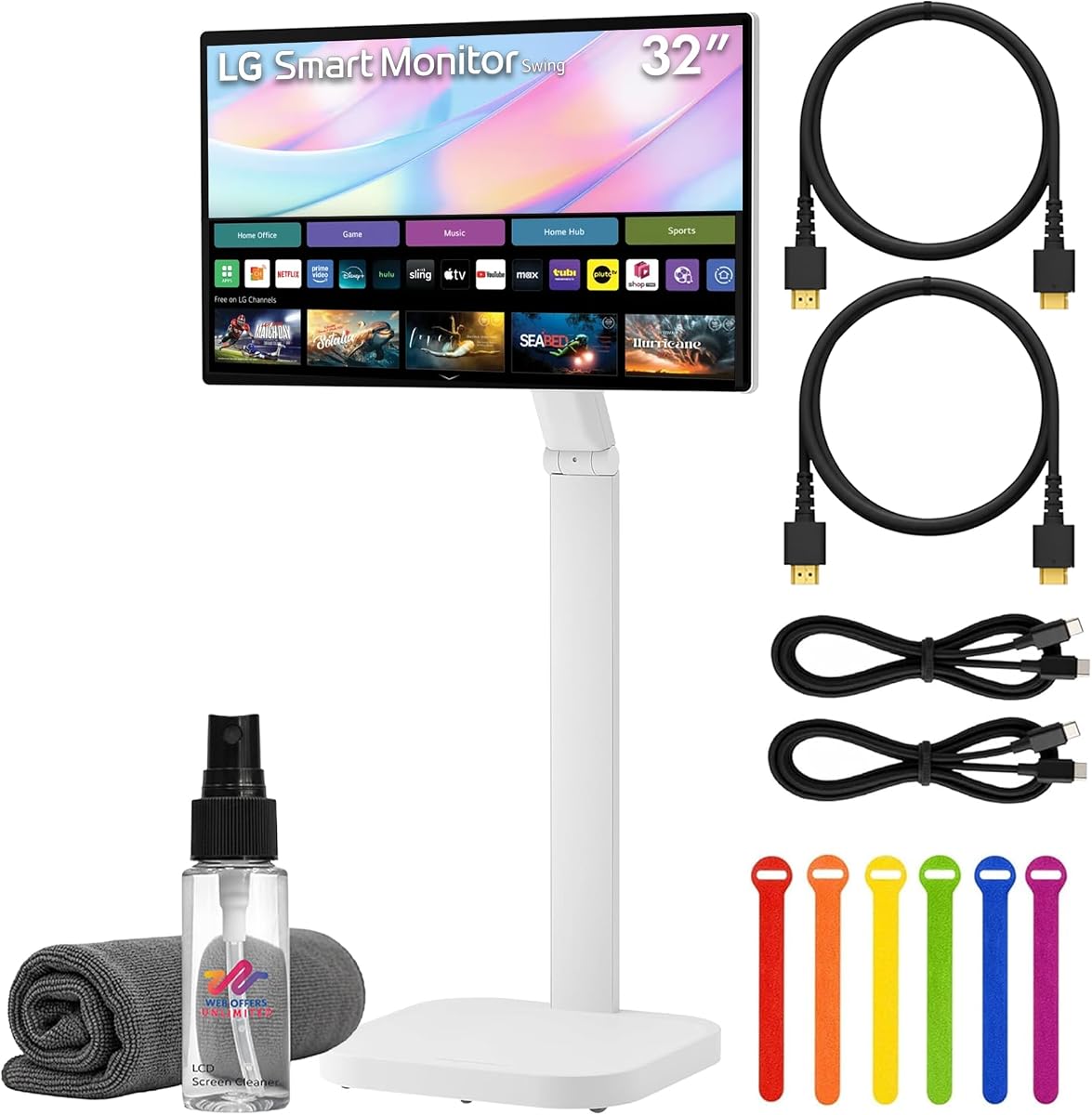
This bundle expands on the standard LG Swing model by including essential accessories like HDMI and USB-C cables plus a cleaning kit. It offers a ready-to-use solution for users who want the premium smart monitor experience without purchasing separate peripherals.
We may earn a commission when you buy through this link, at no additional cost to you.
The 4K UHD display maintains stunning clarity and rich color with HDR10 support while webOS enables standalone streaming and cloud access. The adjustable wheeled stand ensures flexibility in positioning and the bundle provides all necessary connection tools for immediate setup.
The added accessories increase the total cost compared to buying components separately which might not appeal to budget-focused buyers. Users should also evaluate if webOS features meet their specific smart TV needs before committing to this higher price tier.
This option suits buyers who prefer convenience and a fully stocked package for home or office use. The inclusion of a cleaning kit and cable ties adds value by ensuring the display remains pristine and organized from day one.
Included cables and cleaning tools ensure immediate setup and long-term maintenance without additional purchases.
The USB-C port delivers up to 65W power allowing compatible laptops to charge while receiving video and data signals.
We may earn a commission when you buy through this link, at no additional cost to you.
The Elo 3204L is engineered for robust commercial environments requiring 24/7 operation and high durability. It serves businesses needing reliable touch interfaces for signage kiosk applications or interactive displays in high traffic areas.
We may earn a commission when you buy through this link, at no additional cost to you.
Built to withstand constant use it meets UL and IK impact testing standards ensuring longevity and safety. The design supports VESA mounting and power passthrough for easy integration with external PCs while IoT control features enable remote management.
Its commercial focus means it lacks consumer-friendly features like smart apps or gaming capabilities. The price point reflects industrial-grade durability which may be excessive for standard home office needs.
This monitor is best for retail hospitality or healthcare settings where reliability and durability are paramount. Its rugged build ensures consistent performance under demanding conditions without frequent maintenance or replacement.
Built to handle 24/7 operation with high impact and electrical safety ratings for demanding public environments.
IoT control allows administrators to manage displays remotely reducing the need for physical intervention on site.
We may earn a commission when you buy through this link, at no additional cost to you.
This LG model offers a straightforward 32-inch LED display with IPS technology for reliable color accuracy and viewing angles. While not a touchscreen in the modern interactive sense it provides stable visuals for basic monitoring needs.
We may earn a commission when you buy through this link, at no additional cost to you.
The FHD resolution ensures clear text and images suitable for office work or media playback. Its brightness and panel technology deliver consistent performance across various lighting conditions making it a solid choice for everyday tasks.
Modern users seeking touch functionality may find this model too basic. The design focuses on traditional display reliability rather than advanced interactive features.
It suits budget buyers or legacy setups where a large screen is needed without touch capabilities. Its proven brand quality ensures durability for routine daily use.
IPS technology provides wide viewing angles and accurate colors essential for consistent image quality.
350 cd/m2 brightness ensures clear visibility indoors and under moderate ambient light.
We may earn a commission when you buy through this link, at no additional cost to you.
The Samsung QM32R-T earns a perfect five-star rating for its reliable performance and durable construction. It targets users needing a functional touchscreen monitor with robust build quality for professional or public environments.
We may earn a commission when you buy through this link, at no additional cost to you.
Its FHD panel delivers clear visuals suitable for presentations and general computing. While detailed specs are sparse the high rating suggests consistent performance and satisfactory touch responsiveness.
The lack of detailed feature information may make it hard to assess specific capabilities like refresh rates or connectivity options. Buyers should verify compatibility with their specific use cases before purchasing.
This model is ideal for those prioritizing brand reliability and touch functionality without needing advanced smart features. It serves well for basic interactive displays in offices or public kiosks.
The high customer rating indicates dependable performance and user satisfaction in real-world usage.
Integrated touchscreen allows direct interaction for presentations or simple control tasks.
We may earn a commission when you buy through this link, at no additional cost to you.
This Samsung model offers a practical solution for standard display needs with a 75Hz refresh rate for smooth motion. It balances cost and functionality making it accessible for general office or home use.
We may earn a commission when you buy through this link, at no additional cost to you.
The FHD resolution provides adequate clarity for daily tasks. VESA mount compatibility allows flexible installation on walls or arms to save desk space.
Gamers or creative professionals may find the refresh rate and panel specs limited compared to premium models. It is best suited for general computing where budget is a primary concern.
It suits buyers needing a straightforward reliable screen without advanced interactive features. The black finish complements most desk setups professionally.
75Hz refresh rate offers smoother motion than standard 60Hz displays for everyday multimedia.
Vesa compatibility supports wall mounting or arms to optimize workspace ergonomics.
We may earn a commission when you buy through this link, at no additional cost to you.
This LG variant offers similar smart features to its larger counterpart with 4K resolution and AirPlay 2 support for seamless content sharing. The rolling stand ensures it can be moved easily for collaborative sessions or presentations.
We may earn a commission when you buy through this link, at no additional cost to you.
WebOS enables standalone operation for streaming and basic tasks while USB-C power delivery supports laptop connectivity. The white finish adds a modern aesthetic that suits clean office environments.
A lower user rating suggests potential variability in performance or customer service experiences. The price reflects premium features that may not be necessary for all buyers.
Ideal for dynamic workspaces needing mobility and smart connectivity this monitor provides strong visual quality and flexible use cases. Verify specific requirements before purchase to ensure it matches your needs.
Rolling stand and webOS allow flexible use across rooms without needing a fixed connection.
USB-C delivers power and data while AirPlay simplifies streaming from Apple devices.
We may earn a commission when you buy through this link, at no additional cost to you.
Selecting the right touchscreen requires evaluating resolution, touch type, connectivity, and stand design to ensure compatibility with your devices and workflow.
Resolution dictates how sharp text and images appear on screen. For a 32-inch display, 4K offers superior detail ideal for design work, while 2K provides a balance of clarity and performance for general tasks. Ensure the panel type is IPS for consistent color and viewing angles.
Capacitive touch screens offer responsive and natural interaction. Look for multi-touch support such as 10-point which enables gestures like pinch-to-zoom and simultaneous navigation. Verify compatibility with your operating system as macOS may limit touch points compared to Windows.
Refresh rate affects how smooth motion appears on screen. While standard monitors run at 60Hz, models with 100Hz or 144Hz reduce blur during fast scrolling or gaming. Consider your content type to decide if higher refresh rates justify the cost.
Modern monitors should offer versatile ports like HDMI 2.1, DisplayPort, and USB-C. A full-featured Type-C port can deliver video data and power through a single cable simplifying setups. Check if touch control requires an extra USB connection or is integrated via the same cable.
An adjustable stand is crucial for comfort during long sessions. Look for options allowing height tilt swivel and rotation to fit your desk posture. VESA mounting compatibility provides flexibility to mount on arms or walls if space is limited.
Some models include built-in operating systems like webOS allowing them to function without a PC. This is useful for streaming or standalone tasks but adds cost. Evaluate if these smart capabilities align with your needs or if a traditional monitor suffices.
For commercial or heavy-use environments, check for certifications like IK impact ratings and UL compliance. High-quality construction ensures longevity and safety. Consumer models prioritize aesthetics and ergonomics while industrial ones focus on robustness and continuous operation.
Prices vary significantly based on features and brand. Determine your priority needs such as resolution or mobility before setting a budget. Compare bundles that include accessories to find the best overall value rather than focusing only on the base price.
To ensure optimal touch performance, calibrate the screen using the built-in OS settings if available. Clean the surface with a microfiber cloth and approved screen cleaner to avoid smudges that interfere with touch sensors.
Arrange your cables neatly using the included ties or management slots to prevent tripping or signal interference. If using USB-C for power delivery, ensure your device supports charging via that port to avoid connection issues.
Adjust the stand height and tilt to align the center of the screen with your eye level. This reduces neck strain during extended use. Rotate the display if you prefer portrait mode for reading or coding tasks.
While many models are technically compatible, macOS often limits touch functionality to two points instead of multi-touch gestures. You may still use basic touch for navigation but advanced gestures like pinch-to-zoom might not work as expected on Mac systems.
Not all. Only models with full-featured USB-C ports that support display data and power delivery allow true single-cable connection. Traditional monitors may require separate cables for video and touch signal.
Capacitive touch offers higher precision and multi-touch support ideal for modern displays. Resistive touch is less common now and usually requires pressure which can lead to quicker wear and less fluid interaction.
Most models support VESA mounts which allow wall mounting or attachment to monitor arms. Check the specific millimeter dimensions like 100x100mm before purchasing a mount to ensure compatibility.
Smart monitors with built-in operating systems can run apps independently without a PC. However, for full desktop productivity you will still need to connect a computer for standard software use.
Modern capacitive screens are designed to minimize accidental touches but can still register palm rests. Many systems include palm rejection or you can adjust sensitivity settings in your operating system to reduce this issue.
The top selections range from high-performance 4K displays to versatile smart monitors capable of independent operation. Each option offers distinct strengths depending on whether you prioritize resolution, mobility, or budget.
Prioritize your specific needs such as multi-touch support for creative work or rolling stands for collaborative spaces. Consider how often you move the monitor and what devices you connect to ensure compatibility.
Always verify current availability and pricing before purchasing as these values fluctuate. Reading recent user reviews can also provide insight into real-world performance beyond the provided specifications.