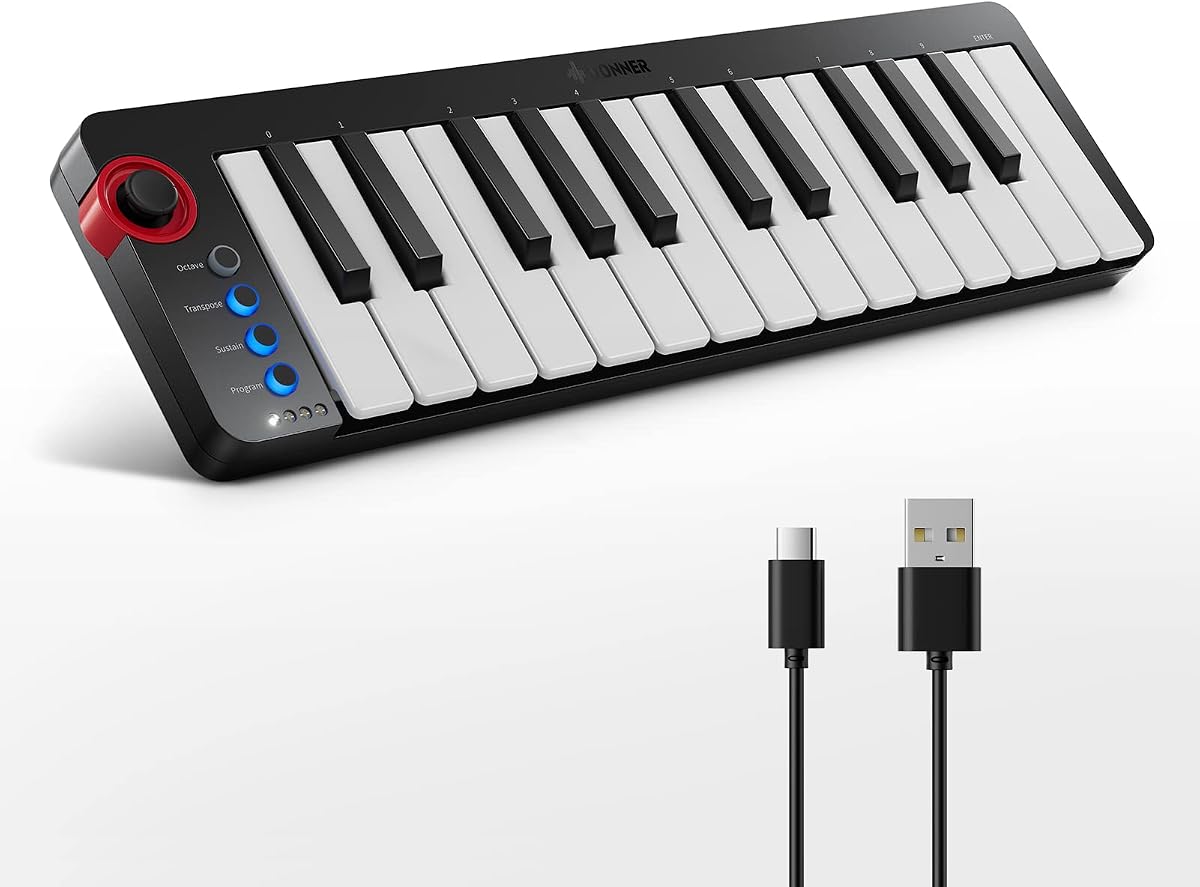
Donner Mini MIDI Keyboard N-25
4.1Editor score
Includes 40 teaching courses
Light-up rocker buttons for visual feedback
Compatible with mobile devices via OTG
This comprehensive guide compares the top 25 Key MIDI Controllers of 2026 to help producers find the perfect compact controller for any studio or performance
Finding the right 25 Key MIDI Controller can transform your music production workflow significantly. These compact devices offer essential controls for playing melodies, triggering samples, and managing software instruments without taking up much desk space. Whether you are a beginner or a seasoned producer, the right controller enhances creativity.
We evaluated leading models based on key feel, feature sets, software integration, and portability. Our comparison covers controllers from major brands like Akai, Arturia, Novation, and newer entrants. We looked at pad quality, knob assignment, and compatibility with popular DAWs to ensure you get reliable hardware.
Each pick below highlights specific strengths like budget friendliness or advanced automation features. Remember that prices and availability change frequently so check current listings before purchasing. Use this guide to narrow down options that fit your specific needs and workflow requirements accurately.
4.1Editor score

4.6Editor score

4.6Editor score
The following table provides a side-by-side look at the core specifications and key features of each model to help you quickly identify differences in connectivity and control layouts.


The Akai Professional MPK Mini MK3 is a highly regarded controller that balances portability with professional features. It holds a strong rating among users who value responsive pads and versatile controls. This model stands out for its robust connectivity options and included production software that enhances its value immediately.
We may earn a commission when you buy through this link, at no additional cost to you.
Key strengths include the 8 backlit velocity-sensitive pads which are perfect for drum programming and sample triggering. The innovative 4-way thumbstick offers dynamic control over pitch and modulation that is rare in this size category. Additionally, the 8 rotary knobs allow for hands-on tweaking of synthesizer parameters and mix effects without touching your mouse.
While the keybed is compact and may take adjustment for players used to full-sized keys, the velocity sensitivity ensures expressive performances. Some users find the mapping software dense at first but it offers deep customization once learned. The included bundle provides immediate access to MPC Beats and various virtual instruments to get started.
This controller is ideal for producers and beat makers who need a reliable portable station that works seamlessly with major software. Its integration with Native Instruments via NKS makes it a versatile choice for modern studios. It remains a top recommendation for those seeking a complete workflow in a minimal footprint.
The 4-way thumbstick provides intuitive modulation and pitch control without needing external wheels.
Includes MPC Beats and curated sound libraries to jumpstart your production workflow immediately.
We may earn a commission when you buy through this link, at no additional cost to you.
The Donner Mini MIDI Keyboard N-25 offers an accessible entry point for beginners looking to produce music. It features velocity-sensitive keys and essential controls like arpeggiator and sustain in a compact design. The standout feature is the inclusion of 40 keyboard teaching courses which adds significant educational value for novices.
We may earn a commission when you buy through this link, at no additional cost to you.
Its light-up rocker buttons provide visual cues during play which helps beginners understand their input. The controller is compatible with Mac and PC and also works with mobile devices using an OTG adapter. This versatility makes it a practical tool for creating melodies and riffs anywhere with a smartphone or tablet.
The build quality is basic compared to higher-end models which may be a concern for heavy daily use. However, for the price it delivers a full music production experience with support for major DAWs like Cubase and Logic. The simple layout ensures you can start creating without getting bogged down in complex setup.
This controller is perfect for students and hobbyists who want to learn music production without a large investment. The included courses help you understand arrangement essentials and creative basics effectively. It is a solid choice for anyone prioritizing education and simplicity over advanced professional features.
The 40 engaging lessons cover arrangement essentials to help unleash your creativity.
Connect easily to smartphone music apps with an OTG adapter for on-the-go production.
We may earn a commission when you buy through this link, at no additional cost to you.
The Novation Launchkey Mini 25 MK4 is a premium controller designed for serious producers needing deep DAW integration. It features 16 responsive FSR pads with polyphonic aftertouch for nuanced drumming and clip launching. Its seamless integration with major software like Ableton Live makes it a favorite for live performers and studio engineers.
We may earn a commission when you buy through this link, at no additional cost to you.
Key strengths include Scale Mode which prevents wrong notes and triggers lush chords from a single key. This feature is invaluable for creating melodic structures quickly without deep music theory knowledge. The controller comes bundled with Ableton Live Lite and sounds from various providers to ensure you have everything needed to start producing.
While it is priced higher than many compact options the build quality and feature depth justify the investment. The keybed feels more substantial than standard mini keys providing a better playing experience. It is slightly heavier which might matter for travel but adds to the sturdy feel on a desk.
This controller is ideal for users who want professional tools in a compact format without sacrificing power. Its compatibility with Native Instruments software via NKS expands its utility significantly. It remains a top choice for anyone seeking the most comprehensive creative tool in this category.
Never hit a wrong note with Scale Mode for harmonious playing and chord creation.
Works intuitively with all major DAWs offering tailored workflows for production software.
We may earn a commission when you buy through this link, at no additional cost to you.
The Akai Professional LPK25 is a streamlined controller focused on melody and bass line creation. It features responsive mini keys that allow for expressive songwriting without occupying much space. Its design fits perfectly alongside studio equipment and offers a simple setup process via USB power for ease of use.
We may earn a commission when you buy through this link, at no additional cost to you.
Strengths include the built-in arpeggiator and dedicated octave buttons which expand your range significantly. The 8 programmable preset slots let you recall mappings for different virtual instruments instantly. This simplifies workflow when switching between software tools during a session. It works universally with applications like GarageBand and Logic.
The lack of drum pads limits its use for beat making compared to other models. However for its simplicity makes it an excellent secondary controller or primary for melodic composers. The high rating reflects user satisfaction with its reliability and straightforward functionality for basic tasks.
This controller is best suited for musicians who prioritize keybed feel over complex controls and automation. It is a reliable companion for songwriting and beat-making where keyboard input is the focus. A great choice for anyone needing a plug-and-play device for instant inspiration.
Spend less time configuring and more time writing music wherever you create music.
Manage and edit all your presets from the computer for organized sessions.
We may earn a commission when you buy through this link, at no additional cost to you.
The Arturia MiniLab 3 adapts to your needs with a layout that encourages hands-on control. It combines premium velocity-sensitive keys with 8 drum pads and 4 faders to create a complete mixing and performance station. The design lets you mute tracks and adjust levels without touching the mouse which streamlines production.
We may earn a commission when you buy through this link, at no additional cost to you.
Its standout feature is the flow that allows you to hook up and discover fresh sounds instantly. The faders offer tactile control over volume and modulation which is rare in mini controllers. It is compatible with major software and works with any host seamlessly. This ensures you can integrate it into any existing studio setup.
While the white aesthetic is distinctive it may require more care to keep looking clean. The software integration is broad but some users may need to map parameters manually for advanced DAWs. Despite this the hardware quality and layout are highly praised for their practical design.
This controller is perfect for producers who want mixing capabilities alongside traditional keyboard control. It is an ideal choice for those who value tactile feedback and flexible layouts. A strong contender for anyone wanting a compact unit that feels like a full studio desk.
Adjust your 4 faders with a fluid flow so you forget you had a mouse.
The controller adapts to your needs and style so you can make music just the way you like it.
We may earn a commission when you buy through this link, at no additional cost to you.
The Rhymo 25-key portable MIDI keyboard is designed for on-the-go music production with a slim and compact form. It is powered directly via USB-C which simplifies connectivity with modern computers and tablets. The X-Y joystick provides pitch and modulation control which is a unique feature for this size.
We may earn a commission when you buy through this link, at no additional cost to you.
Its Full Level mode and 16 user-selectable MIDI channels offer flexibility for advanced users. It supports Bluetooth MIDI and class-compliant USB-MIDI for universal compatibility without drivers. This ensures it works with Mac PC iOS and all major DAWs like GarageBand and Cubase seamlessly for hassle-free setup.
The build is minimal which keeps it light but may lack the durability of larger brands. However it includes a sustain pedal interface which adds expressive capability not found on some competitors. The joystick adds a dynamic layer to performance that helps in live or recording contexts.
This controller is ideal for travelers who need a small tool that supports modern connectivity like USB-C. It is a good choice for beginners looking for a versatile device that grows with their skills. A practical option for anyone prioritizing portability and modern interface standards.
Powered directly via USB-C from your computer or tablet for a truly hassle-free setup.
Features X-Y joystick for pitch bend and modulation for expressive performances.
We may earn a commission when you buy through this link, at no additional cost to you.
The M-VAVE 25 Key USB MIDI stands out for its wireless capability via Bluetooth which enhances mobility. It features a built-in 2,000 mAh battery that supports about 16 hours of continuous use. This allows you to compose music anywhere in a cafe or studio without needing a cable connection.
We may earn a commission when you buy through this link, at no additional cost to you.
It includes 8 RGB backlit velocity-sensitive pads and 8 rotary encoders for versatile control. The smart chord and sound functions help users choose chords quickly which is great for live settings. Compatibility extends to Windows Mac Android and iOS ensuring broad integration across devices and platforms.
Managing the Bluetooth connection may require an extra step compared to wired models but offers flexibility. The battery life is impressive for a device of this size and the pads are responsive. The included software helps you get started with production immediately without needing third-party tools.
This controller is perfect for mobile producers who value the freedom of wireless connectivity. It is also suitable for performers needing reliable operation without tethering to a computer. A great choice for anyone wanting a portable station that works as a standalone unit.
Connect wirelessly to your device with Bluetooth and take it with you anywhere.
Integrate smart chord and sound functions to select quickly through the keys.
We may earn a commission when you buy through this link, at no additional cost to you.
The Akai Professional MPK Mini Play MK3 is a compact standalone keyboard that works without a computer. It features a built-in speaker and over 100 internal drum and instrument sounds for immediate play. This design is perfect for beat makers who want a portable tool that functions on its own.
We may earn a commission when you buy through this link, at no additional cost to you.
It includes MPC Beats and various virtual instruments plus access to Splice for samples. The OLED display provides clear feedback on settings and modes which enhances usability. With the ability to run on batteries it can be taken anywhere for writing or performance.
While it is designed for standalone use it also works as a USB MIDI controller for software production. The sound selection is broad covering acoustic pianos and synth leads which covers many genres. The educational software download includes free lessons to help improve playing skills quickly.
This controller is ideal for musicians who want a dedicated production tool that does not depend on a computer. It is great for travel or practice where a full studio setup is not available. A unique option for those who value versatility between standalone and software use.
Compact yet powerful standalone mini keyboard with built-in speaker and USB MIDI capabilities.
Includes over 100 internal drum and instrument sounds for immediate play anywhere.
We may earn a commission when you buy through this link, at no additional cost to you.
This variant of the Akai Professional MPK Mini MK3 offers the same robust feature set in a classic black finish. It holds a strong rating for its responsive pads and versatile controls. The model stands out for its connectivity and software bundle that enhances value immediately for producers.
We may earn a commission when you buy through this link, at no additional cost to you.
Strengths include the 8 backlit velocity-sensitive pads for drumming and the thumbstick for modulation. The 8 knobs allow for hands-on tweaking of synthesizers. This flexibility ensures you can shape your sound without relying on the mouse for every parameter change.
The compact keybed is standard for this class but may require adaptation for some players. The software suite is comprehensive and offers deep customization once you learn the interface. The included NKS integration ensures seamless control over Native Instruments software which is popular in production.
This controller is ideal for those needing a portable station that integrates with professional software. It is a top recommendation for anyone seeking a complete workflow in a minimal footprint. A classic choice for beat makers and producers who value reliability and features.
The 4-way thumbstick provides intuitive modulation and pitch control without external wheels.
Includes MPC Beats and curated sound libraries to jumpstart your workflow.
We may earn a commission when you buy through this link, at no additional cost to you.
The Akai Professional APC Key 25 MK2 is built specifically for Ableton Live users who need clip launching. It features a bright 5×8 RGB pad matrix with 40 pads for instant control of loops and vocals. This makes it perfect for live performance and quick idea capturing within the Ableton environment.
We may earn a commission when you buy through this link, at no additional cost to you.
It comes with Ableton Live Lite and virtual instruments to ensure you have everything to start. The 8 assignable rotary knobs allow volume and pan adjustments directly from the hardware. This level of control over track parameters is essential for mixing and sound design during sessions.
The directional arrow buttons make navigating large projects easy by scrolling tracks and scenes. While optimized for Ableton it can function in other modes but excels within that software. The pre-mapped design saves time setting up and ensures a 1-to-1 integration experience out of the box.
This controller is ideal for users committed to the Ableton ecosystem who want tactile clip control. It is a strong choice for live performers and producers using Live for composition. A dedicated tool for maximizing efficiency and creativity within a specific workflow.
40 RGB pads provide visual feedback for launching clips and samples instantly.
Pre-mapped for 1-to-1 integration with Ableton Live for seamless control.
We may earn a commission when you buy through this link, at no additional cost to you.
Selecting the right controller depends on your workflow needs and budget constraints.
Mini keys are standard for portable controllers but vary in weight and resistance. Some offer velocity sensitivity for dynamic playing while others are static. Choose a keybed that feels comfortable for long sessions to avoid fatigue.
Look for velocity sensitivity if you need expressive dynamics in your recordings.
Pads are essential for drum programming and clip launching. Velocity-sensitive backlit pads provide better feedback and visibility in dim environments. Ensure the pads have low latency and are programmable for custom functions.
Check if the pads support aftertouch for advanced modulation capabilities.
Seamless integration with your preferred software speeds up production. Some controllers come with pre-mapped controls for specific DAWs like Ableton or Logic. This reduces setup time and allows you to focus on creativity immediately.
Prioritize controllers that offer native support for your main production software.
USB power is convenient but USB-C is becoming the modern standard for faster data transfer. Bluetooth MIDI offers wireless flexibility but may introduce latency. Ensure the controller supports your operating system and includes necessary drivers.
Look for sustain pedal inputs if you need to play piano parts expressively.
Many controllers come with bundled DAWs and virtual instruments. These can save money and help you get started quickly without extra purchases. Check which software is included to ensure it fits your workflow.
Ensure the included software is relevant to the genre you plan to produce.
Plastic bodies are common but heavier units often feel more premium. If you travel frequently ensure the casing is sturdy and the keys are durable. Read user reviews for long-term reliability reports.
Select a build quality that matches the frequency of your travel and usage.
The main advantage of a 25-key controller is portability. Measure the dimensions to ensure it fits in your bag alongside a laptop. Lightweight units are better for travel but might feel less stable on a desk.
Balance portability with stability based on whether you use it at a studio or on the go.
More advanced features often come at a higher cost but are worth it for professionals. Basic models are great for beginners who need simple playback. Determine your budget and compare feature sets to get the best value.
Invest in features you will use regularly rather than buying extras you may not need.
Connect your controller to your computer using the provided USB cable. Most devices are class compliant and will be recognized automatically. If needed install the manufacturer software to map controls to your DAW.
Map your knobs and pads to specific parameters in your software to streamline your workflow. Adjust the sensitivity of keys and pads in your software settings if you feel they are too light or heavy.
Keep the controller in a cool dry place when not in use to prevent dust damage. Use a cover or case during transport to protect the keys and pads from scratches and impact.
Most modern 25 Key MIDI Controllers are class compliant and work without drivers on Mac and PC. However some brands offer proprietary software for advanced mapping. Always check the manufacturer's website for optional utilities.
Velocity-sensitive keys detect how hard you press to change volume or tone. Non-velocity keys always play at the same volume. For expressive music production velocity is recommended.
Many controllers support mobile use via USB OTG adapters. Ensure your device has enough power and your DAW supports external MIDI input. Some models specifically market mobile compatibility.
Check that your DAW is set to receive external MIDI input. Ensure the USB connection is secure and the device is selected in your audio preferences. Restarting the computer often resolves detection issues.
While limited in range 25 keys are sufficient for melody and bass lines with octave shift buttons. They are ideal for portable setups and quick ideas. Serious composers might use them as a travel controller.
NKS stands for Native Kontrol Standard and allows control over Native Instruments software. It maps parameters to knobs and pads automatically. This feature is supported by controllers from Akai and others.
Many include Lite versions of DAWs and virtual instruments. Software bundles often include Ableton Live Lite or MPC Beats. Always check what is included before buying to understand the value.
Yes especially models with MIDI pads and robust build quality. They allow for quick parameter changes and clip launching on stage. Ensure they are battery powered or have a reliable power source.
We reviewed top options from Akai Arturia Novation and others to find versatile tools for every need. The Akai MPK Mini MK3 and Novation Launchkey Mini 25 MK4 stand out for their rich features and integration. These models provide a professional experience in a portable form factor.
Prioritize controllers that match your primary DAW and your workflow habits. If you value ease of use choose models with intuitive controls and software bundles. For maximum mobility wireless options offer unique flexibility for creating music anywhere.
Remember to check current pricing and availability before making your final decision. Models may have sales or limited stock at times. This guide helps you select the right controller based on reliability and feature sets.