
Arduino Uno REV3
4.8Editor score
Affordable classic ATmega328P core
Wide community support and libraries
Ideal for beginners and prototyping
This guide compares the top Arduino Uno Q boards and kits for AI robotics and IoT development with detailed specs and expert insights for makers.
The Arduino Uno Q represents a significant leap forward in embedded development by combining high-performance processing with classic Arduino simplicity for modern AI and robotics projects.
We evaluated ten distinct options ranging from standalone boards to comprehensive starter kits ensuring each selection offers unique value for developers seeking advanced connectivity and machine learning capabilities.
Each pick below highlights specific strengths and trade-offs so you can choose the right platform for your needs while keeping in mind that pricing and availability may change over time.
4.8Editor score

4.4Editor score
3.7Editor score
This comparison table provides a side-by-side look at all ten products featuring key specifications and connectivity options to help you make an informed decision quickly.


The Arduino UNO Q 4GB is a groundbreaking hybrid board that merges the processing power of a Qualcomm CPU with the real-time control of an STM32 microcontroller. With a 4.4 rating it stands out for enabling advanced AI vision and voice tasks directly on the board while running Linux Debian for flexible Python development.
We may earn a commission when you buy through this link, at no additional cost to you.
Its standout feature is the dual brain power allowing complex tasks like object recognition to run on the CPU while precise motor control stays on the MCU. The 4GB RAM and 32GB storage make it suitable for single board computer use cases handling logs and heavy workloads. It supports Arduino libraries for continuity with your existing projects.
While it offers immense power it comes at a higher cost than traditional boards and requires familiarity with Linux environments. This is acceptable given the leap in capability it provides for robotics and IoT developers who need both edge AI and real-time hardware control.
This board is ideal for innovators prototyping advanced robotics or smart home systems who want a unified development experience. If you need to run containerized AI models alongside Arduino Sketches this is the platform to choose.
The board includes specialized hardware acceleration for AI models allowing you to deploy object recognition and voice commands without needing external servers.
You can connect Modulino nodes via Qwiic or use standard UNO shields for a seamless transition from classic Arduino projects to advanced AI applications.
We may earn a commission when you buy through this link, at no additional cost to you.
This bundle provides the full power of the Arduino UNO Q 4GB along with a dedicated 45W USB-C power supply designed to handle high performance AI tasks reliably. It is perfect for developers who need guaranteed stable power during intense computing sessions without worrying about external adapters.
We may earn a commission when you buy through this link, at no additional cost to you.
The inclusion of the power supply ensures that the board can run multiple simultaneous processes without power drops. This is crucial for robotics and industrial IoT systems where stability is key. The board itself retains the high performance features of the standard UNO Q.
While it does not have an official rating yet the value of the included power supply is significant for professionals. The higher cost is justified by the reliability and completeness of the package for critical applications.
Buy this if you are building scalable AI systems or industrial automation where power stability is non-negotiable. It removes the guesswork of finding a compatible power adapter.
The 45W USB-C power supply ensures stable and regulated power which is essential for heavy workloads and peripheral usage in robotics.
We may earn a commission when you buy through this link, at no additional cost to you.
The GeeekPi Starter Kit is a comprehensive package that includes the UNO Q with 2GB RAM and 16GB storage along with all necessary accessories for immediate setup. With a 4.6 rating it is praised for its rugged aluminum case and the included USB-C hub with Ethernet which simplifies connections.
We may earn a commission when you buy through this link, at no additional cost to you.
This kit allows you to use the UNO Q as a standalone computer with a monitor and keyboard or connect it to a PC via USB-C. The protective case ensures heat dissipation and durability which is vital for long term embedded projects. It covers all bases for a quick start.
The only trade-off is the 2GB RAM limit compared to 4GB boards but for many projects this is sufficient. The added cost for accessories is worth it for the convenience of a ready-to-use package.
This is perfect for makers who want an all-in-one solution to start experimenting with embedded development quickly. The included hub makes professional applications significantly easier.
The aluminum case protects the board from dust and impacts while ensuring efficient heat dissipation during operation.
We may earn a commission when you buy through this link, at no additional cost to you.
The Arduino Uno REV3 is the standard for beginners and education offering a reliable ATmega328P microcontroller for prototyping and DIY projects. With a 4.8 rating it is trusted worldwide for its simplicity and the sheer volume of community resources available for support and learning.
We may earn a commission when you buy through this link, at no additional cost to you.
It provides 14 digital I/O pins and 6 analog inputs which are sufficient for most sensors and motors. The USB connectivity makes uploading sketches simple and the IDE compatibility ensures you can get started immediately without complex setup.
While it lacks modern features like Wi-Fi or AI it is still the best budget option for learning the basics. The limitation is acceptable because it keeps costs low and focuses on core electronics skills.
Choose this if you are new to Arduino or building simple projects like home automation. It is the best choice for learning the logic before moving to advanced boards.
Widely used in schools and classrooms this board helps teach fundamental programming and electronics concepts effectively.
We may earn a commission when you buy through this link, at no additional cost to you.
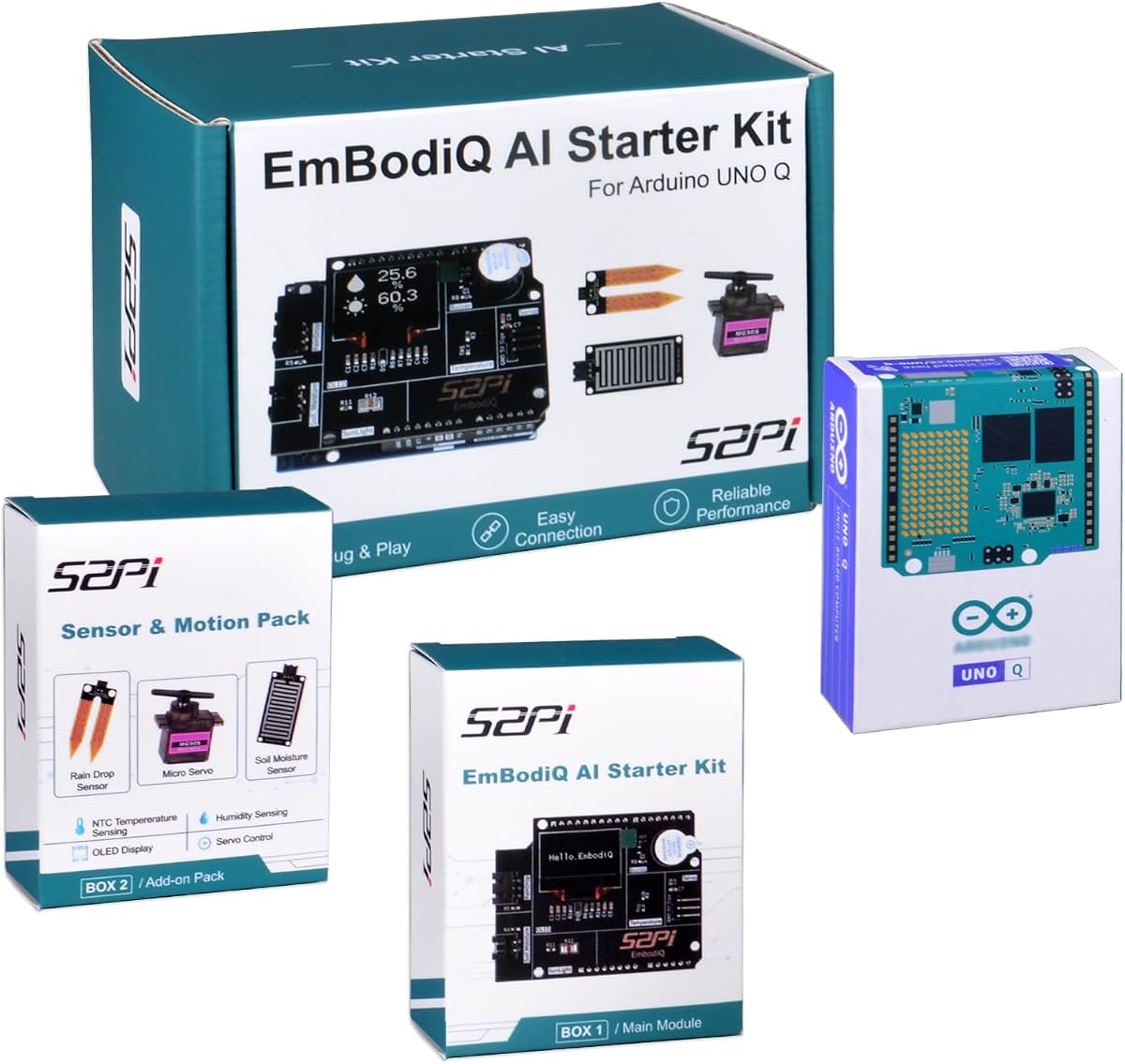
The GeeekPi EmbodiQ AI Starter Kit allows you to control hardware using natural language making it a unique choice for AI enthusiasts. It uses the UNO Q with 4GB RAM and an AI Agent HAT to interpret your commands and execute tasks like moving servos or reading sensors.
We may earn a commission when you buy through this link, at no additional cost to you.
You can talk to your sensors and say exactly what you want to do without writing code. It supports multiple AI models via API giving you flexibility. The included sensors make it ready for smart gardening or weather stations.
The lower rating indicates some users face stability issues depending on API latency which is expected for cloud-based AI. This is acceptable for experimental projects but may not suit real time critical systems.
This kit is for makers who want to experiment with voice control and AI reasoning without deep coding. It is a great way to visualize the future of human hardware interaction.
Support for OpenAI and other APIs lets you choose your preferred model via a web interface for custom behavior.
We may earn a commission when you buy through this link, at no additional cost to you.
The Arduino UNO R4 WiFi combines Renesas and ESP32-S3 chips for powerful dual-core processing and robust wireless communication. With a 4.7 rating it is favored for IoT projects that need reliable Wi-Fi and Bluetooth without additional shields.
We may earn a commission when you buy through this link, at no additional cost to you.
It includes a CAN bus for reliable industrial communication and a 12-bit DAC for high precision analog output. The built-in LED matrix provides visual feedback for status or data. USB-C and Qwiic connectors simplify connections.
It lacks the heavy AI processing of the UNO Q but excels at connectivity and data transfer. This trade-off is acceptable if your project prioritizes communication over local machine learning.
Buy this for advanced IoT or automotive projects requiring wireless reliability. It is the best choice for modern smart devices.
USB-C and Qwiic connectors reduce wiring complexity making it easier to add sensors and peripherals.
We may earn a commission when you buy through this link, at no additional cost to you.
This ELEGOO UNO R3 Kit is designed for absolute beginners with over 22 guided lessons that teach everything from blinking LEDs to controlling motors. It has a 4.7 rating for its organized approach and the variety of components included in one box.
We may earn a commission when you buy through this link, at no additional cost to you.
You can start coding without soldering using the included breadboard and pre-soldered LCD. The tutorial helps you understand logic quickly so you can create your own projects. It is perfect for family builds or STEM classes.
The lessons may seem basic compared to advanced AI but they build a strong foundation. This is acceptable because you need to know basics before advancing to complex boards.
This is the best kit for teaching electronics to children or those new to programming. It removes the confusion of sourcing parts individually.
All modules plug directly into the breadboard allowing you to focus on wiring and testing without tools.
We may earn a commission when you buy through this link, at no additional cost to you.
The ELEGOO UNO R3 Board is a practical and reliable controller for maker desks and classrooms. With a 4.7 rating it provides the classic ATmega328P core for everyday projects including sensors motors and displays.
We may earn a commission when you buy through this link, at no additional cost to you.
It comes with a clear labeled header design that simplifies wiring and includes a USB cable for immediate use. This makes it easier to connect to other modules without tracing pin numbers manually.
While it is a basic board it is highly reliable for simple automation. This is acceptable because it focuses on stability and ease of use for daily tasks.
Choose this if you need a standard board to expand your work. It is a solid choice for robotics and testing.
The ATmega16U2 USB interface supports smooth sketch uploads and serial communication.
We may earn a commission when you buy through this link, at no additional cost to you.
This Arduino UNO R3 Board provides a standard foundation with a 16MHz clock speed and essential communication interfaces. It offers 14 digital and 6 analog pins for versatile connectivity with sensors and modules.
We may earn a commission when you buy through this link, at no additional cost to you.
It supports UART SPI and I2C making it compatible with a wide range of peripherals. This allows you to expand your capabilities easily. The package includes a USB cable for immediate use.
Performance is limited to basic logic but it is reliable for smart home tech. This is acceptable for hobbyists who need a cheap working board.
Buy this for simple DIY tasks. It is a direct solution for those needing a standard Arduino.
The board works with many Arduino shields ensuring you can add functions without changing hardware.
We may earn a commission when you buy through this link, at no additional cost to you.
This UNO R3 Board offers a versatile open-source design for customization and integration with various sensors. With a 4.5 rating it is known for reliable performance and broad compatibility with different development environments.
We may earn a commission when you buy through this link, at no additional cost to you.
It supports 7-12V input and has ample I/O pins for interactive projects. It works with Raspberry Pi models allowing for hybrid setups. This makes it a flexible choice for smart home automation.
While it lacks advanced features it is perfect for prototyping ideas. This is acceptable for hobbyists exploring electronics without high costs.
Choose this for DIY projects needing flexibility. It is a must-have for innovative interactive systems.
Open-source design allows for customization and access to vast code libraries.
We may earn a commission when you buy through this link, at no additional cost to you.
Choosing the right board depends on your project needs whether you require AI processing or simple control.
Consider if you need a hybrid CPU like the UNO Q for AI or a standard MCU like the REV3 for basic tasks. Higher power allows for complex local processing.
Prioritize a CPU if you need to run Linux or Python scripts directly on the board.
More RAM and storage enable running multiple processes and storing logs. The UNO Q offers 4GB RAM and 32GB eMMC for heavy workloads.
Select at least 4GB RAM if you plan to use machine learning models locally.
Look for built-in Wi-Fi and Bluetooth for IoT projects. Some boards like the R4 WiFi offer CAN bus for industrial use.
Choose a board with wireless capabilities to avoid extra shields and wiring.
The UNO Q supports Linux Debian allowing for Python coding and complex development. Traditional boards rely on C++ sketches only.
Pick a Linux capable board if you need flexibility in programming languages.
Check for shield compatibility or Qwiic connectors for easy sensor integration. The UNO Q maintains classic form factor compatibility.
Ensure the board supports the sensors you need without complex wiring.
Basic boards like the REV3 are affordable while hybrid AI boards cost more. Determine if AI capabilities justify the price.
Stick to classic boards for simple projects to save money.
Kits often include cases power supplies and cables which add value. The GeeekPi kit offers a protective case and hub.
Consider kits if you want a complete solution ready to use immediately.
The UNO Q supports Arduino App Lab for a unified interface. Traditional IDEs work with standard boards.
Choose a platform with a familiar IDE if you want a smooth learning curve.
Connect your board to a computer via USB-C and install the necessary drivers and IDE. Use the Arduino App Lab to manage your projects easily.
For advanced AI tasks enable Linux Debian on the UNO Q and install libraries using standard terminal commands. Test your scripts before connecting to external hardware.
Keep the board clean and use a case to protect it from dust. Ensure proper ventilation to prevent overheating during long runs.
The UNO Q has a hybrid Qualcomm and STM32 processor with Linux and AI capabilities while the REV3 uses a standard microcontroller for basic control. The Q is suited for complex AI tasks and the REV3 for simple electronics.
Yes the UNO Q runs Linux Debian OS allowing you to use Python alongside Arduino Sketches. This provides flexibility for both high-level logic and low-level control.
The UNO Q maintains the classic UNO form factor so most standard shields can be connected easily. This allows you to reuse existing components in your new projects.
The UNO Q can be powered via USB-C but heavy workloads may require a dedicated 45W supply. Ensure your power source provides stable voltage to avoid crashes.
You can use standard GPIO pins or the Qwiic connector for I2C sensors. The UNO Q supports various interfaces for easy sensor integration.
It is best for those with some coding experience due to its Linux interface. However the App Lab simplifies the process for those new to AI development.
The UNO Q series offers powerful AI capabilities while the REV3 remains a solid choice for basic prototyping and education.
Prioritize processing power and memory if you need local AI or else choose a standard board for simplicity.
Always check current prices and availability as bundles may offer better value for specific needs.