
LG UltraFine evo 32U990A-S
4.5Editor score
Thunderbolt 5 support included
Nano IPS Black panel tech
Built-in KVM functionality
The 6K monitor category has exploded with options designed for professionals who demand exceptional clarity and color precision. These displays offer nearly twice the pixel density of standard 4K screens, making text razor sharp and details incredibly vivid for creative work.
We compared ten leading models based on panel quality, connectivity options, color accuracy, and ergonomic features. Our analysis focuses on real-world performance for video editing, design, and productivity while considering value and reliability across different user needs.
Each pick below highlights specific strengths like touch capability, ultra-wide formats, or gaming speeds. Prices and availability change frequently so check current listings before buying to ensure you get the latest pricing and warranty terms for your setup.
4.5Editor score

3.9Editor score
3.9Editor score
As an Amazon Associate we earn from qualifying purchases.
This table provides a side-by-side look at the key specifications for each of the ten models reviewed in this guide.




The ASUS ProArt PA32QCV stands out as a top contender for professionals seeking high fidelity visuals. With a rating of 3.9 from verified users, it delivers on its promise of precision color and sharp detail.
We may earn a commission when you buy through this link, at no additional cost to you.
Its factory calibration ensures Delta E values stay below 2, making it reliable for print and video work. The dual Thunderbolt 4 ports support daisy chaining which simplifies multi monitor setups significantly.
While the price is steep the included Adobe Creative Cloud trial adds value. The lack of USB-C charging is a minor trade-off given the robust port selection and build quality.
Creative professionals who prioritize color fidelity should consider this model first. It offers a balanced mix of performance and features that justify the investment for serious workflows.
The M Model-P3 Color Preset Mode ensures seamless color transition when working across Mac devices.
Ambient light sensors adjust brightness and color temperature to reduce eye strain during long sessions.
We may earn a commission when you buy through this link, at no additional cost to you.
Dell's 52-inch 6K monitor offers an expansive workspace that transforms how you handle complex projects. Users praise its cinematic 21:9 aspect ratio and smooth motion handling.
We may earn a commission when you buy through this link, at no additional cost to you.
The IPS Black panel delivers a 2000:1 contrast ratio which ensures deep blacks and vibrant colors. Thunderbolt 4 support with 140W power delivery allows for powerful single cable connections.
Eye comfort features like low blue light and ambient light sensing make it suitable for all-day use. However the size and cost mean it suits dedicated workstations rather than home offices.
Editors and designers needing multiple windows open at once will find this screen invaluable. It provides the ultimate in screen real estate without needing a multi monitor setup.
This panel type significantly improves contrast over standard IPS panels for more lifelike visuals.
Picture-by-Picture and KVM support let you control two computers with one mouse and keyboard.
We may earn a commission when you buy through this link, at no additional cost to you.
The G32P 32-inch monitor impresses with its 223 PPI and vibrant IPS panel. Reviewers highlight the sharpness and accurate color reproduction ideal for media consumption and creation.
We may earn a commission when you buy through this link, at no additional cost to you.
HDR support and 99% DCI-P3 coverage ensure content looks as intended on professional workflows. The CNC-machined aluminum body adds durability and a premium feel to the desk setup.
While the glossy finish might reflect bright office lights it enhances the vividness of dark scenes and rich colors. Eye care features help reduce strain during long editing sessions.
Content creators wanting a balance of resolution and color performance will appreciate this model. It offers a compelling alternative to more expensive professional panels with similar visual quality.
With 223 PPI text and images appear exceptionally sharp and detailed.
Height swivel tilt and pivot adjustments help find a comfortable viewing position.
We may earn a commission when you buy through this link, at no additional cost to you.
Samsung introduces a novel dual mode feature that shifts between 6K and 3K resolutions. This allows gamers to prioritize either visual fidelity or speed depending on the task.
We may earn a commission when you buy through this link, at no additional cost to you.
At 3K the monitor reaches 330Hz with a 1ms response time for competitive play. The Fast IPS panel ensures wide viewing angles and consistent colors across the screen.
HDR10+ gaming optimizes brightness and contrast for immersive experiences. While the 6K option is stunning for creative work the gaming features are the main draw here.
Gamers and content creators who want one display for both worlds will find this versatile. It bridges the gap between professional and recreational use cases effectively.
Switch between high resolution for work and high refresh rate for gaming instantly.
DP 2.1 and HDMI 2.1 ensure compatibility with next-gen consoles and PCs.
We may earn a commission when you buy through this link, at no additional cost to you.
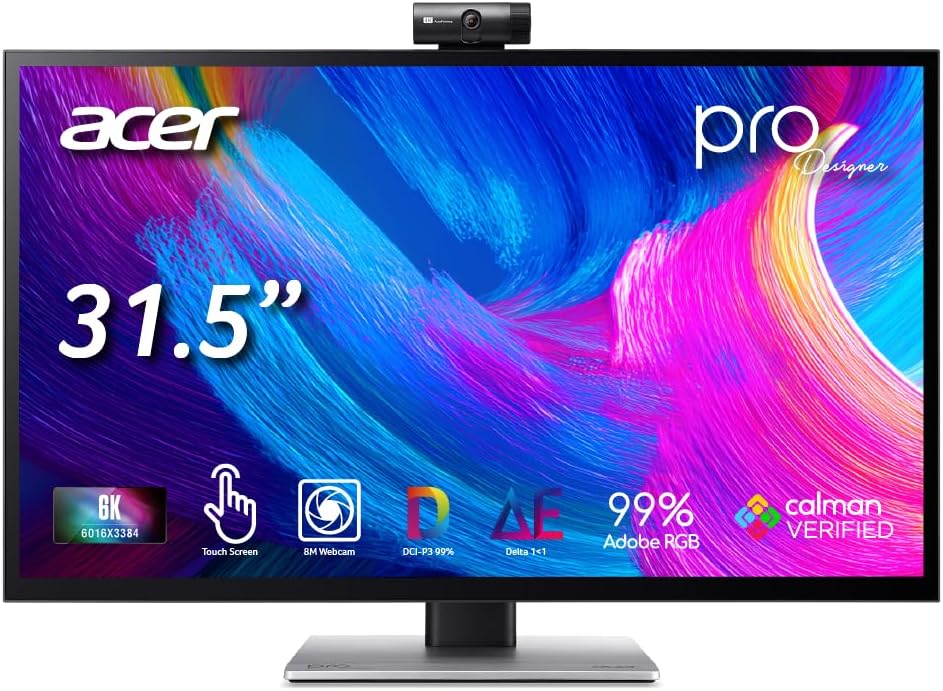
The Acer ProDesigner brings touch interaction to the 6K market allowing direct manipulation on screen. This is a game changer for artists who prefer drawing or annotating directly.
We may earn a commission when you buy through this link, at no additional cost to you.
Factory calibration ensures Delta E is under 1 which is exceptional for print work. The built-in 8MP webcam and mic array remove the need for external peripherals during client calls.
DisplayHDR 600 certification ensures accurate previews of high dynamic range content. The Creator Hub software helps manage color spaces and workflows without leaving the display settings.
Designers and editors working with touch interfaces will find this model indispensable. It consolidates tools and reduces desk clutter significantly for efficient creative work.
Use the stylus or fingers to draw and edit directly on the display surface.
Hardware noise reduction and 8MP resolution make video calls clear and professional.
We may earn a commission when you buy through this link, at no additional cost to you.
The G32X earns a perfect 5.0 rating for its clean aesthetic and reliable performance. Users appreciate the minimalist look that blends well with modern desks.
We may earn a commission when you buy through this link, at no additional cost to you.
With 218 PPI and anti-glare coating it offers sharp visuals without distracting reflections. The 100W high-speed port charges laptops while streaming video efficiently.
The aluminum body ensures durability while maintaining a sleek profile. It is ideal for users who want high resolution without excessive marketing features.
Professionals seeking a clean and efficient workspace will find this monitor fitting. It delivers core performance without unnecessary complexity or bulk.
Multi-layer coatings reduce reflections for better visibility in bright environments.
100x100mm VESA compatibility allows flexible arm mounting options.
We may earn a commission when you buy through this link, at no additional cost to you.
Dell's U5226KW is designed for heavy-duty office setups with extensive connectivity needs. It serves as a central hub for multiple devices and peripherals.
We may earn a commission when you buy through this link, at no additional cost to you.
Dual Thunderbolt 4 ports and HDMI 2.2 offer flexibility for diverse workstation configurations. The remote control simplifies settings adjustments during presentations or meetings.
Software tools like Dell Color Management ensure consistent output across the fleet. This monitor is best suited for corporate environments requiring reliability and standardization.
IT managers and office workers who need centralized control should consider this model. It streamlines device management and enhances productivity in multi-device settings.
Multiple ports allow direct connections to laptops cameras and drives.
Adjust settings remotely without leaning over the monitor.
We may earn a commission when you buy through this link, at no additional cost to you.
LG's UltraFine evo series leads with Thunderbolt 5 support offering up to 80 gigabits per second. This is future-proofing for the highest speed data and video transfers.
We may earn a commission when you buy through this link, at no additional cost to you.
Nano IPS Black technology improves contrast and color accuracy for professional work. The bundle includes essential accessories like cable ties and a cleaning kit.
KVM functionality helps switch between two systems easily without extra hardware. The DisplayHDR 600 certification ensures high quality dynamic range previews.
Creators needing the fastest connection speeds and best visuals should choose this model. It justifies the cost with cutting-edge tech and solid build quality.
Achieve up to 80Gbps data speeds for rapid file transfers and display.
Control multiple computers with a single keyboard and mouse setup.
We may earn a commission when you buy through this link, at no additional cost to you.
This bundle offers a solid 6K monitor with an extended warranty for peace of mind. The 450 Nit brightness ensures clear visibility even in well-lit rooms.
We may earn a commission when you buy through this link, at no additional cost to you.
USB Type-C allows fast data transmission and simplified connectivity. Dell includes multiple cables in the box to start using it immediately.
While the response time is adequate for general use it is not aimed at fast gaming. The value lies in the warranty and reliability of the setup.
Business users and home office workers wanting support are well served here. It provides dependable performance with extra protection included.
Two year CPS Enhanced Protection Plan covers hardware issues and defects.
Cables for USB-C DisplayPort and USB are included out of the box.
We may earn a commission when you buy through this link, at no additional cost to you.
For users who already have monitor arms this renewed option saves space and money. It offers the same 52-inch curved display and Thunderbolt 4 hub.
We may earn a commission when you buy through this link, at no additional cost to you.
The lack of a stand requires VESA mounting but allows flexible positioning. A 120Hz refresh rate ensures smooth scrolling and media consumption.
This model is ideal for secondary setups or workspaces needing large formats without clutter. Check the renewed conditions carefully before purchase.
Technical users wanting to customize their mounting setup will find this practical. It delivers premium specs at a lower total cost with existing hardware.
Requires a separate arm or stand but allows flexible positioning.
Immersive 21:9 aspect ratio with curved edges for reduced glare.
We may earn a commission when you buy through this link, at no additional cost to you.
Selecting the right 6K monitor requires evaluating resolution panel type connectivity and ergonomics. This section breaks down the critical factors to consider.
6K resolution typically refers to screens with 6144 pixels across. This provides high pixel density reducing eye strain from zooming.
Look for a PPI over 200 for sharp text and detailed visuals in creative work.
IPS panels offer wide viewing angles and accurate color. IPS Black variants improve contrast ratios significantly for better blacks.
Avoid TN panels for color critical work as they lack viewing angles and accuracy.
Professional work requires wide color gamuts like DCI-P3 and Adobe RGB. Aim for 98% or more coverage for accuracy.
Factory calibration ensures Delta E is low which is essential for print and video delivery.
Thunderbolt 4 or 5 allows single cable video data and charging. Ensure your laptop matches the port standard.
HDMI 2.1 is good for console connections while USB-C is best for laptops.
Standard 60Hz is fine for work but higher rates smooth motion for editing or gaming. Look for under 5ms response time.
Fast IPS panels are ideal for those who switch between work and entertainment.
Adjustable stands reduce neck strain by allowing height and tilt. VESA mounting lets you use arms for flexibility.
Choose aluminum builds for durability and a premium feel on your desk.
Flicker-free backlighting and low blue light modes protect vision. Ambient sensors adjust brightness automatically.
Prioritize TUV certified features if you work long hours daily.
Professional monitors should come with long warranties. Check if you can register for extensions online.
Bundle packs may include extended protection which is valuable for business use.
Set your display to native resolution in your operating system settings to ensure maximum clarity. Scaling options should be adjusted to keep text readable on 6K screens.
Calibrate colors periodically using hardware tools or the built-in presets. This maintains accurate output over time especially for creative work.
Clean the screen with a soft microfiber cloth to avoid scratches. Keep the area dry and avoid harsh chemicals that could damage coatings.
Yes for professional and technical work it provides clarity and screen real estate. General users may find 4K sufficient but creators benefit greatly from the sharpness and space.
Yes graphics cards must support 6K output which usually requires newer models. For 6K60Hz check if your card supports the required bandwidth for your chosen resolution.
Absolutely most models support macOS. Look for MacBook color presets and Thunderbolt support for seamless integration and charging.
Thunderbolt 5 offers faster data transfer speeds up to 80Gbps. This is useful for large files and high bandwidth video signals.
Curved screens enhance immersion and reduce eye movement. They are ideal for wide productivity tasks but straight screens suit color calibration better.
High quality monitors can last 5 to 10 years with proper care. LEDs do not degrade as quickly as older technologies but brightness may dim over time.
It smooths scrolling and animations reducing eye strain. It is less critical for static work but beneficial for video editors or multitaskers.
It saves desk space but audio quality is often limited. Use external speakers for music or video calls if sound quality matters.
We reviewed ten top 6K monitors ranging from professional creative tools to versatile gaming screens. The ASUS ProArt PA32QCV leads for balanced performance and color accuracy.
Prioritize panel quality and connectivity that match your current and future devices. High pixel density and calibration features are worth the investment for professionals.
Check current availability and pricing as these models evolve quickly. Always verify the warranty details to ensure long term support for your investment.