
Adesso AKB-670UB Mechanical Keyboard
4.8Editor score
Copilot AI hotkey included
Multi-OS layout support
Large print keys for visibility
This guide compares the top AI keyboards featuring voice typing, meeting notes, and smart shortcuts to boost productivity and streamline your workflow.
AI keyboards are redefining how we interact with computers by integrating smart features directly into the hardware. These devices offer voice typing, meeting transcription, and dedicated AI keys to streamline workflows. Choosing the right model depends on your specific needs for productivity and comfort.
We evaluated ten leading models based on build quality, AI integration, and typing experience. Our analysis covers wireless connectivity, switch types, and software capabilities. This list highlights the most effective tools for enhancing efficiency in both professional and personal settings.
Each pick showcases unique strengths, from budget-friendly options to premium ergonomic designs. We include detailed pros and cons to help you make an informed decision. Please note that prices and availability may change frequently on retailer platforms.
4.8Editor score

4.4Editor score

3.3Editor score
This side-by-side comparison highlights the key specifications and unique features of each model to help you find the perfect fit for your workspace.


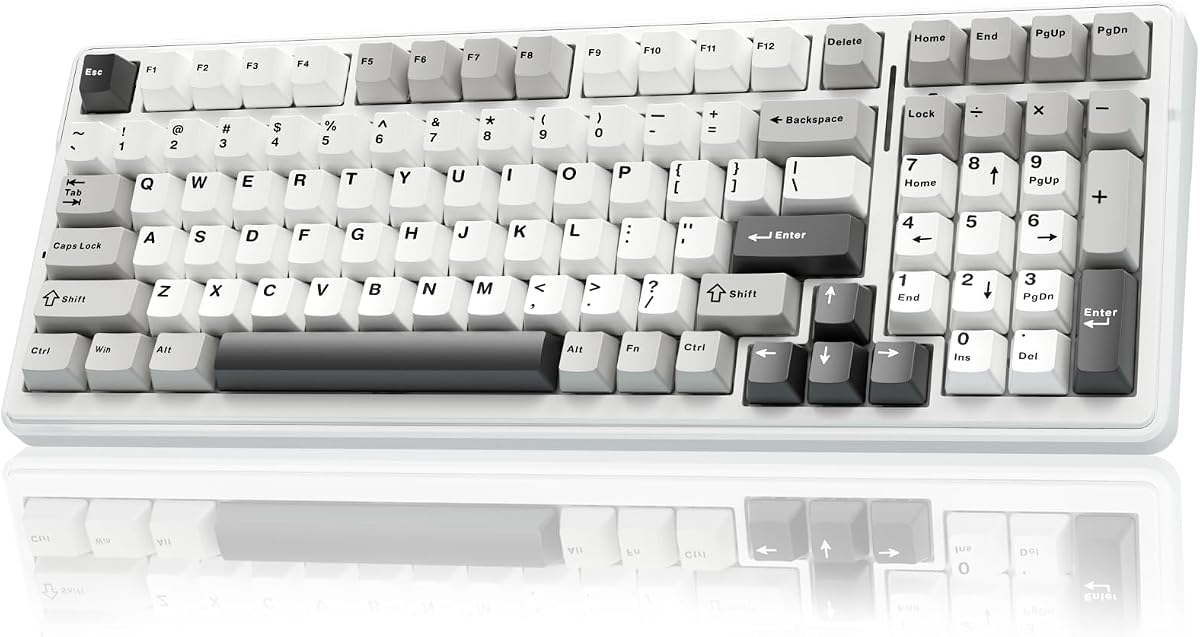


The VSD K1 Pro is a powerful tool for streamers and power users who need extensive macro capabilities. It features a built-in TFT display and streaming deck functions that go beyond standard keyboard inputs. With a rating of 4.2, it appeals to those wanting hardware-level customization.
We may earn a commission when you buy through this link, at no additional cost to you.
Its standout feature is the ability to create unlimited switchable pages with LCD keys and knobs via the VSD Craf software. This allows you to assign actions for game combos, app launching, or media control directly from the board. The gasket mount and five-layer dampening structure ensure a premium typing feel.
While the display offers great customization, it requires a wired connection and software setup on Windows or macOS for full functionality. Users may find the initial configuration time-consuming compared to plug-and-play options. However, the resulting workflow efficiency is worth the effort for dedicated professionals.
This keyboard is ideal for streamers, gamers, or anyone needing complex macro sequences. If you value hardware integration and visual feedback during tasks, the K1 Pro delivers a unique experience. We recommend it for users who prioritize customizability over simplicity.
The LCD keys allow for personalized images and animations, making it easy to identify specific actions at a glance during intense sessions.
Hot-swappable switches let you tailor the sound and feel without soldering, supported by pre-lubed stabilizers for a smooth keystroke.
We may earn a commission when you buy through this link, at no additional cost to you.
The Virtusx Phronesis brings AI capabilities directly into your typing workflow. It features a dedicated voice key for hands-free dictation and meeting recording that generates structured notes. With a 4.4 rating, it stands out as a productivity powerhouse for professionals.
We may earn a commission when you buy through this link, at no additional cost to you.
Key strengths include its ability to label speakers during meetings and create action items automatically. The one AI chat feature lets you switch between models like ChatGPT and Gemini to brainstorm or summarize text. The Smart Toolbar provides quick tools for rewriting or translating selected text.
Users should note that advanced features require the Virtusx app and an internet connection. While three months of Pro plan are included, ongoing access to unlimited words or meeting minutes may need a subscription upgrade. This is a reasonable trade-off for the extensive functionality provided.
This keyboard is best for remote workers, students, or anyone attending frequent meetings. If you want to reduce manual note-taking and leverage AI for writing, the Phronesis is a top contender. It transforms the keyboard into a comprehensive assistant.
Capture calls and lectures directly from the keyboard, with speaker-labeled transcriptions that save hours of post-meeting work.
Access multiple AI models from one workspace, allowing you to leverage the strengths of different systems for complex tasks.
We may earn a commission when you buy through this link, at no additional cost to you.
The Adesso AKB-670UB offers a cost-effective way to integrate AI into your typing routine. It features a dedicated Copilot AI hotkey that provides instant access to Microsoft Copilot. With a high rating of 4.8, it is a favorite for budget-conscious users.
We may earn a commission when you buy through this link, at no additional cost to you.
Its large print keys make it ideal for users who struggle with small text, ensuring better visibility and ease of use. The tactile blue switches provide satisfying feedback, while the multi-OS layout allows seamless switching between Windows and macOS. Multimedia hotkeys add convenience for daily tasks.
While it lacks advanced voice input or meeting notes, it covers the essentials of AI access at a low price. The build quality is solid, but it does not offer the same level of customization as higher-end models. For basic productivity enhancement, it is a reliable choice.
This keyboard is perfect for students or office workers on a tight budget. If you want quick access to AI assistance without a major investment, the AKB-670UB is a smart buy. It delivers core functionality without unnecessary complexity.
The large print keys reduce eye strain during extended typing sessions, making it a great choice for users with visual sensitivities.
Press a single key to launch AI assistance for code generation or creative suggestions, streamlining your workflow instantly.
We may earn a commission when you buy through this link, at no additional cost to you.
The RK ROYAL KLUDGE F99 is designed for users who need multilingual communication tools. It supports real-time voice-to-text transcription and translation, recognizing 300+ words per minute. The rating of 3.4 suggests room for improvement in overall satisfaction.
We may earn a commission when you buy through this link, at no additional cost to you.
Key strengths include its one-touch AI shortcuts for tasks like PPT generation and meeting notes. The integrated USB hub keeps your desk tidy by offering convenient connectivity for peripherals. The triple dampening structure and PBT keycaps provide a smooth and quiet typing feel.
The wired-only connection may limit flexibility compared to wireless models. Some users report mixed experiences with the software integration for translation features. Despite these issues, the hardware build and specific AI tools remain valuable for international teams.
This keyboard suits office workers who frequently handle multilingual tasks or need translation. If you prefer a wired connection for stability and want translation tools, it is a viable option. We recommend checking recent reviews for software updates before buying.
Supporting 60+ languages, the voice translation feature bridges communication gaps instantly during calls or notes.
The integrated USB hub reduces cable clutter by allowing you to connect mice or headsets directly to the keyboard.
We may earn a commission when you buy through this link, at no additional cost to you.
The Razer Pro Type Ergo focuses on health and efficiency with its split ergonomic design. It features an AI prompt master to save time with one-touch shortcuts for summarizing or drafting emails. The 3.3 rating indicates a niche appeal due to its specialized design.
We may earn a commission when you buy through this link, at no additional cost to you.
Its adjustable tilt and wrist rest minimize pressure during long workdays. The command dial and macro keys enhance productivity by allowing custom functions for multitasking. Low-profile keycaps improve typing speed and accuracy across documents and code.
The split layout may require an adjustment period for users accustomed to standard keyboards. The premium price is justified for those needing ergonomic support, but it might not suit everyone. It is a specialized tool rather than a general-purpose device.
This keyboard is ideal for professionals experiencing wrist pain or prioritizing posture. If you value comfort and productivity shortcuts in one device, it is worth considering. We recommend testing the layout in-store if possible before purchase.
The split layout and adjustable tilt reduce strain on wrists and hands, making it a strong choice for long typing sessions.
The AI prompt master integrates directly with your workflow, offering quick access to common AI tasks without app switching.
We may earn a commission when you buy through this link, at no additional cost to you.
The Adesso EasyTouch 1200 offers robust customization through open-source VIA software. It includes a Copilot AI hotkey for instant access to AI tasks and features a 4000mAh battery for long usage. With a 4.6 rating, it is a favorite among enthusiasts.
We may earn a commission when you buy through this link, at no additional cost to you.
Key strengths include the ability to remap keys and layouts easily without proprietary software. The gasket structure reduces noise and improves typing feel. USB-C charging ensures longevity, and the compact design fits well in smaller setups.
The mini size may limit functionality for users needing a full number pad. Initial configuration via VIA might be complex for non-technical users. However, the flexibility it offers is unmatched for those who want total control over their keyboard.
This keyboard is best for tech-savvy users who value open-source tools. If you need a portable keyboard with AI access and customization, the 1200 is a strong choice. It balances performance with versatility effectively.
VIA support allows you to personalize layouts and shortcuts easily, giving you total control over your typing experience.
With a large battery and USB-C charging, you can use this keyboard for extended periods without frequent recharging needs.
We may earn a commission when you buy through this link, at no additional cost to you.
The AULA F75 Pro is a versatile mechanical keyboard with a 75% layout for gaming and office use. It features a multi-function knob for volume and media control. The 4.6 rating reflects high satisfaction among users seeking quality and style.
We may earn a commission when you buy through this link, at no additional cost to you.
Its tri-mode connection supports Bluetooth, wireless, and USB-C for up to five devices. The side-printed PBT keycaps are durable and stylish. The gasket structure and dampening provide a solid, responsive typing experience for games and work.
While it lacks dedicated AI hotkeys, its programmable keys can serve similar functions with software. The design is visually appealing but may not meet specific AI productivity needs. It is a solid general-purpose tool rather than a specialized AI device.
This keyboard suits gamers and typists who value build quality and customization. If you want a compact board with a knob and RGB, the F75 Pro is recommended. It excels in hardware performance over AI software.
Connect multiple devices via Bluetooth or wireless and switch seamlessly, making it ideal for multi-device workflows.
Gasket structure and double-injection molding for keycaps ensure durability and a satisfying, consistent typing experience.
We may earn a commission when you buy through this link, at no additional cost to you.
The AULA F99 offers a 96% layout that balances compactness with full functionality. It supports tri-mode connection and features an 8000mAh battery for extended use. With a 4.5 rating, it is a popular choice for users needing space efficiency.
We may earn a commission when you buy through this link, at no additional cost to you.
Its hot-swappable PCB and linear switches provide a smooth, quiet typing experience. The gasket structure enhances stability and sound. Programmable keys allow for macro customization to streamline tasks, though AI features are not built-in.
Lack of dedicated AI integration may be a drawback for productivity-focused users. The design is primarily gaming-oriented but works well for general work. It is a robust option if you prioritize hardware over software tools.
This keyboard is best for users needing a compact full layout with long battery life. If you value customization and smooth typing without needing AI, the F99 is a strong contender. It delivers reliable performance for daily tasks.
The 96% layout keeps arrow keys and a number pad while saving desktop space, perfect for smaller workstations.
With an 8000mAh battery, you can use this keyboard for weeks without recharging, ensuring uninterrupted workflow.
We may earn a commission when you buy through this link, at no additional cost to you.
The Logitech Alto Keys K98M offers a premium mechanical experience with gasket mounting for smooth keystrokes. It includes Action Keys programmable via Logi Options+ to access features. The 4.4 rating reflects high satisfaction for build quality.
We may earn a commission when you buy through this link, at no additional cost to you.
Its UniCushion design absorbs vibrations for comfort and precision. The clicky Marble switches provide tactile feedback without being too loud. Wireless connectivity via Bluetooth or Logi Bolt ensures seamless multi-device use for a year on a single charge.
It lacks built-in AI hotkeys, relying on software for enhancements. This might be limiting for users seeking hardware-level AI. However, the typing quality and durability make it a strong choice for professionals.
This keyboard suits users seeking a premium tactile experience and reliability. If you prefer hardware quality over dedicated AI buttons, the K98M is excellent. It balances style and function effectively for office environments.
The gasket mount ensures smoother keystrokes and reduced noise, making it comfortable for extended typing sessions.
Logi Options+ allows you to tailor the keyboard to your needs, including shortcuts for AI features through software.
We may earn a commission when you buy through this link, at no additional cost to you.
The Adesso EasyTouch 130SB is unique for its built-in smart card reader and Copilot AI hotkey. It offers secure authentication and AI access directly from the keyboard. The 4.6 rating highlights its reliability and functionality for specific environments.
We may earn a commission when you buy through this link, at no additional cost to you.
Its smart card reader supports various security standards for banking and web applications. The large print keycaps enhance visibility, and red switches provide silent feedback. Multimedia and internet hotkeys add convenience for daily tasks.
The wired-only design limits mobility but ensures stable security connections. It is specialized for secure workstations rather than general home use. Users in regulated industries will find it particularly valuable.
This keyboard is best for security-conscious professionals and financial institutions. If you need integrated card readers and AI access with large keys, it is the top choice. We recommend it for specialized secure environments.
Built-in card readers meet high security standards, streamlining login processes for banking and secure applications.
Large print keycaps ensure clear character legibility, reducing eye strain for users requiring high contrast.
We may earn a commission when you buy through this link, at no additional cost to you.
Selecting the right AI keyboard involves understanding your specific workflow needs and the level of AI integration you require.
Consider what specific AI tasks you need, such as voice typing, meeting notes, or AI chat access. Some keyboards offer dedicated hardware keys for instant access, while others rely on software. Decide if you need built-in microphones or external apps for AI functions.
Prioritize keyboards with hardware AI keys if speed is critical. Software-based solutions offer flexibility but may require more setup time.
Check if you need wireless connectivity like Bluetooth or 2.4GHz for multi-device use, or if a wired connection is sufficient. Wireless models offer flexibility but may have battery considerations. Wired models ensure stable connections for secure environments.
Choose wireless for portability and multi-device setups. Select wired for security and zero-latency requirements.
The layout should match your typing habits, whether you need a full numpad, a compact design, or an ergonomic split. Ergonomic models help prevent wrist strain, while compact ones save desk space. Test the switches for tactile or linear preference.
Select layouts based on desk size and hand comfort. Ergonomic shapes are best for long sessions to reduce physical strain.
Hot-swappable keyboards let you change switches without soldering, which is useful if you want to tweak the feel later. Pre-lubed switches offer a smoother experience out of the box. Ensure compatibility with your preferred switch type for maintenance.
Prioritize hot-swappable options if you value customization. They provide long-term flexibility without needing technical skills.
Evaluate the software required for AI features and customization. Some need proprietary apps that must be installed, while others work via open-source tools like VIA. Ensure compatibility with your operating system for seamless integration.
Check for multi-OS support if you switch between Windows and Mac. Open-source tools offer more control than proprietary software.
Look for keyboards rated for high keystroke lifespans and quality materials like PBT keycaps. Gasket mounts and sound dampening contribute to build quality and longevity. A sturdy case ensures resistance to wear and tear.
Invest in high-quality materials for daily use. A solid build ensures the keyboard remains functional over years of heavy typing.
Set a budget based on the features you truly need. AI-specific keyboards can vary widely in price, with premium models offering more tools. Basic models provide essential AI access at lower costs without extra bells and whistles.
Balance cost against required functionality. Avoid paying for features you won't use frequently.
To get the most out of your AI keyboard, install any necessary drivers or software apps on your computer. Configure the AI hotkeys and shortcuts according to your workflow preferences to ensure they trigger the actions you need.
Regularly clean your keyboard by brushing away dust and wiping the keys with a dry cloth. If your model has a built-in microphone, keep it free of debris to ensure accurate voice typing performance.
For wireless models, charge the battery periodically and store the keyboard in a protective case if transporting. Check for firmware updates to keep your AI features and security patches current for optimal performance.
Most AI keyboards support Windows and macOS, but some features may vary. Always check the product specifications for Linux or mobile OS compatibility.
Voice typing typically requires an internet connection to send data to AI servers. Offline modes may be available in specific models but are limited in scope.
Use the manufacturer's software to map specific AI functions to keys. Some keyboards allow direct remapping through tools like VIA or Logi Options+.
Many AI keyboards have gaming features like macros and anti-ghosting. However, specialized AI features may not be needed for pure gaming scenarios.
Battery life varies but often lasts weeks on a single charge. Look for models with large mAh capacity for longer periods between charges.
Some models allow you to customize AI shortcuts or integrate with multiple models. Others have fixed AI functions determined by the manufacturer.
We reviewed ten excellent options ranging from budget-friendly essentials to premium ergonomic designs. The Virtusx Phronesis leads in voice and meeting integration while the AKB-670UB offers accessible AI at a low price.
Prioritize your specific needs such as connectivity type, comfort, and AI feature depth. A model designed for voice input may not suit those needing macro automation, so match the tools to your tasks.
Remember that prices and availability fluctuate frequently. Always check the current price on retailer pages before making your final decision to ensure you get the best value.