
SCRIB3D P1 3D Printing Pen with Display
4.4Editor score
Adjustable temperature control
Stepless speed slider
Includes starter filament and stencils
Compare the top 3D printing pens for kids to find safe, easy-to-use tools that boost creativity, STEM skills, and screen-free fun for young creators.
3D printing pens allow children to draw in three dimensions using heated plastic that hardens instantly. These tools turn flat sketches into tangible sculptures, fostering spatial awareness and hands-on creativity. Choosing the right pen involves balancing safety features, ease of use, and filament compatibility to match your child's skill level.
We evaluated ten leading models based on safety certifications, nozzle temperature controls, and included accessories like stencils and mats. Our analysis focuses on pens designed specifically for younger users as well as versatile options that grow with their skills. Each product was assessed for build quality, operational simplicity, and potential for educational engagement.
This guide highlights unique strengths such as cool-touch nozzles, adjustable speed settings, and comprehensive starter kits. While prices vary significantly, we focus on value and functionality rather than cost. Always check current availability and bundle contents before purchasing since manufacturers frequently update what comes in the box.
4.4Editor score
4.4Editor score
4.5Editor score
This side-by-side comparison highlights key specifications across all ten models to help you identify the right features for your needs.


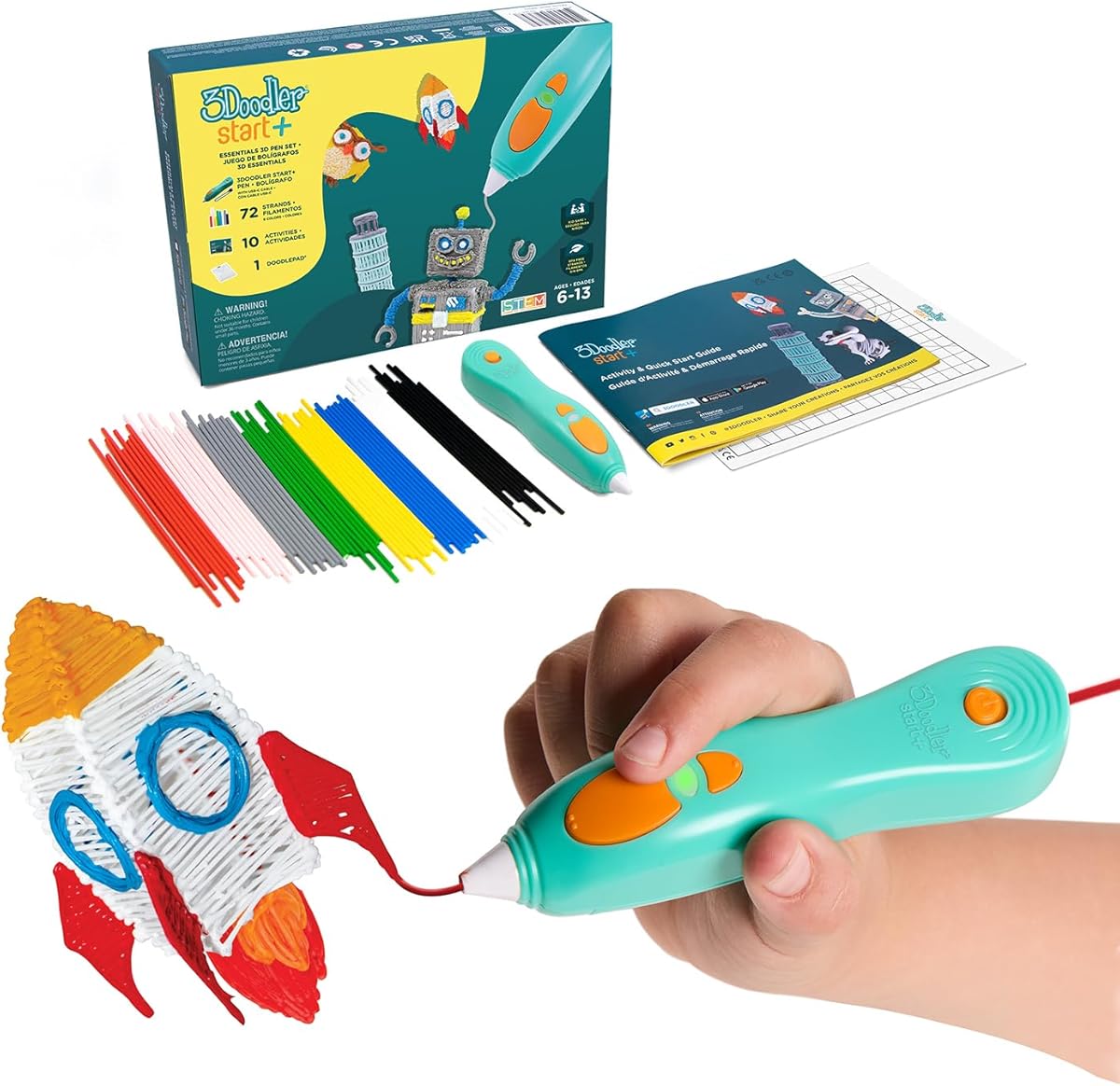
The 3Doodler Start+ Essentials set leads our list with its dedicated focus on safety and ease of use for young children. It holds a strong rating due to its cool-touch nozzle design that eliminates burn risks entirely. This pen is specifically engineered to make 3D drawing accessible without the complexity of traditional hot-end tools.
We may earn a commission when you buy through this link, at no additional cost to you.
Its standout feature is the upgraded experience which includes 50 percent more filament and new stencils to jumpstart creativity. The slimmer ergonomic body makes it easier for smaller hands to hold during long creative sessions. Parents appreciate the safety stand-by mode that prevents accidental heating when the pen is idle.
While the proprietary filament system limits options compared to universal pens, it ensures consistent quality and safety for kids. The price point reflects the premium safety features and comprehensive kit contents including the DoodlePad mat. The investment is justified by the peace of mind regarding heat exposure and burn injuries.
This pen is ideal for families seeking a safe introduction to 3D art for children aged 6 and older. Its educational STEM focus encourages spatial thinking while reducing screen time significantly. We recommend this set for beginners prioritizing safety and structured learning activities over advanced customization.
The nozzle and plastic are completely safe to touch even while the pen is operating. This design eliminates the primary concern parents have about traditional 3D printing tools.
The included activity guide connects drawing to real-world STEM concepts helping kids learn while they create. It supports structured learning goals alongside freeform artistic expression.
We may earn a commission when you buy through this link, at no additional cost to you.
The SCRIB3D P1 offers an accessible entry point into 3D pen technology without sacrificing essential features for creative control. Its display allows users to monitor temperature visually which helps prevent overheating or inconsistent extrusion. The pen balances affordability with robust functionality suitable for both beginners and intermediate users.
We may earn a commission when you buy through this link, at no additional cost to you.
Key strengths include its ability to handle both PLA and ABS filaments providing flexibility for different project types. The stepless speed slider enables precise control over line thickness whether doing intricate details or faster infill work. The included power adapter and starter colors mean you can begin creating immediately after unboxing.
The warm-up period of about two to three minutes requires planning before starting projects which some users may find inconvenient. While manual controls are straightforward they lack the digital precision found in higher-end models. However this limitation is acceptable given the competitive price and reliable performance overall.
This pen is best suited for budget-conscious buyers who still want reliable performance and filament versatility. It works well for family projects or classroom settings where cost efficiency matters. We recommend it for users ready to experiment with different materials without breaking the bank.
Compatibility with both PLA and ABS expands project possibilities beyond basic plastic drawing. Users can choose materials based on durability and flexibility needs.
The stepless slider allows smooth transitions between slow and fast speeds for varying line weights. This feature supports both detailed work and rapid structural builds.
We may earn a commission when you buy through this link, at no additional cost to you.
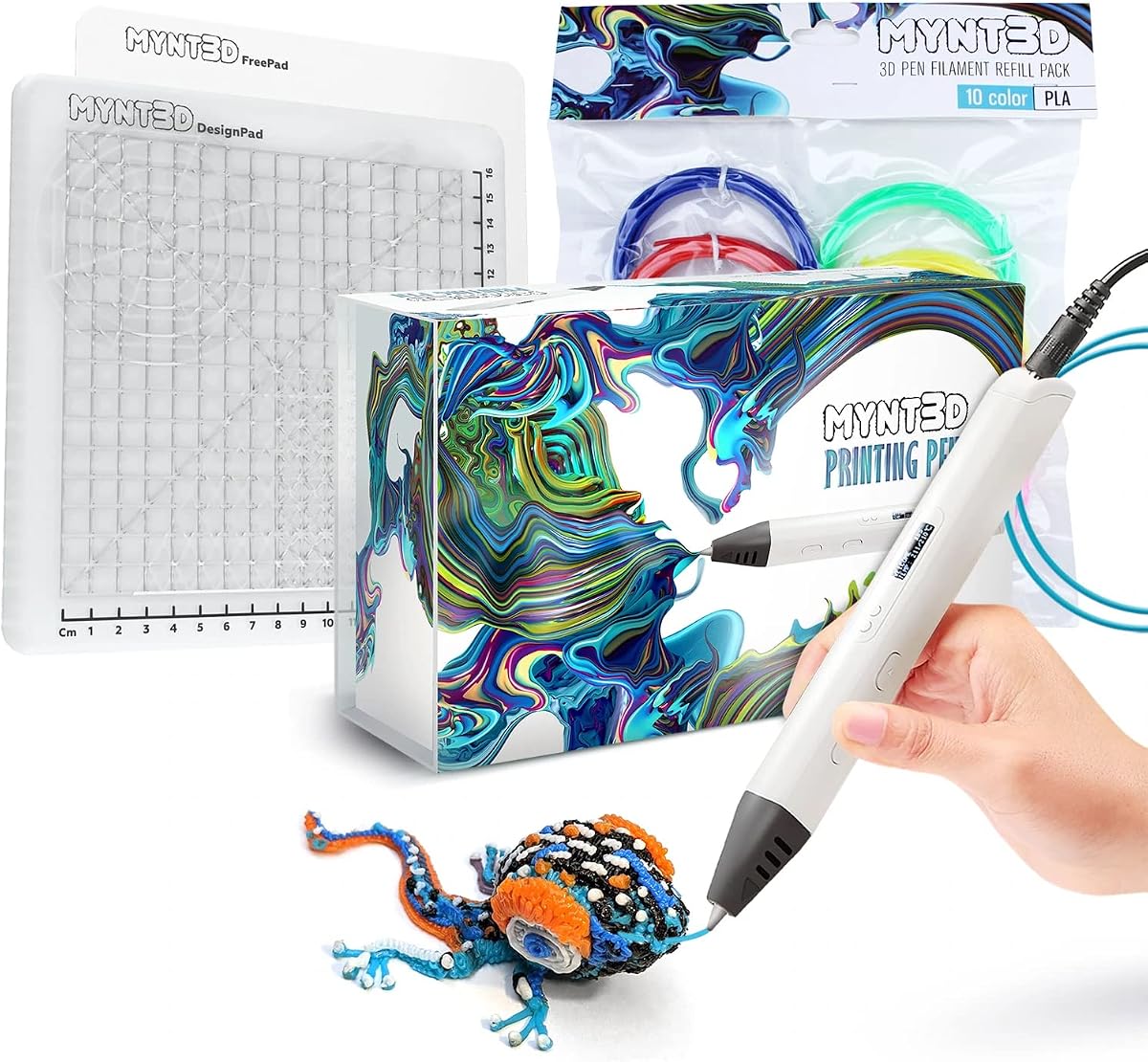
The MYNT3D Pro kit stands out with the highest user rating of any pen reviewed here due to its reliability and extensive accessories. The replaceable sealed nozzle ensures long-lasting operation which reduces maintenance needs for frequent creators. This premium bundle includes everything needed to start professional-quality 3D drawing immediately.
We may earn a commission when you buy through this link, at no additional cost to you.
Its strengths lie in the included ten-color PLA set which offers broad creative possibilities right out of the box. The DesignPad mat with channels helps create perfect geometric shapes while the FreePad supports tracing custom designs. These additions transform the pen from a simple tool into a complete creative workspace solution.
The price reflects the comprehensive nature of the kit and the durability of its components over time. Some users may find the initial investment significant compared to single-pen options but value is high. The warranty and unlimited customer service access provide additional security for expensive hardware purchases.
This kit is perfect for serious hobbyists or educators needing durable tools for multiple users. It suits those who want maximum variety in colors and surfaces without buying items separately. We recommend it for users prioritizing longevity and creative flexibility over initial cost.
The kit includes both DesignPad and FreePad mats to support different techniques from structured shapes to freehand tracing. This versatility supports growth from beginner to advanced skill levels.
The replaceable nozzle design extends the life of the pen by allowing easy part swaps when needed. This reduces waste and maintenance costs for long-term users.
We may earn a commission when you buy through this link, at no additional cost to you.
The MYNT3D Professional pen features a large OLED display that provides exceptional control over temperature settings with one-degree precision. This level of detail is valuable for users working with sensitive materials requiring exact heat levels. The ergonomic slim design ensures comfort during extended drawing sessions without hand fatigue.
We may earn a commission when you buy through this link, at no additional cost to you.
Its primary strength is the precise temperature control which allows fine-tuning for different filament effects. The adjustable feed system helps regulate material flow for optimal control while drawing complex shapes. These features appeal to advanced users who need accuracy beyond basic heating capabilities.
However the included color selection is limited compared to full kits requiring additional purchases for variety. The professional focus may be overwhelming for young children needing simpler operation interfaces. This makes it less ideal for very young users despite its high quality construction.
This pen suits experienced artists or engineers needing precision control over their 3D creations. It works well for detailed modeling where exact temperatures affect material consistency. We recommend it for users seeking advanced features rather than simple plug-and-play convenience.
Temperature adjustable in one-degree increments allows fine-tuning for different material behaviors. This helps achieve consistent extrusion and avoids clogging from incorrect heat levels.
The slim ergonomic shape fits comfortably in the hand for long creative sessions without strain. This design reduces fatigue when working on large or detailed projects.
We may earn a commission when you buy through this link, at no additional cost to you.
The MYNT3D Super pen is engineered for reliability with an ultrasonic sealed nozzle that resists clogging effectively. This design ensures consistent performance even during frequent use without frequent maintenance interruptions. The variable speed control offers flexibility for varying line thickness during creative projects.
We may earn a commission when you buy through this link, at no additional cost to you.
Its main strength lies in its durability and resistance to common issues like blockages that frustrate users. The compatibility with both ABS and PLA gives users material choices for different project requirements. The slim ergonomic design feels natural in hand during extended drawing sessions.
It lacks a built-in display for temperature monitoring which requires users to rely on indicator lights. The package includes fewer accessories compared to bundles focusing on full creative environments. This trade-off prioritizes reliability and simplicity over comprehensive starter materials.
This pen is best for users prioritizing hardware reliability and consistent extrusion over extras. It suits those who already have filament supplies and want a dependable core tool. We recommend it for practical users who value performance and longevity above all else.
The ultrasonic sealed nozzle provides market-leading durability that reduces clogs significantly. This means fewer interruptions and smoother creative flow during projects.
Compatible with 1.75mm ABS and PLA filaments allowing flexible project choices. Users can switch between materials based on strength and flexibility needs.
We may earn a commission when you buy through this link, at no additional cost to you.
The SCRIB3D Advanced pen features an ergonomic design with a soft-touch surface optimized for comfort during long sessions. Its LCD screen displays temperature data clearly allowing users to maintain precise control over settings. The eight speed options provide granular control for varying line thickness and detail levels.
We may earn a commission when you buy through this link, at no additional cost to you.
Key strengths include the comprehensive stencil guide and project instructions that help users learn techniques quickly. The soft touch grip reduces hand fatigue making it suitable for extended educational or creative use. The included five colors offer decent variety for immediate experimentation.
The pen is slightly heavier than lightweight alternatives which might fatigue younger hands over time. Warm-up periods of two to three minutes require planning before starting specific projects. These factors are minor trade-offs for the enhanced comfort and control features provided.
This model suits users prioritizing comfort and accuracy in their creative workflow. It is well-suited for school classrooms or home studios where extended use is common. We recommend it for those valuing ergonomic design and precise speed control.
The soft touch surface and ergonomic shape reduce hand strain during prolonged creative sessions. This is particularly helpful for users working on large projects.
Eight distinct speed options allow precise adjustment for varying line weights and detail levels. This flexibility supports both intricate work and rapid structural builds.
We may earn a commission when you buy through this link, at no additional cost to you.
The MYNT3D Super Bundle combines a reliable pen with a substantial accessory kit including ten colors of PLA and a DesignPad. This comprehensive package offers exceptional value by providing everything needed to begin creative 3D drawing immediately. The sealed nozzle ensures consistent performance while the mat supports structured practice.
We may earn a commission when you buy through this link, at no additional cost to you.
Its strengths include the extensive color variety and dual-purpose mat that supports both tracing and geometric shape creation. The transparent FreePad allows tracing favorite designs which aids learning for beginners. This bundle removes the need to purchase accessories separately saving time and money.
Shipping might be bulkier due to the included mat which could increase delivery weight and packaging. Prices vary by retailer so checking current deals can maximize value further. These factors are minor compared to the convenience of a complete setup.
This bundle is perfect for beginners wanting a full creative solution without separate purchases. It suits families or classrooms needing multiple colors and surfaces for varied activities. We recommend it for users seeking maximum convenience and accessory variety.
Includes everything needed from pen to mat and filament to start projects immediately. This reduces setup time and allows immediate creative exploration.
The combination of pen, mat, and ten colors supports diverse projects from tracing to geometric design. This variety encourages broader skill development and experimentation.
We may earn a commission when you buy through this link, at no additional cost to you.
The 3Doodler Flow is designed for teens and adults seeking a versatile pen with broad material compatibility. Its LCD screen provides real-time temperature monitoring which ensures smooth operation across different filament types. The compact lightweight build makes it easy to carry for on-the-go projects or repairs.
We may earn a commission when you buy through this link, at no additional cost to you.
Key strengths include compatibility with PLA ABS and wood filaments expanding material options significantly. The 80 feet of included filament provides ample supply for numerous creative sessions. The included stencil book helps users transition from basic drawings to structured designs quickly.
Younger children may find the operational complexity challenging without adult supervision or guidance. The focus on broader compatibility means it lacks simplified safety features found in child-specific pens. These trade-offs suit experienced users needing flexibility over child-safe simplicity.
This pen is best for older kids adults and creators needing material versatility. It suits users comfortable with temperature settings and filament changes. We recommend it for teens and adults prioritizing broad material support and portability.
Compatible with PLA ABS and wood filaments allowing diverse project possibilities. This versatility supports repair work and creative arts equally.
The compact lightweight design allows easy transport to classrooms or creative spaces. This supports flexible use cases beyond a fixed home workstation.
We may earn a commission when you buy through this link, at no additional cost to you.
This SCRIB3D P1 Bundle adds a heat-resistant silicone mat to the standard pen setup for consistent practice. The mat features built-in shapes and patterns that help guide designs for more consistent work. It is reusable and easy to wipe clean which maintains a tidy workspace after sessions.
We may earn a commission when you buy through this link, at no additional cost to you.
Its strengths include the flexible drawing surface that supports tracing and improves accuracy for beginners. The two-sided design allows different textures or patterns for varied creative techniques. This bundle enhances the base pen functionality without requiring separate accessory purchases.
Current ratings are unavailable so recent user experiences may vary slightly from expected performance. Purchasing the mat separately might be cheaper in some cases. However the convenience of a coordinated bundle adds value for first-time buyers.
This bundle suits users wanting a complete setup including drawing aids from the start. It is ideal for educators or parents needing structured practice tools for students. We recommend it for those seeking consistency and cleanliness in their creative workspace.
Built-in shapes and patterns on the mat help guide designs for more consistent output. This support is especially helpful for those new to 3D drawing.
The durable silicone mat is easy to wipe clean and built to handle repeated creative use. This reduces cleanup time and keeps projects organized.
We may earn a commission when you buy through this link, at no additional cost to you.
This 3Doodler Start+ bundle includes over 1250 feet of additional filament providing massive capacity for extensive creativity. It is compatible with the free 3Doodler app which offers templates and instructions for guided learning. The bundle is engineered to support long-term use without needing frequent refills.
We may earn a commission when you buy through this link, at no additional cost to you.
Its strengths include the massive filament volume which supports uninterrupted creative play over months. The app compatibility adds digital integration for structured lessons while maintaining screen-free drawing. This combination supports both freeform art and educational activities effectively.
The price is higher due to the extensive filament supply and digital integration features. The app requires a compatible device which some households may not wish to use during play. These factors are acceptable for families prioritizing long-term value and digital support.
This bundle is best for households wanting maximum supply and app-based learning tools. It suits educators needing consistent materials for groups or extended creative programs. We recommend it for users planning long-term engagement and digital integration.
Over 1250 feet of additional filament supports months of uninterrupted creative play. This reduces the need for frequent refills and interruptions.
The free app provides templates and step-by-step instructions to guide users through new projects. This blends digital guidance with hands-on tactile learning.
We may earn a commission when you buy through this link, at no additional cost to you.
Selecting the right 3D pen requires evaluating safety, usability, and included accessories to match your child's skill level and interests.
Safety is paramount when choosing a pen for children. Look for pens with cool-touch nozzles that prevent burns during operation. Some models use heated plastic filaments that remain safe to touch even when active. Others require careful handling of hot parts so adult supervision is essential. Always verify age recommendations before purchasing.
Prioritize pens with automatic shut-off or stand-by modes to prevent accidental heating. Safety certifications from recognized organizations add credibility to claims of child-safe design.
Filament compatibility determines project possibilities and ongoing costs. Some pens accept only proprietary filaments ensuring consistent quality but limiting options. Others work with standard 1.75mm PLA or ABS allowing broader material choice. Consider how easily refills are sourced and their cost over time.
Choose pens with versatile filament support if you want to experiment with different textures or colors. Proprietary systems may be safer for young children but limit creativity as skills grow.
Adjustable temperature and speed settings provide control over extrusion quality. Digital displays help monitor heat levels accurately while analog dials are simpler to use. Variable speed sliders allow fine-tuning line thickness for detail or structural work. These features become important as users tackle complex projects.
Beginners may prefer fixed or simple controls for ease of use. Advanced users benefit from precise adjustments that enable consistent results across different projects.
Comfort during extended use matters for young hands creating detailed designs. Look for ergonomic shapes with soft-touch surfaces that reduce fatigue. Lightweight materials make handling easier while durable construction ensures longevity. Pens with replaceable parts extend their useful life over time.
Check for balanced weight distribution and grip comfort before purchasing. High-quality build materials resist wear from frequent use better than cheaper alternatives.
Accessories like stencils, mats, and guides significantly enhance value. Bundles often include starter filament and activity books to get started immediately. Practice mats help with consistency and cleanup which simplifies the process for parents. Comprehensive kits reduce the need for separate purchases over time.
Evaluate whether bundled items are essential for your intended use cases. Some accessories may be sold separately later which affects long-term cost.
Many pens include educational content connecting drawing to science concepts. App integration provides templates and tutorials for structured learning. These features support skill development beyond simple creative play. Parents often prefer tools that align with school or learning goals.
Look for activity guides or STEM labels that indicate educational alignment. Such features add value for families prioritizing learning outcomes alongside fun.
Simple setup reduces frustration for new users. Pens with plug-and-play operation require minimal configuration before use. Clog-resistant nozzles reduce downtime during projects. Clear instructions and responsive customer service help resolve issues quickly when needed.
Choose models with intuitive controls and clear indicators for readiness. Easy maintenance features prevent technical issues from interrupting creative flow.
Consider total cost including initial price and refill expenses over time. Bundles may offer better value upfront but could lock you into proprietary filament systems. Durability affects how often replacement parts are needed. Assess whether the pen will grow with skill development or limit options.
Weigh initial investment against expected usage duration and frequency. Versatile pens with standard filaments often provide better long-term value for active creators.
Start by plugging in the pen and allowing it to warm up until the indicator light signals readiness. Load filament by inserting it into the back opening and pressing forward until extrusion begins. Keep hands away from the nozzle to avoid accidental burns during operation.
Create designs by guiding the pen tip over paper or a mat while extruding plastic. Lift the pen slightly to draw raised structures that connect points. Let extrusions cool before moving them to prevent deformation or collapse.
Clean the pen by retracting filament after use and unplugging it completely. Wipe the nozzle with a soft cloth and store it upright in a stand. Regular maintenance prevents clogs and extends the lifespan of the device significantly.
Some pens are specifically designed with cool-touch nozzles and no hot parts making them safe for children ages 6 and up. Always verify age recommendations and supervise usage until children understand safety protocols. Models without heated components are ideal for beginners.
PLA filament is generally the safest and easiest to use for children due to its lower melting temperature. Avoid ABS filaments for young users as they require higher temperatures and may release fumes. Proprietary safe filaments are also good options for younger kids.
Most pens require 2 to 3 minutes to reach operating temperature before extrusion begins. Some models feature faster warm-up times while others may take longer depending on settings. Always wait for the indicator light to confirm readiness before starting.
Compatibility depends on the pen model. Some accept standard 1.75mm PLA or ABS filaments while others require proprietary strands. Check manufacturer specifications to ensure compatibility before purchasing refill filaments.
Allow the pen to cool and retract the filament to clear potential blockages. Clean the nozzle gently and reload fresh filament following proper loading steps. Consult the user manual if issues persist after basic troubleshooting.
Unplug the pen and let it cool completely before cleaning. Wipe the exterior with a soft cloth and retract any leftover filament. Clean the nozzle periodically with a soft brush to prevent clogs and maintain performance.
Yes some pens work well for household repairs like fixing broken plastic or filling gaps. They allow precise application of plastic to bond or fill materials quickly. This makes them practical tools beyond creative projects.
Most models require a power adapter for operation while some have rechargeable batteries for portable use. Check product details for power requirements before purchasing to ensure compatibility with your setup.
The 3Doodler Start+ Essentials leads our list with unmatched safety and ease of use for children. The SCRIB3D P1 offers the best budget-friendly value for those needing versatility. The MYNT3D Pro Bundle provides top-tier accessories and color variety for serious creatives.
Prioritize safety features and filament compatibility based on your child's age and skill level. Look for pens with ergonomic designs and accessories that support structured learning and creativity. Value bundles that offer comprehensive kits to avoid additional costs later.
Always check current availability and bundle contents before buying as manufacturers update packages frequently. Prices vary by retailer so comparing options ensures you get the best deal available. Choosing the right pen can spark lasting interest in design and engineering.