
QNAP TL-D1600S
4.5Editor score
16 Drive SATA JBOD
PCIe SATA Card Included
High Performance Desktop
Finding the right storage solution is crucial for modern data management. A robust 16 Bay NAS Enclosure offers massive capacity for backups media libraries and enterprise data. These units support multiple drives and advanced networking for seamless integration.
We evaluated ten top rated models based on drive support networking speed and build quality. Each product was analyzed for compatibility expansion options and reliability. Our list covers both rackmount and desktop options for diverse environments.
Each pick highlights key features pros and cons to aid your decision. Note that prices change frequently so check current listings before buying. This guide helps you find the ideal enclosure for your specific storage demands.
4.5Editor score
4.3Editor score

4.8Editor score
As an Amazon Associate we earn from qualifying purchases.
Compare the key specifications of all ten selected enclosures side by side to find the best fit for your infrastructure needs.


The QNAP TL-D1600S is a highly rated JBOD enclosure perfect for expanding storage on existing systems. It supports sixteen drives and comes with a necessary PCIe card for connectivity.
We may earn a commission when you buy through this link, at no additional cost to you.
Its main strength lies in its value proposition. Users get a full sixteen bay unit at a reasonable cost without sacrificing SATA 6Gbps speeds. It is compatible with Windows Linux and QNAP NAS units.
However it functions only as an external drive bank not a standalone NAS. You must connect it to a host server which adds to the total system cost but ensures flexibility.
Buy this if you need cost effective mass storage for media or backups and already have a capable host system to manage the array efficiently.
This unit delivers maximum drive density at a low price compared to full NAS solutions with built-in intelligence.
Including the PCIe card ensures easy integration into desktops or servers for immediate storage expansion.
We may earn a commission when you buy through this link, at no additional cost to you.
This QNAP model stands out for its hybrid capabilities combining HDD bulk storage with NVMe caching. It supports sixteen bays and features a capable Intel Atom processor for multitasking.
We may earn a commission when you buy through this link, at no additional cost to you.
Its standout feature is the blend of capacity and speed. Dual 2.5GbE ports ensure fast file transfers while NVMe slots boost application performance. It supports up to 128GB ECC RAM for enterprise tasks.
Some users find the initial configuration complex compared to simpler boxes. Also the cooling fans can be audible during heavy workloads which might bother quiet office environments.
Choose this unit if you need a robust standalone NAS that grows with your needs and supports diverse workloads from virtualization to media streaming.
Mixing HDDs with NVMe SSDs allows for large capacity pools with fast access for active data.
ECC memory support and high core count make this suitable for demanding business virtualization tasks.
We may earn a commission when you buy through this link, at no additional cost to you.
The Synology RS4021xs+ is a premium rackmount powerhouse designed for mission critical environments. It offers massive throughput and supports redundant power supplies for continuous operation.
We may earn a commission when you buy through this link, at no additional cost to you.
Its performance is outstanding with 234k random read IOPS and high sequential speeds. The Intel 8-core processor handles virtualization and compute heavy tasks smoothly. PCIe slots allow further upgrades like faster networking.
The main drawbacks are cost and size. It is significantly more expensive than desktop units and needs a 19 inch rack cabinet for installation. These are necessary trade-offs for business continuity.
Ideal for small to medium businesses that need guaranteed uptime and high performance for databases virtual machines or large scale file services.
Redundant power supplies ensure your data remains accessible even if one power source fails unexpectedly.
Expand storage up to 40 bays using additional expansion units without losing performance or management simplicity.
We may earn a commission when you buy through this link, at no additional cost to you.
CENMATE offers a straightforward desktop DAS solution supporting twelve drives with hot swap capability. It connects via USB 3.0 for high speed data access without complex setup.
We may earn a commission when you buy through this link, at no additional cost to you.
The aluminum body helps dissipate heat effectively while fans keep drives cool during heavy transfers. It supports both 2.5 and 3.5 inch drives allowing for flexible drive choices.
Users should verify drives individually before loading all to avoid issues. Fan noise is moderate and might be noticeable in quiet rooms during operation.
This is perfect for creatives needing quick access to large video files or backups on a workstation without the overhead of a network operating system.
Aluminum construction paired with cooling fans ensures drives stay within safe temperature ranges during long sessions.
USB 3.0 and USB-C ports make connecting to laptops and desktops seamless without extra adapters.
We may earn a commission when you buy through this link, at no additional cost to you.
The DX1222 is designed exclusively for Synology DiskStation units providing a simple way to add twelve more drives. It integrates directly into DSM making management seamless for existing users.
We may earn a commission when you buy through this link, at no additional cost to you.
Its main benefit is the ease of use. You simply connect the unit and configure new storage volumes in minutes using the familiar interface. The five year warranty adds confidence for long term use.
It cannot function independently so you need a compatible Synology NAS to start. This limits flexibility but ensures maximum compatibility within the ecosystem.
Recommended for current Synology users who have outgrown their base unit and need reliable expansion without losing data management simplicity.
Volumes appear automatically in Storage Manager allowing quick setup without technical expertise.
The five year warranty reflects Synology's confidence in the hardware build quality and durability.
We may earn a commission when you buy through this link, at no additional cost to you.
This full tower case is perfect for building a custom NAS with high component flexibility. It supports EATX boards and GPUs making it suitable for workstations or powerful servers.
We may earn a commission when you buy through this link, at no additional cost to you.
Its flexibility is unmatched allowing you to choose every component from CPU to PSU. Fifteen drive bays and hot swap support provide enterprise class storage density in a desktop format.
However shipping can take up to 40 days from sea freight which delays your project. You will need to assemble it yourself ensuring proper power and cooling connections.
Ideal for enthusiasts and IT pros who want full control over their hardware build and need extra room for components or GPU acceleration.
Support for various board sizes and GPUs allows tailored builds for specific performance needs.
Fifteen hot swap bays enable massive storage capacity in a single tower chassis.
We may earn a commission when you buy through this link, at no additional cost to you.
The Lockerstor 10 Gen3 stands out for its cutting edge networking options including dual 10GbE ports and USB4. It is designed for enterprise workloads and high performance users.
We may earn a commission when you buy through this link, at no additional cost to you.
Its AMD Ryzen processor and ECC DDR5 RAM ensure stability under heavy loads. Four M.2 NVMe slots allow for fast caching or storage pools. This makes it great for virtualization.
It has only ten bays which is fewer than the sixteen requested but the speed and connectivity compensate well for advanced needs. Noise levels are standard for rackmount gear.
Buy this if network speed and data integrity are top priorities and you need a modern platform for demanding professional environments.
Dual 10GbE ports support link aggregation and high throughput for multi user enterprise environments.
USB4 40Gbps support ensures compatibility with the latest high speed external storage solutions.
We may earn a commission when you buy through this link, at no additional cost to you.
The DS3622xs+ is a robust enterprise solution with a powerful Xeon processor and support for 25GbE networking. It handles virtualization and database tasks effectively with its high core count.
We may earn a commission when you buy through this link, at no additional cost to you.
Its performance is exceptional with high IOPS for fast application response. You can add expansion units to reach 36 bays total. NVMe SSD caching further boosts read write speeds.
Cost is a factor and it is primarily for 12 bays natively requiring expansion for higher capacity. But for business environments needing speed and stability it is worth it.
Best suited for IT departments needing a centralized server that supports heavy workloads and high speed network access.
Intel Xeon and high RAM capacity allow running multiple VMs or database services efficiently.
10/25GbE ports support backbone connections for high throughput environments.
We may earn a commission when you buy through this link, at no additional cost to you.
This QNAP JBOD unit offers sixteen bays in a space efficient short depth chassis ideal for smaller racks. It includes redundant power supplies for reliable operation in business settings.
We may earn a commission when you buy through this link, at no additional cost to you.
The Mini-SAS HD interface supports high speed data transfer. Its compact depth helps manage cabling in crowded environments. It is designed for flexible expansion without requiring much rack space.
Cost is high and rail kits are sold separately which adds to setup time. However the redundancy and build quality justify the price for professional use.
Recommended for data centers or offices with limited rack depth who need reliable storage expansion without compromising on power redundancy.
The short depth chassis fits easily into tight cabinets and reduces cable management challenges.
Redundant power supplies ensure continuity during power interruptions to protect critical data.
We may earn a commission when you buy through this link, at no additional cost to you.
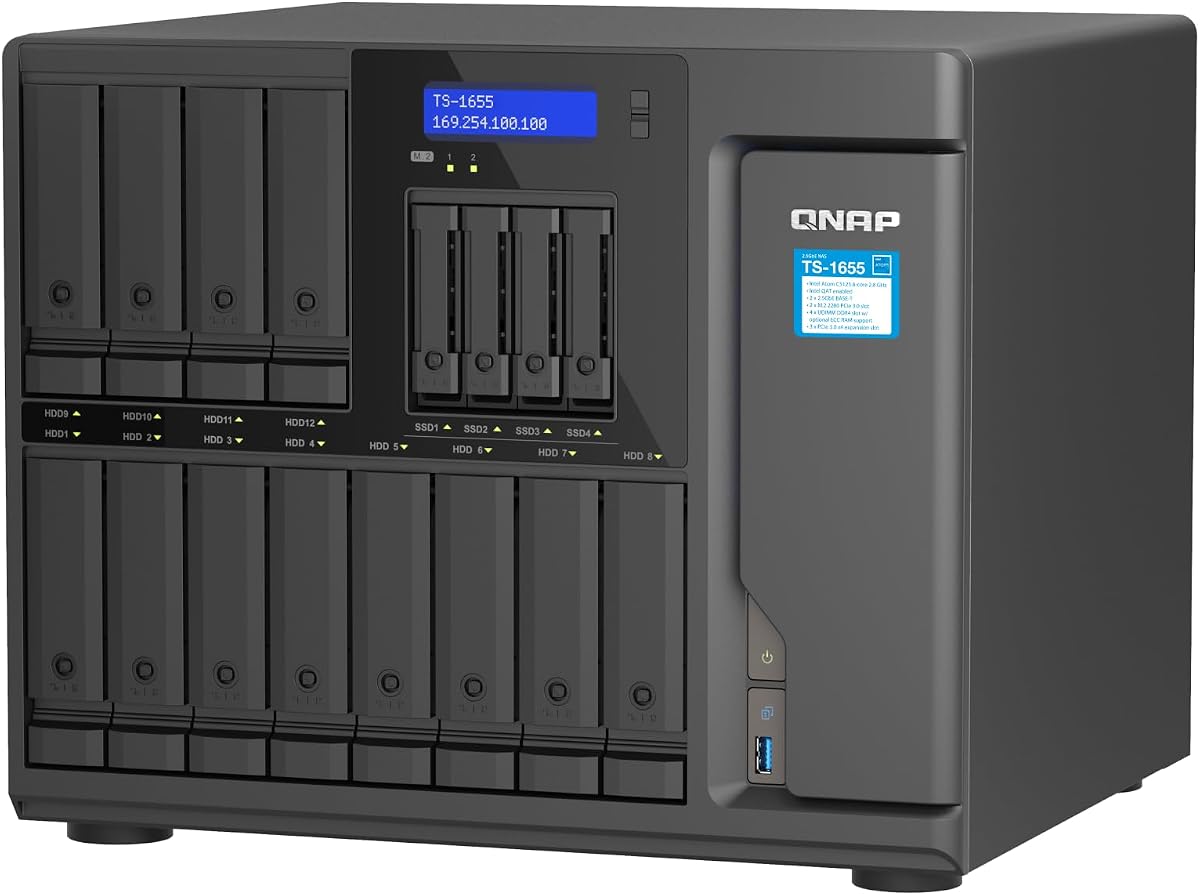
The TS-1655 provides a reliable hybrid NAS with sixteen bays and long-term availability for business continuity. Its Intel Atom 8-core processor supports virtualization and multimedia transfer well.
We may earn a commission when you buy through this link, at no additional cost to you.
It offers dual 2.5GbE ports for fast network speeds and supports ECC RAM upgrades up to 128GB. NVMe slots allow caching and storage pools for better performance.
Like similar models fans may be noticeable under load. Setup can be complex for new users but the long-term support promise adds value.
Best for businesses needing dependable storage and processing power with the assurance of future software and hardware support.
Long-term availability ensures you can rely on this unit for years without forced migrations.
Combine massive HDD capacity with fast NVMe caching to suit different workload needs.
We may earn a commission when you buy through this link, at no additional cost to you.
Selecting the right enclosure requires understanding your storage needs connectivity and management preferences.
Ensure the unit supports the drive size and capacity you plan to use. Most 16 bay units support 3.5 inch drives up to 20TB each.
Check compatibility with SSDs or HDDs depending on your speed and storage requirements.
Look for USB 3.0 USB-C Mini-SAS HD or Ethernet ports that match your network or host capabilities.
High speed interfaces like 2.5GbE or 10GbE are essential for large file transfers.
Some units are standalone NAS with their own OS while others are JBOD needing a host PC.
Ensure the firmware or OS supports your existing ecosystem like Windows or Synology DSM.
Check if the unit supports expansion modules or daisy chaining to grow storage over time.
Expansion flexibility helps avoid replacing the whole unit when you need more space.
For critical data redundant power supplies prevent downtime if one power source fails.
This is vital for business environments where continuous availability is required.
16 bay enclosures generate heat so fans are necessary but noise levels vary.
Consider the placement of the unit to avoid noisy operation in quiet spaces.
Prices range significantly from affordable DAS to premium rackmount NAS systems.
Look for warranties to protect your investment against early hardware failures.
Choose between desktop tower or rackmount chassis based on your available space.
Rackmount units save floor space but require a proper rack setup.
Install drives carefully ensuring they are properly aligned in the bays before powering on. Some units require individual drive verification to avoid data issues.
Connect the unit to your network or host via the recommended interface and install any required drivers or software.
Keep vents clear of dust and ensure adequate airflow to prevent overheating. Regular maintenance helps extend hardware life.
A NAS includes an operating system for file sharing and services. A JBOD is just an external storage unit requiring a host system to manage drives. NAS provides more features while JBOD is simpler and cheaper.
Most units support both 2.5 and 3.5 inch drives allowing you to mix SSDs and HDDs. However performance depends on the controller and how the array is configured for best results.
Some models include PCIe cards or Mini-SAS cables in the box. Others may require separate purchases depending on the interface and host system compatibility.
A 16 bay unit supports up to sixteen 3.5 inch drives. Ensure you check the manual for individual drive capacity limits to avoid compatibility issues.
Yes if the unit explicitly supports hot swapping. Always follow manufacturer guidelines to avoid data loss during drive changes. Not all models support this feature safely.
Built-in fans usually provide sufficient cooling for standard operation. Place the unit in a well ventilated area and avoid blocking air vents to maintain safe temperatures.
Many units support expansion boxes or daisy chaining. Check if the model allows adding more enclosures to increase total capacity without replacing the main unit.
Using a UPS protects drives and data from power surges or outages. It is highly recommended for business and important data storage to prevent corruption.
Our top picks highlight the best options for budget performance and premium needs including QNAP and Synology leaders.
Prioritize connectivity expansion and redundancy based on whether you need a standalone solution or a simple storage bank.
Check current prices and stock before buying as these values fluctuate often on major online retailers.