
HP OmniBook 3 14 inch Next Gen AI PC
4.4Editor score
Snapdragon X X1-26-100 processor
2K OLED display panel
Up to 41 hours battery life
The landscape of personal computing is shifting rapidly as artificial intelligence becomes a core component of modern laptops. Today's AI laptops are not just marketing buzzwords but powerful machines equipped with dedicated neural processing units designed to handle complex tasks locally. These devices promise enhanced productivity, smarter workflows, and improved efficiency for professionals and students alike.
To compile this definitive list, we evaluated ten cutting-edge models from leading manufacturers like HP, Lenovo, Dell, and ASUS. Our analysis focused on real-world performance, battery life, display quality, and the practical implementation of AI features such as Copilot+ capabilities and advanced noise cancellation. We compared specifications and user feedback to ensure each recommendation delivers genuine value.
Each pick in this guide highlights specific strengths tailored to different user needs whether you prioritize portability, raw processing power, or creative display fidelity. While our research provides a solid foundation, remember that technology moves quickly and pricing can fluctuate based on market demand. We recommend verifying the latest details before making your final purchase decision to ensure you get the best current offer.
4.4Editor score

4.3Editor score

5.0Editor score
As an Amazon Associate we earn from qualifying purchases.
This side-by-side comparison breaks down the key specifications of the ten selected AI laptops to help you identify which model aligns best with your specific performance and portability requirements. We have standardized the data to make it easy to see differences in processors memory storage and display technology at a glance.


The HP OmniBook X 14 inch stands out as a premier choice for professionals seeking a blend of power and portability. With a solid rating of 4.3 stars users appreciate its ability to handle complex workflows without breaking a sweat. The inclusion of the Intel Core Ultra 7 processor ensures that AI tasks run smoothly and efficiently.
We may earn a commission when you buy through this link, at no additional cost to you.
What truly sets this machine apart is its exceptional battery life which can last up to 27 hours and 30 minutes on a single charge. This makes it ideal for travelers or students who need reliability throughout the day. The 3K OLED touchscreen delivers deeper blacks and richer contrast enhancing both work and entertainment experiences.
While the device excels in many areas there are some trade-offs to consider. The premium price point might be a barrier for budget-conscious buyers and the port selection is somewhat limited compared to bulkier workstations. However the smart sense technology that optimizes fan noise and temperature adds significant value for daily comfort.
If you need a reliable AI laptop that offers top-tier battery performance and a stunning display the HP OmniBook X is a strong recommendation. Its Copilot+ PC experiences provide intelligent assistance that can streamline your daily tasks. This model is best suited for professionals who prioritize mobility and display quality above all else.
Users can expect all-day productivity with fast charging capabilities that restore fifty percent battery in just thirty minutes.
The OLED display technology ensures accurate color reproduction and vivid visuals for creative tasks and media consumption.
We may earn a commission when you buy through this link, at no additional cost to you.
The HP OmniBook 3 14 inch offers an accessible entry point into the world of AI computing with a rating of 4.4 stars. It is designed for users who need essential performance without the high cost associated with premium models. The Snapdragon X processor delivers efficient power management and AI capabilities right out of the box.
We may earn a commission when you buy through this link, at no additional cost to you.
One of the most impressive features is the battery life which can reach up to 41 hours and 45 minutes. This is a game changer for anyone who spends long hours away from a power source. Additionally the inclusion of Otter.ai provides automatic transcription and meeting summaries adding real value for remote workers and students.
Despite its affordability there are some limitations to be aware of. The 256 GB SSD might fill up quickly if you store large media files locally and the 16 GB RAM is not easily upgradeable. However for general productivity tasks and web browsing this device performs admirably without slowing down.
For those seeking a budget-friendly AI laptop that still delivers on battery life and connectivity this model is hard to beat. It strikes a balance between cost and functionality making it a great choice for students or secondary devices. We recommend it for users who prioritize endurance and value over raw processing power.
Otter.ai integration allows users to record audio and generate summaries automatically to save time during meetings.
Built-in Wi-Fi 6E ensures fast and stable internet connections for seamless cloud syncing and video calls.
We may earn a commission when you buy through this link, at no additional cost to you.
The ASUS Vivobook S16 boasts a perfect 5.0 star rating making it a top contender for anyone seeking reliability and high performance. Its powerful AMD Ryzen AI 9 465 processor ensures that demanding AI tasks are handled with ease. This laptop is designed for users who need a robust machine for creative work and multitasking.
We may earn a commission when you buy through this link, at no additional cost to you.
A standout feature is the impressive NPU performance which offers up to 50 TOPS for on-device AI. This capability allows for smoother workflows and faster processing of AI-driven applications. The 32 GB of RAM ensures that you can run multiple heavy applications simultaneously without any lag or slowdowns.
While the performance is stellar there are a few drawbacks to consider. The price reflects the premium specs and some users might prefer a touchscreen interface for more intuitive interaction. However the slim design at just 0.7 inches thin makes it incredibly portable for such a powerful device.
If you need a laptop that combines exceptional AI performance with a stunning OLED display this model is an excellent choice. It is ideal for content creators and power users who demand the best in speed and visual quality. We highly recommend it for those willing to invest in top-tier hardware.
The high NPU power allows for faster rendering and AI-assisted creative tasks in professional software.
Dolby Atmos and ASUS Audio Booster provide rich sound quality for movies and video conferencing.
We may earn a commission when you buy through this link, at no additional cost to you.
The HP OmniBook 5 16 inch focuses on efficiency and battery longevity with a rating of 4.2 stars. It utilizes the Snapdragon X processor which is known for its ability to deliver long battery life while maintaining solid performance for productivity tasks. This is a great choice for users who are constantly on the move.
We may earn a commission when you buy through this link, at no additional cost to you.
With up to 34 hours and 45 minutes of battery life this laptop is one of the longest lasting in its class. The Qualcomm Adreno GPU handles everyday tasks smoothly and supports hardware accelerated encoding for video calls. Additionally the integration of Otter.ai helps users stay organized with automated meeting notes.
However there are some trade-offs when choosing this model. The Adreno GPU is not designed for heavy gaming or 3D rendering which might limit creative professionals. Also the lack of Thunderbolt ports means fewer options for high-speed external connections compared to Intel based models.
For those who prioritize battery life above all else this laptop is a top contender. It offers a stable platform for everyday work with smart AI features included. We recommend it for frequent travelers and students who need a machine that lasts through long days without needing a charger.
The Snapdragon architecture ensures consistent performance without excessive heat or battery drain during daily tasks.
Built-in Otter.ai support allows for seamless transcription and summarization of important business meetings.
We may earn a commission when you buy through this link, at no additional cost to you.
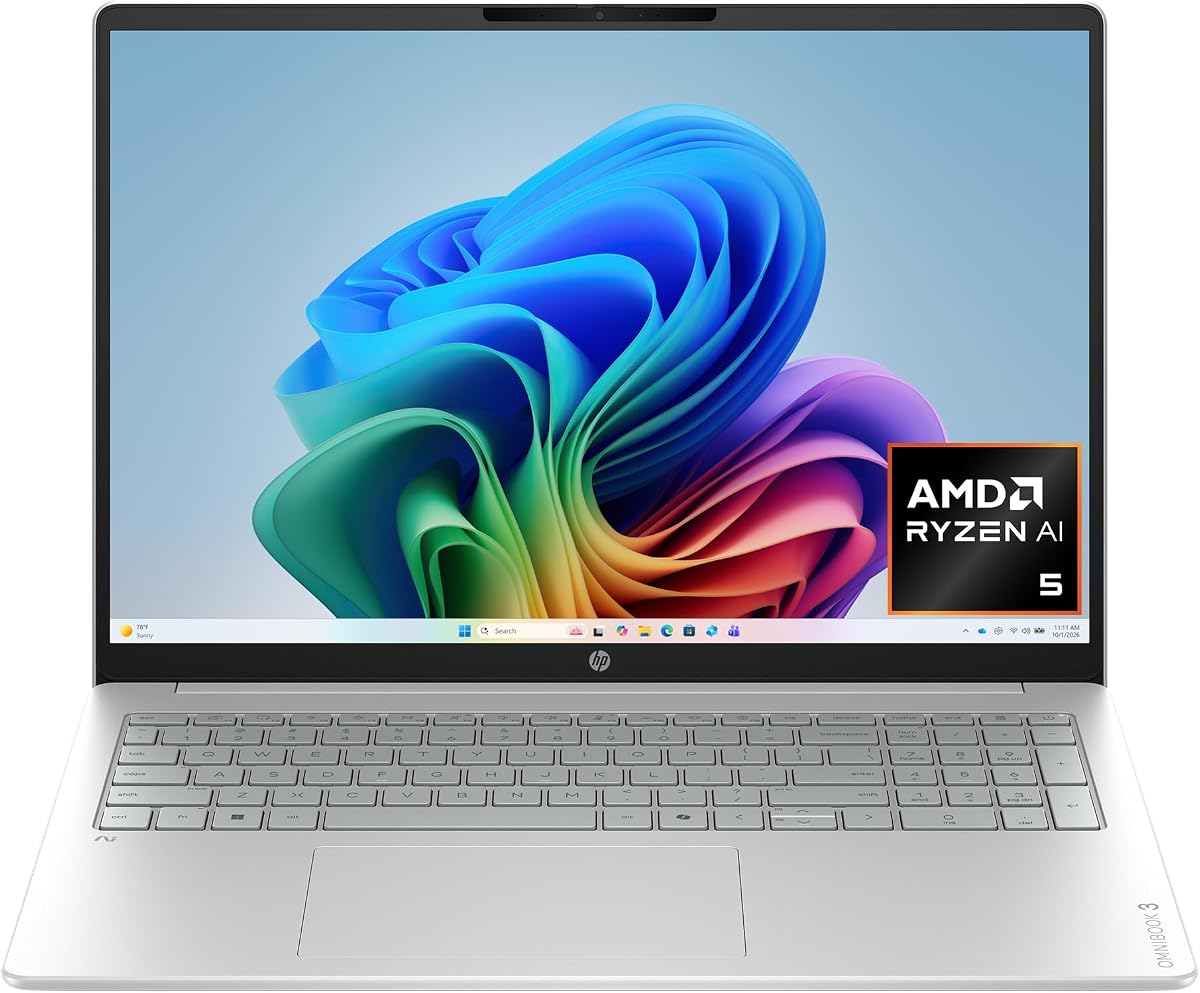
The HP OmniBook 3 16 inch is a highly rated option with 4.8 stars making it a reliable choice for many users. It features an AMD Ryzen AI 5 processor that delivers strong performance for general computing needs. The 2K touchscreen adds a layer of interactivity that enhances navigation and content creation.
We may earn a commission when you buy through this link, at no additional cost to you.
One of its key strengths is the advanced AI noise reduction which ensures clearer team conversations during calls. The 16 GB of DDR5 RAM provides sufficient speed for multitasking and the 512 GB SSD offers fast access to files. Fast charge technology also means you can get significant battery back quickly when needed.
While it excels in many areas it is not designed for heavy gaming or intensive 3D rendering. The Radeon GPU is efficient but lacks the raw power of dedicated graphics cards. However for most business and educational tasks this laptop provides a smooth and responsive experience.
This model is an excellent choice for users who want a large touchscreen and reliable performance at a reasonable price. It is well suited for professionals who rely on video calls and need clear audio. We recommend it for anyone looking for a balanced all-around laptop with great reviews.
Advanced noise reduction filters out background sounds ensuring clear communication in busy environments.
The 2K resolution offers sharp detail and color accuracy making it easy to work on visual tasks.
We may earn a commission when you buy through this link, at no additional cost to you.
The HP OmniBook 5 16 inch is a solid mid-range option rated at 4.5 stars for balanced performance and features. Powered by the Intel Core Ultra 7 processor it handles productivity and creative tasks with ease. The large 16 inch touchscreen provides plenty of workspace for navigating complex applications.
We may earn a commission when you buy through this link, at no additional cost to you.
Storage is a strong point with a massive 1 TB SSD ensuring you have plenty of room for files and projects. The Wi-Fi 6E connectivity ensures stable and fast internet which is crucial for cloud-based workflows. It also runs Windows 11 with Copilot AI support to help streamline daily work processes.
Despite its strengths there are some limitations to keep in mind. The display is not OLED which means blacks are not as deep as premium models. Also the device is slightly heavier than some 14 inch ultrabooks but the larger screen compensates for this in many use cases.
If you need a reliable laptop with ample storage and a large screen this model is a smart choice. It is ideal for office work and home use where performance and connectivity are key. We recommend it for users who value practical features over cutting edge display technology.
The 1 TB SSD provides plenty of space for media files and documents without needing external drives.
Wi-Fi 6E ensures fast download speeds and low latency for video conferencing and streaming.
We may earn a commission when you buy through this link, at no additional cost to you.
The Lenovo ThinkBook 16 Gen 8 is a business-focused laptop rated at 4.6 stars for professional reliability. Its 16 core Intel Ultra 7 processor handles complex spreadsheets and enterprise applications effortlessly. The Windows 11 Professional OS ensures advanced security features suitable for corporate environments.
We may earn a commission when you buy through this link, at no additional cost to you.
With 32 GB of DDR5 RAM this machine eliminates lag when running multiple business apps simultaneously. The 1 TB PCIe SSD ensures quick boot times and data access which is vital for productivity. Security features like the fingerprint reader add an extra layer of protection for sensitive data.
While it is powerful for business tasks it is not designed for gaming or high-end creative rendering. The weight and build reflect a focus on durability over portability. However for office work and data analysis this laptop provides a stable and efficient workstation.
This model is ideal for businesses and professionals who need secure and fast computing power. It offers reliable performance for daily tasks without unnecessary bloat. We recommend it for corporate users who need enterprise grade security and multitasking capability.
Windows 11 Professional and fingerprint readers ensure sensitive data is protected during transit.
32 GB RAM allows for smooth operation of multiple heavy business applications at once.
We may earn a commission when you buy through this link, at no additional cost to you.
The Dell 16 Plus Touchscreen offers top-tier specs including Wi-Fi 7 and a powerful Core Ultra 9 processor rated at 4.5 stars. It is designed for professionals who need the latest connectivity and processing speed. The 16 inch touchscreen provides a convenient way to interact with software directly.
We may earn a commission when you buy through this link, at no additional cost to you.
High-speed connectivity is a major advantage with Wi-Fi 7 ensuring fast data transfer and low latency. The 32 GB of LPDDR5X memory ensures that demanding workflows remain smooth. Thunderbolt 4 ports provide versatile options for connecting external displays and storage devices efficiently.
While the performance is excellent the laptop is heavier than ultrabooks which may impact portability. The premium price also reflects the high-end specifications included. However for users who need future-proof connectivity and processing power this model delivers on those front.
This is a great choice for tech professionals who need the latest standards like Wi-Fi 7. It handles complex tasks well and provides a modern design for business use. We recommend it for users who prioritize speed and connectivity above portability.
Wi-Fi 7 ensures you are ready for the next generation of wireless internet standards.
Thunderbolt 4 supports high-speed data and video output for versatile external connectivity.
We may earn a commission when you buy through this link, at no additional cost to you.
The Acer Aspire 16 AI is an affordable option rated at 4.2 stars that packs impressive specs for the price. It features a 120Hz touchscreen display which makes interaction feel incredibly smooth and responsive. The Snapdragon X processor delivers capable AI performance with a 45 TOPS NPU.
We may earn a commission when you buy through this link, at no additional cost to you.
Connectivity is a strong suit with Wi-Fi 7 ensuring you have access to the fastest wireless speeds available. The 16 GB of LPDDR5X RAM is sufficient for multitasking and the 512 GB SSD offers decent storage. It is a great choice for users who want high refresh rates without a high cost.
One trade-off is the average battery life compared to other models in this list. Also the 16 GB RAM is not easily expandable for future needs. However for general computing and media consumption this device offers a lot of value.
If you are looking for a budget laptop with high-end features like 120Hz displays and Wi-Fi 7 this is a great pick. It is well suited for students and casual users who want modern specs. We recommend it for those who prioritize display smoothness and connectivity.
The 120Hz refresh rate makes scrolling and touch interactions feel fluid and responsive.
Competitive pricing makes advanced AI features accessible to a wider range of users.
We may earn a commission when you buy through this link, at no additional cost to you.
The HP Omnibook 16 inch is a well-rounded machine rated at 4.6 stars with impressive specs for daily use. The AMD Ryzen AI 7 processor delivers exceptional speed for heavy multitasking and the 50 TOPS NPU handles complex AI tasks well. The 32 GB of RAM ensures smooth performance over time.
We may earn a commission when you buy through this link, at no additional cost to you.
Windows 11 Professional is included offering advanced security features ideal for business users. The 16 inch 2K touchscreen provides clear visuals for creative work and navigation. Backlit keys and a numeric keypad enhance typing comfort for long work sessions.
While it offers great specs the display is not OLED which limits contrast compared to premium models. The port selection is also somewhat limited compared to older business laptops. However for general performance and reliability this device offers solid value.
This is a great choice for professionals who need high memory capacity and reliable performance. It is ideal for office tasks and moderate creative work. We recommend it for users who want a balance of specs and usability at a competitive price.
Windows 11 Pro ensures enhanced security and management tools for business environments.
32 GB RAM allows for running demanding applications without slowdowns.
We may earn a commission when you buy through this link, at no additional cost to you.
Choosing the right AI laptop requires careful consideration of several key factors to ensure it meets your specific needs.
The processor is the heart of your laptop and for AI models the Neural Processing Unit or NPU is critical. A higher TOPS rating indicates better performance for on-device AI tasks like image generation or speech recognition.
Look for laptops with dedicated NPUs like Intel Core Ultra or AMD Ryzen AI to ensure future-proofing and efficiency.
AI applications often require significant memory to run smoothly. A minimum of 16 GB of RAM is recommended for general tasks while 32 GB provides headroom for heavy workloads.
Storage speed also impacts loading times so PCIe Gen4 SSDs are preferred to ensure quick access to large files and applications.
Since many AI tasks involve visual content a high-quality display is essential. Look for resolutions above 1080p with good color accuracy and brightness for comfortable viewing.
Touchscreens are becoming common for intuitive interaction so consider if you need this feature for your workflow.
AI processing can be power-intensive so battery life is a major consideration for portable use. Aim for models that promise at least 10 hours of real-world usage to get through a workday.
Fast charging capabilities are also valuable so you can quickly top up your device when on the go.
Fast internet is crucial for cloud-based AI tools and data syncing. Wi-Fi 6E or Wi-Fi 7 ensure stable and rapid connections.
Physical ports like Thunderbolt 4 or USB-C are important for connecting external monitors and peripherals without adapters.
Ensure the laptop supports the AI features you need like Copilot+ PC experiences or specific software tools.
Windows 11 Home or Pro is standard but check if your software requires specific OS features for full functionality.
A durable build ensures longevity so look for premium materials like aluminum if you plan to carry the laptop often.
Weight and thickness also matter for travelers so consider ultrabook designs if you need to move frequently.
AI laptops range widely in price so determine a budget that aligns with your needs without overspending on unused features.
Compare models based on long term value rather than just initial cost to ensure you get a machine that lasts.
Start by setting up your AI features like Copilot+ experiences immediately after unboxing to maximize productivity. This allows you to integrate tools like Recall and advanced search into your daily workflow from the beginning.
Keep your software updated to ensure AI drivers and firmware are optimized for the latest features. Manufacturers often release updates that improve NPU performance and battery efficiency over time.
Maintain your battery health by avoiding extreme temperatures and letting the device cool down during intensive AI tasks. Proper care ensures your laptop remains reliable for years of regular use.
An AI laptop is a computer equipped with specialized hardware like a Neural Processing Unit to handle AI tasks locally. These devices offer smarter features like noise cancellation and advanced search without relying solely on cloud processing.
Not necessarily as modern AI laptops often have integrated NPUs that handle most tasks efficiently. However dedicated GPUs are still useful for heavy graphical workloads or advanced machine learning.
They tend to be priced higher due to advanced components like NPUs and better displays. However the long-term value from productivity gains can justify the cost for many users.
Many AI laptops have soldered RAM to optimize power efficiency so upgrades might not be possible. It is best to check specifications before buying to ensure you choose enough memory.
Copilot+ PC refers to a standard for Windows laptops that include specific AI capabilities for enhanced productivity. Features include Recall and improved search that leverage on-device AI processing.
Battery life varies but many models now offer 10 to 20 hours of usage thanks to efficient processors. Actual time depends on your workload and usage habits.
Yes most advanced AI features like Copilot+ require Windows 11 to function properly. Older operating systems may not support the necessary AI infrastructure.
We have reviewed ten top AI laptops ranging from budget-friendly options to high-performance premium machines. The HP OmniBook X and ASUS Vivobook S16 lead the pack for balanced features and raw power.
Prioritize your needs such as battery life, display quality, and processing speed to find the right fit. Remember that AI capabilities are still evolving so choosing a model with a strong NPU is a smart investment.
Check current pricing and availability as these models are popular and inventory can change. We hope this guide helps you make an informed decision for your next computing experience.