
Canon PIXMA TR4720
3.9Editor score
Affordable entry-level pricing
Built-in fax functionality
Compact home office design
This guide compares the top all in one printer with fax models for home and office use, evaluating speed, ink costs, connectivity, and fax capabilities.
Finding the right all in one printer with fax can streamline your workflow by combining printing, scanning, copying, and faxing into one device. Whether you run a small business or manage a home office, having reliable fax capabilities ensures you can send and receive important documents securely without needing separate hardware.
We evaluated ten highly rated models based on their print quality, speed, connectivity options, and ease of use. Our analysis focuses on how well each device handles daily workloads while maintaining clear fax transmission and user-friendly interfaces for both tech-savvy and casual users.
Each pick below highlights key strengths and potential trade-offs to help you decide which model fits your specific needs. Keep in mind that pricing and availability can change frequently, so always check current offers before making your final purchase decision.
3.9Editor score

4.0Editor score

4.3Editor score
The following table provides a side-by-side comparison of all ten models, highlighting their core specifications, capabilities, and ideal use cases to help you narrow down your choice quickly.






The HP OfficeJet Pro 9125 stands out as a top choice for small offices needing professional-quality color documents with reliable fax capabilities. It holds a solid rating from users who appreciate its speed and ease of use in busy work environments.
We may earn a commission when you buy through this link, at no additional cost to you.
Its standout qualities include print speeds up to 22 ppm for black documents and seamless wireless printing through dual-band Wi-Fi. The HP AI feature optimizes print formatting for web pages and emails, reducing wasted paper and ensuring clean layouts.
While the requirement for original HP chips may limit third-party cartridge options, this ensures consistent print quality and protects your network from cyber threats using Wolf Pro Security. The three-month Instant Ink trial also provides immediate cost savings for new users.
This model is ideal for businesses that prioritize speed, security, and professional output without needing overly complex setup. If you need a versatile all-in-one printer with fax that handles daily office tasks efficiently, this is a strong recommendation.
HP AI removes unwanted content from web pages and emails, ensuring your prints are precise and free of awkward layouts or wasted pages.
Wolf Pro Security bolsters your network protection against cyber threats, keeping sensitive office data safe during print and fax operations.
We may earn a commission when you buy through this link, at no additional cost to you.
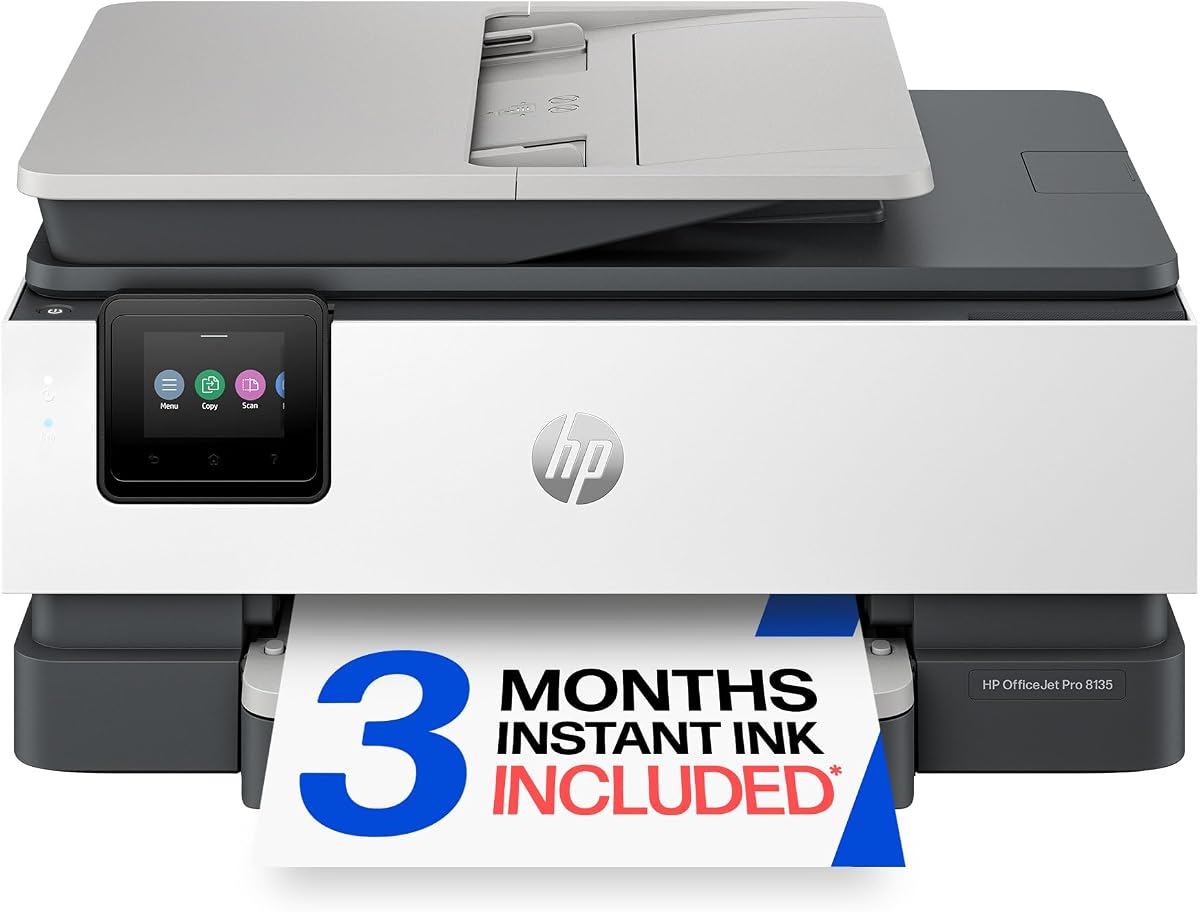
The HP OfficeJet Pro 8135 offers excellent value for home offices that need professional-quality color documents without the high cost of larger office models. With a strong user rating, it balances performance and affordability effectively.
We may earn a commission when you buy through this link, at no additional cost to you.
It delivers print speeds up to 20 ppm for black documents and includes essential features like auto duplex printing, an auto document feeder, and fax capabilities. The 2.7-inch touchscreen provides a phone-like interface that makes navigation intuitive for all users.
One trade-off is the slower color printing speed at 10 ppm, but this is acceptable for typical home office volumes. The sustainable design using over 45% recycled plastic content aligns with eco-friendly preferences without compromising functionality.
This printer is perfect for home-based businesses or individuals who need reliable faxing and color printing on a budget. Its combination of features makes it a smart entry point for those new to all-in-one devices.
Made with more than 45% recycled plastic content, this model supports environmental goals while delivering robust printing performance.
The easy-to-use HP app lets you print, scan, copy, or fax directly from your smartphone for maximum convenience.
We may earn a commission when you buy through this link, at no additional cost to you.
The Brother MFC-L2820DW delivers premium performance for small offices focused on black and white documents with fast speeds and robust faxing. Its highest rating among the list reflects strong user satisfaction with reliability and speed.
We may earn a commission when you buy through this link, at no additional cost to you.
Producing print speeds up to 36 ppm and scan speeds up to 23.6 ipm, this laser printer handles high-volume workloads efficiently. The compact footprint saves space, while the 2.7-inch touchscreen enables easy navigation and cloud app integration.
Although it only prints in black and white, this is often ideal for office documents where color is not essential. The Refresh EZ Print Subscription Service helps manage toner costs, ensuring you never run out of supplies unexpectedly.
This model is best for users who prioritize speed, security, and cost-efficiency for text-heavy printing tasks. If fax capability and laser quality are your top needs, this Brother unit is a top-tier choice.
Built-in dual-band wireless, Ethernet, and USB options allow you to securely connect multiple devices for flexible printing.
Works with Alexa to provide voice control and smart reorder notifications for seamless supply management.
We may earn a commission when you buy through this link, at no additional cost to you.
The Epson EcoTank ET-4800 offers a unique approach to printing with cartridge-free Supertank technology that reduces waste and ongoing costs. It is well-rated for its impressive print quality and eco-friendly design.
We may earn a commission when you buy through this link, at no additional cost to you.
Using Micro Piezo Heat-Free Technology, it produces sharp text and vibrant color photos on various paper types. The high-capacity ink tanks mean you rarely need to refill, saving time and reducing environmental impact from discarded cartridges.
While the initial purchase price is higher than standard inkjet models, the long-term savings on ink make it a smart investment for high-volume printing. The high-resolution flatbed scanner supports detailed document copying and navigation.
This printer is perfect for users who want to minimize hassle and waste while maintaining high-quality output. If you need reliable faxing with color photos and want to avoid frequent cartridge replacements, this is a great option.
High-capacity ink tanks and EcoFit ink bottles eliminate tiny cartridges, making refills easy and worry-free for years.
Zero cartridge waste means less plastic ending up in landfills, supporting greener office practices.
We may earn a commission when you buy through this link, at no additional cost to you.
The HP OfficeJet Pro 8125 is a compact solution for home offices needing essential multi-functionality without taking up too much space. Its high rating reflects user satisfaction with its balance of price and performance.
We may earn a commission when you buy through this link, at no additional cost to you.
It handles print speeds up to 20 ppm for black documents and includes features like auto duplex printing and an auto document feeder. The large color touchscreen simplifies navigation, while dual-band Wi-Fi ensures reliable connectivity.
Although optimized for home environments, it delivers professional-quality results for documents and flyers. The sustainable design using over 45% recycled plastic appeals to environmentally conscious users without sacrificing functionality.
This model is best for home offices that need reliable faxing and printing on a budget. If you want a small footprint with big features, this printer fits the bill perfectly.
HP AI improves precision for web pages and emails by removing unwanted content for cleaner print layouts.
Automatic connection issue detection and resolution ensure uninterrupted wireless printing when you need it.
We may earn a commission when you buy through this link, at no additional cost to you.
The HP Smart Tank 7603 is designed for high-volume printing with up to three years of ink included right out of the box. It holds a strong rating for its ability to handle demanding tasks without frequent maintenance.
We may earn a commission when you buy through this link, at no additional cost to you.
With up to 8,000 color pages or 6,000 black pages included, this model is ideal for busy home offices or small businesses. The mess-free refill system lets you replenish ink simply by plugging in bottles, avoiding spills or squeezing.
While the initial investment is higher than cartridge-based models, the long-term savings are significant. The magic touch control panel offers borderless prints and intuitive mobile connectivity for seamless operation.
This printer is perfect for users who print frequently and want to avoid running out of ink. If you need a reliable all-in-one with fax that supports high volumes, this is an excellent choice.
Get up to 3 years of ink included, reducing long-term costs and ensuring you never run out unexpectedly.
Easy-access ink bottles plug and drain without squeezing or spilling, making refills simple and clean.
We may earn a commission when you buy through this link, at no additional cost to you.
The HP OfficeJet Pro 9135 stands out with the fastest print speeds in its class, making it ideal for busy offices that handle high volumes daily. It is highly rated for performance and professional output quality.
We may earn a commission when you buy through this link, at no additional cost to you.
It delivers print speeds up to 25 ppm for black documents and includes a 4.3-inch touchscreen for easy navigation. The single-pass duplex scanning saves time by automatically scanning two sides without flipping pages manually.
With two 250-sheet input trays, you can handle large jobs without frequent refills. The inclusion of HP Wolf Pro Security ensures your network remains protected during every print or fax operation.
This model is perfect for professional environments that prioritize speed and efficiency. If you need an all-in-one printer with fax that can keep up with a fast-paced workflow, this is a top pick.
Scan both sides of documents automatically in one pass, saving time and increasing office efficiency.
HP Wolf Pro Security bolsters protection against cyber threats to keep your data safe during operations.
We may earn a commission when you buy through this link, at no additional cost to you.
The Canon PIXMA TR4720 is an entry-level all-in-one printer that covers all basics including print, copy, scan, and fax. It is popular for home use due to its compact design and straightforward features.
We may earn a commission when you buy through this link, at no additional cost to you.
It supports auto 2-sided printing and an auto document feeder for multi-page tasks. While print speeds are slower at 8.8 ipm, this is manageable for light home workloads. Alexa integration lets you receive notifications when supplies are running low.
The ENERGY STAR rating ensures efficient power consumption during standby or operation. Its 100-sheet capacity is sufficient for occasional use but may need refilling for larger batches.
This printer is best for users seeking an affordable solution without compromising on essential capabilities. If you need a reliable home printer with fax capabilities at a low cost, this is a solid option.
Connect to Alexa for smart reorder notifications so you never run out of ink unexpectedly.
Designed for easy installation and replacement, this model fits well in small home office spaces.
We may earn a commission when you buy through this link, at no additional cost to you.
The Canon PIXMA TR8620a brings modern convenience with voice-activated printing via Alexa alongside standard all-in-one functions. It has a high rating for reliability and seamless integration with smart home setups.
We may earn a commission when you buy through this link, at no additional cost to you.
Print speeds reach 15 ipm for black documents, and it supports AirPrint and Android connectivity. The 200-sheet capacity and auto 2-sided printing enhance efficiency for home office tasks. A Micro SD slot allows direct photo printing without a computer.
Alexa integration ensures you never run out of ink through smart reorder notifications, reducing downtime. This feature alone makes it stand out for tech-savvy users who value automation.
This model is perfect for households that want easy control and reliable faxing. If you value voice commands and smart connectivity, this printer delivers a seamless experience.
Just say discover my printer to Alexa and control your device hands-free for easier operation.
Use the Micro SD slot to print photos directly without connecting a computer or mobile device.
We may earn a commission when you buy through this link, at no additional cost to you.
The HP OfficeJet Pro 8139 extends the Instant Ink trial to one year, offering longer-term savings for new home office users. It maintains a high rating for performance and robust multi-functionality.
We may earn a commission when you buy through this link, at no additional cost to you.
It delivers professional-quality color documents with print speeds up to 20 ppm. Features like HP Wolf Essential Security and AI optimization ensure data safety and clean layouts for every print job.
The 225-sheet input tray reduces the need for frequent refills during busy days. While it may cost more upfront, the extended trial period provides immediate value that offsets initial investment.
This model is ideal for users planning long-term usage who want extended supply management benefits. If you need a secure and efficient printer with fax, this is a strong contender.
Enjoy a full year of Instant Ink delivery to save on costs and ensure supplies arrive before you run out.
HP Wolf Essential Security keeps your network protected from cyber threats during all fax and print activities.
We may earn a commission when you buy through this link, at no additional cost to you.
Choosing the right all in one printer with fax involves balancing performance, costs, and features that match your workflow. Here are the key factors to consider before making your decision.
Print speed determines how quickly you can produce documents during busy periods. Look for models offering at least 20 pages per minute for black text to ensure efficiency in office environments. For color printing, check if the model supports borderless prints and high-resolution graphics for professional presentations.
Prioritize models that balance speed with consistent quality to avoid reprints and wasted resources.
Faxing is essential for industries requiring legal or secure document transmission. Ensure the printer supports digital faxing with automatic send and receive features. Security features like Wolf Security or similar technologies help protect sensitive data during fax operations.
Check for encryption options and secure network connections to safeguard your faxed information.
Laser printers are generally faster and more cost-effective for high-volume black and white printing. Inkjet models excel in color quality and are better suited for mixed document and photo printing needs. Consider how much you print each month to determine which technology fits your budget.
Laser is better for speed and text; inkjet is better for color vibrancy and lower upfront costs.
A larger paper tray reduces downtime by allowing you to load more sheets at once. Look for models with at least 250 sheets if you handle large batches daily. Auto document feeders are critical for scanning or faxing multi-page documents efficiently.
Ensure the capacity matches your average daily workload to avoid frequent paper refills.
Wireless connectivity is standard, but dual-band Wi-Fi ensures stable connections in busy networks. Mobile app support lets you print and scan from smartphones or tablets easily. Some models also support voice control or cloud storage integration for added convenience.
Prioritize models with robust mobile apps and dual-band Wi-Fi for seamless workflow integration.
Evaluate the long-term cost of ink or toner, as this impacts overall ownership expenses. Models with Instant Ink or subscription services can reduce costs significantly. Check if the printer supports third-party cartridges or requires specific branded supplies.
Calculate the total cost of ownership based on estimated monthly volume and supply prices.
Consider the dimensions of the printer to ensure it fits your available desk or office space. Compact models are ideal for home offices with limited room. Larger units may offer better features but require more dedicated space.
Measure your workspace and compare it with printer dimensions before purchasing to avoid placement issues.
A solid warranty provides peace of mind and protects against manufacturing defects. Look for models offering at least one year of limited warranty coverage. Check if the manufacturer offers responsive customer support and easy access to drivers or updates.
Verify warranty terms and support availability to ensure long-term reliability.
Proper setup is essential for optimal performance. Connect the device to your network using the touchscreen interface, ensuring dual-band Wi-Fi is selected for stable connectivity. Install the provided drivers or mobile apps to enable seamless printing from all devices.
Regular maintenance helps extend the lifespan of your printer. Clean the exterior regularly with a soft cloth, and use the built-in cleaning functions for print heads if print quality declines. Check for firmware updates frequently to ensure security and feature improvements.
For fax functionality, verify that the connection is active by sending a test page. Load paper correctly in the input tray to prevent jams and ensure clear transmission. If you notice errors, consult the manual's troubleshooting section or reset the device to default settings.
An all in one printer with fax combines printing, scanning, copying, and faxing into a single device. It allows you to manage multiple document tasks from one unit, reducing clutter and streamlining office workflows. Most models connect wirelessly to your network for easy access from computers and mobile devices.
Traditional faxing requires a phone line, but many modern printers offer digital or internet faxing options. These allow you to send faxes over Wi-Fi without a physical phone connection. Always check the product specifications to see which fax method the printer supports.
Both types support faxing, but laser printers tend to be faster and cheaper for black and white documents. Inkjet models may provide better quality if you need to fax color documents or photos. Your choice depends on whether speed or color quality is your priority.
Consider models with instant ink subscriptions or tank-based systems that include large supplies. Printing in draft mode for internal documents can also save ink. Regularly check your print settings to avoid unnecessary color use when black and white suffices.
Yes, most modern models support mobile printing apps that allow faxing directly from your phone. These apps usually let you select documents from storage and send them via the fax line connected to the printer. Ensure your printer is on the same network for best results.
Ink life varies based on usage and model. Standard cartridges may last hundreds of pages, while tank systems can last years for average users. Monitoring ink levels through the printer software helps ensure you never run out unexpectedly during important tasks.
Many modern printers include security features like encryption and secure network connections to protect fax data. Always enable these security settings to safeguard sensitive information. Avoid using open public Wi-Fi for fax transmission to maintain data integrity.
Check that the printer is connected to the network and the paper tray is loaded correctly. Restart the device and verify any fax settings in the control panel. If issues persist, consult the support manual or contact customer service for specific troubleshooting steps.
Our top picks for best all in one printer with fax include the HP OfficeJet Pro 9135 for overall performance and the Canon PIXMA TR4720 for budget-conscious buyers. Each model offers unique advantages depending on your specific needs for color quality, speed, or connectivity.
When making your decision, prioritize features that matter most to your daily workflow, whether that is faxing frequency, print speed, or cost efficiency. Investing in a reliable model upfront saves time and money in the long run.
Prices and availability can change quickly so always check current listings before purchasing. We hope this guide helps you find the perfect all in one printer with fax for your home or office needs.